3 Things : playing with printing + a giveaway
Tags: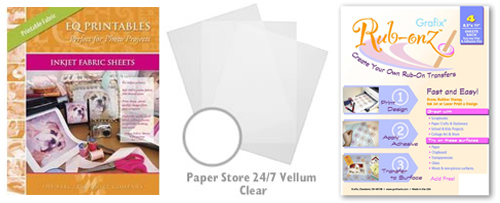
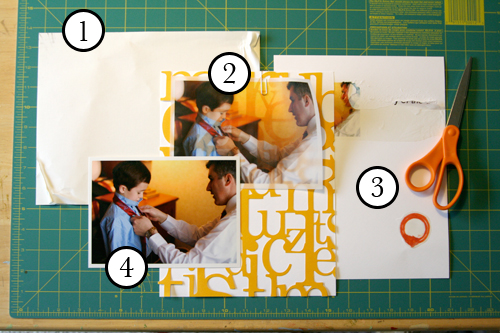
Staying in the theme of words + photos this week I wanted to experiment with a couple different inkjet printing surfaces. I took that photo of Chris & Simon and the tie and printed it on each of the following using my HP Photosmart D7360
[ Warning : any of my experiences below could very well be operator error. ]
WorldWin Inkjet Printable Translucent Vellum : Quick and easy. Great result. See sample below. It's been awhile since I last used vellum and it was fun to reintroduce it into my supplies. Definitely want to play with it more: thinking about layering with transparencies and text and photos.
EQ Printables Peel & Stick Fabric Sheets
Grafix Rub Onz - Create your own rub ons. Super cool idea. I wanted to see if this would work with a photo + some words...and at least in my case it was a challenge. This is a multi-step process that includes printing, then placing adhesive paper on top, and then adhering your image to final paper. The real challenge is getting the adhesive paper onto your image without bubbles. The second challenge is in the choice of the paper you rub on to. I tried it on textured cardstock and it didn't seem to work - it just tore the paper. I will probably try this whole process again to see if I can make it work.
[1]
EQ Printables Peel & Stick Fabric Sheets

And now, the giveaway:
3 readers will receive the following from The Papermill Store/Worldwin:
• 1 pack 27 lb WorldWin Inkjet Printable Translucent Vellum
• 1 pack 40 lb WorldWin Inkjet Printable Translucent Vellum
• 1 pack 12x12 WorldWin Doublemates Cardstock
• 1 pack 12x12 WorldWin Rouche Cardstock
For more information on The Papermill Store/WorldWin, check out their blog here.
For a chance to win this selection of papers leave a comment below with your favorite photo tip or what you want to work related to taking photos. Winners will be drawn tomorrow at 5pm Pacific.
Don't miss today's words + photos post below.


Comments
Sign in or sign up to comment.
780 comments
I want to work on just. taking. pictures. Sheesh! I can go weeks without a single picture and tend to think of taking pictures as too much work. But my babe's are getting older and as my hands are gradually freed of babies, I'm hoping they'll be filled with my camera.
Replies
Sign in or sign up to reply.
just put it on auto and TAKE THE PHOTO, no waiting for the perfect moment or a better hair day. Get right in there and snap away. Hold the camera out and take photos of yourself, use reflections, take a pic of your shadow. Take photos of the "unimportant" days and moments.. you'll thank yourself later.
Replies
Sign in or sign up to reply.
I don't know if this is a tip - but I am really into taking pictures of my little boys' feet. There little shoes..them taking steps at the playground. There is just something about feet...little feet + shoes + steps. Maybe it shows how busy they are, how fast they move, and how fast they grow. Feet are good. Take pictures of feet.
Replies
Sign in or sign up to reply.
You've already mentioned it, but you said to do my favorite. :) No flash. After reading "Designing with Photos" I flat-out refuse to use flash. I never realized before how much it alters the image I'm trying to capture, and I'm still working on convincing my family members of the same thing. :)
Thanks for the giveaway! Hope I win!
Replies
Sign in or sign up to reply.
My favorite photo tip is to take lots of photos of the same thing, but using different settings on my camera. This has allowed me to get to know my camera and what it can do. The results are sometimes fantastic (and sometimes not)...
Replies
Sign in or sign up to reply.
My best tip...Take candid shots too, not always 'portrait' ones. Get the everyday stuff.
And lighting lighting lighting, don't forget the lighting.
Replies
Sign in or sign up to reply.
My best tip is to be FEARLESS with your camera!
I carry mine in my purse at all times and you need to be FEARLESS when it comes to taking pictures.
Capture things that are pretty, that inspire you, that tell a story.... whatever it is- don't be afraid to take that picture. Who cares if someone is looking? they will not remember you in 10 mintues, and if they do, maybe it will encourage them to get out there and start taking pictures too :)
You have to learn to be FEARLESS about capturing what inspires your life. :)
I would love to win some of those goodies! thanks for the chance!
Replies
Sign in or sign up to reply.
my photo tip is always give the kids a camera the have such great eyes and a whole different view of objects and situations.
What I need to work on is light balance
Replies
Sign in or sign up to reply.
My fav tip when printing pics at home for a layout is to print off my focal point photos & then print off half a dozen coordinating photos into 2" squares right from my printer onto one 4x6 piece of photo paper. The option to print multiple minis straight off my printer is my fav trick when printing.
Replies
Sign in or sign up to reply.
I am still working on a lot of the basics with taking photos, but lately I've been working on close ups.
Replies
Sign in or sign up to reply.
GREAT post! Such great information! I need to work on the deleting thing and also a more organized storage method. Great inspiration!!! Thanks Ali- love your blog!!
Replies
Sign in or sign up to reply.
My photo tip: cut your digital photos digitally (I have PS 7.0 and it is enough, there is no need of a new or fancy photo edition program) and make portraits when the background isn't great, remove that things that should not be in the photo but are :) I love make mini albums pages with only a big portrait in it! Lot of people already told me that I am a great portrait photographer but I am not! I can only cut photos very well :lol:
And take lot of photos, there will sure be a wonderful one between all of the shoots!
Thanks for the give away, Ali! I am loving your posts this week, thanks for the inspiration too!
Replies
Sign in or sign up to reply.
I guess my tip is to have 2 batteries available for your camera so one is always charged and ready to use.
I need to work on taking MORE photos, setting aside more time to play with them digitally (I need to take a photoshop course) and then more time to scrap them!
Replies
Sign in or sign up to reply.
Looks great and very fun. My tip is natural light!
Replies
Sign in or sign up to reply.
To keep little ones happy during a photo shoot, find a little fan to keep air blowing on them. Plus, it's cute to see their fine hair blowing in the wind.
Replies
Sign in or sign up to reply.
Always check the background for distractions before snapping the photo. It's so easy to miss something so obvious like a person that looks as if a tree is growing out of his or her head ;-)and you don't realize it until after you've downloaded the photos on the computer. Most of these situations are easily resolved by moving slightly to the left or right of the subject, or having the subject move to another location. If that option isn't possible, use a small aperture setting such as F5 to blur the background (or the portrait/flower setting on automatic cameras).
I have a digital SLR, and I also have a little Nikon CoolPix that is always in my purse so that I can snap photos anytime, and anywhere. Most of these little digital cameras have a rating of at least 6.1 megapixels picture quality (which is the same as some of the digital SLR models).
Buy an extra battery for your camera so that you always have one charged -- and will never miss out on those once in a lifetime photo opportunities. It is definitely worth the investment.
Most importantly, it is the photographer, NOT the camera that creates and designs the photos -- make the best of what you've got.
Replies
Sign in or sign up to reply.
I'm trying to be more patient with my photography, I stress too much worrying about getting the "perfect" photo. I love how you take such candid photos. Thanks for sharing your tips and techniques.
Replies
Sign in or sign up to reply.
here are my tips:
1. Get low....bend your knee's. If you find yourself standing up to take a picture, just bend your knee's and see what a difference it makes.
2. Tilt your camera. Not too much, but change your orientation, you will probably like your photo's better. You can also do this by cropping in an editing program. Just crop, but turn it a little too! The best part of the editing process is that you can undo and do it over again until you like it!
3. Take a class...just your basic photography 1 at a community college. It is priceless. You will learn SO MUCH. Much of it is traditional composition so take that with a grain of salt because most popular photographers today are anything but traditional..but the technical learning will be priceless!
Replies
Sign in or sign up to reply.
My photo tip is to move when you are taking photos. So many people remain static when they're taking a picture and everything can get stuck in that one spot. I'm not afraid to get down on the ground, stand on a chair, tilt the camera (or my head) and see things from a different perspective.
Moving around not only improves your photos, but often times helps YOU see things from another perspective as well -- so it's a 2-for-1 benefit!
Replies
Sign in or sign up to reply.
thanks for posting the giveaway! My favorite photo tip is to use curves in photoshop. That and altering the images to black & white, and sometimes sepia.
Replies
Sign in or sign up to reply.