3 Things : playing with printing + a giveaway
Tags: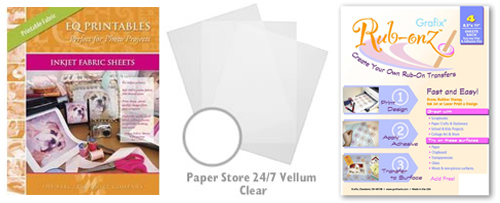
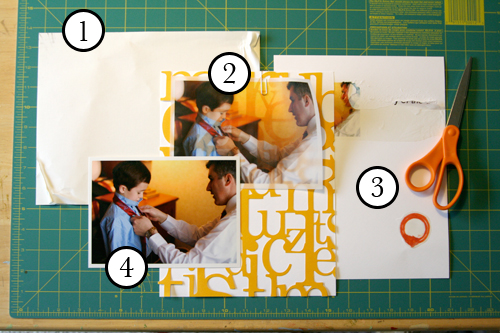
Staying in the theme of words + photos this week I wanted to experiment with a couple different inkjet printing surfaces. I took that photo of Chris & Simon and the tie and printed it on each of the following using my HP Photosmart D7360
[ Warning : any of my experiences below could very well be operator error. ]
WorldWin Inkjet Printable Translucent Vellum : Quick and easy. Great result. See sample below. It's been awhile since I last used vellum and it was fun to reintroduce it into my supplies. Definitely want to play with it more: thinking about layering with transparencies and text and photos.
EQ Printables Peel & Stick Fabric Sheets
Grafix Rub Onz - Create your own rub ons. Super cool idea. I wanted to see if this would work with a photo + some words...and at least in my case it was a challenge. This is a multi-step process that includes printing, then placing adhesive paper on top, and then adhering your image to final paper. The real challenge is getting the adhesive paper onto your image without bubbles. The second challenge is in the choice of the paper you rub on to. I tried it on textured cardstock and it didn't seem to work - it just tore the paper. I will probably try this whole process again to see if I can make it work.
[1]
EQ Printables Peel & Stick Fabric Sheets

And now, the giveaway:
3 readers will receive the following from The Papermill Store/Worldwin:
• 1 pack 27 lb WorldWin Inkjet Printable Translucent Vellum
• 1 pack 40 lb WorldWin Inkjet Printable Translucent Vellum
• 1 pack 12x12 WorldWin Doublemates Cardstock
• 1 pack 12x12 WorldWin Rouche Cardstock
For more information on The Papermill Store/WorldWin, check out their blog here.
For a chance to win this selection of papers leave a comment below with your favorite photo tip or what you want to work related to taking photos. Winners will be drawn tomorrow at 5pm Pacific.
Don't miss today's words + photos post below.


Comments
Sign in or sign up to comment.
780 comments
I thought vellum had gone by the way-side! I am so excited to bring this "out-dated" staple back into my line-up! Thanks for the inspiration.
Replies
Sign in or sign up to reply.
I would like to work on focusing on telling stories rather than making a work of art. Because if I tell the story successfully, it is automatically a work of art.
Thanks for the posts this week. Very inspiring.
Replies
Sign in or sign up to reply.
Don't use that delete button too eagerly. Sometimes the imperfect pictures tell your story the best.
Replies
Sign in or sign up to reply.
I leave my photos prettymuch as is. Once in a while I will add some text before printing. I may put two photos on one 4X6 using my photo editor. Would love to play with vellum. Thanks for the inspiration.
Replies
Sign in or sign up to reply.
I really want to experiment with the TV and AV settings on my camera. I just bought the Cannon Rebel XT. I also need to get centered on photo storage now that I am going digital!
Replies
Sign in or sign up to reply.
Thank you Ali for the wonderful ideas!
something i would like to work on in terms of my photos would be to be able to capture photos of objects, people and places from as many unusual angles as possible...
Replies
Sign in or sign up to reply.
I love your work Ali! You are a huge inspiration to me!
I love working with levels on my photos in photoshop. It's my favorite tool.
Replies
Sign in or sign up to reply.
loving these photos + words posts...you are so inspiring.
my favorite photo tip is fill the frame...i love taking photos of specific baby parts or eyes.
thanks for the chance to win!
Replies
Sign in or sign up to reply.
Thank you for the inspiration - I used to plan the page around the picture and what cool new product we have but really like the alternative - the WORDS which are the important part of the page !!
I use natural light , hardly ever use the flash.....better pictures, I think and sometimes the shadows are cool.
Happy Day and thanks for another great give away !!
Carole Hepburn
Replies
Sign in or sign up to reply.
I am really enjoying the series, Ali!
I tend to struggle quite a bit with taking candid people photos. I've got lots of posed people shots, and lots of shots of all kinds of objects. Very much still working on how to do the everyday people stuff. So far my solution is to keep my camera with me as much as possible, but it's definitely a work in progress.
Replies
Sign in or sign up to reply.
Thanks for all your inspiration and instruction! I find your blog very entertaining and useful and I love your work. Thanks again, Vicki
Replies
Sign in or sign up to reply.
I am by no means a good photographer. However, I take photos of my family DAILY and have NO regrets with the photos I get. I would be more dissapointed if I DIDN'T take a photos of our lives because I was afraid of the quality of the photo. Having the picture good or bad is good enough for me!
Replies
Sign in or sign up to reply.
My favorite photo tip would be to get close...as for something I'd like to work on, that would be to be more willing to hand the camera over and GET IN THE PICTURE!
Replies
Sign in or sign up to reply.
Thanks so much for this week!
For my photography, I am still trying to learn how to take action shots of my kids playing sports. Just once, I would like to be able to capture a shot of her hand just at the point of impact with the ball. Instead, I have the same three shots over & over - holding the ball, the ball tossed up in the air, and then her arm as it comes down from the hit. I know it's a matter of timing, but just can't seem to adjust!
Replies
Sign in or sign up to reply.
My favorite tip is one I learned from you, Ali! Take pictures of your subject from diff. angles and syles to tell your story..... a close up, a wide angle, from above , below and anything else that might be interesting....keep shooting....you don't have to use them all, but you have a variety of choices! (Blurry or imperfect photos have their place-I love that!).
Love, love, LOVE your blog, books, YOU!
Replies
Sign in or sign up to reply.
Me!! Pick me!
I don't have a fave tip- I feel like I am no good at taking pics at all!
Replies
Sign in or sign up to reply.
Wow! I would love to get these papers. My favorite photo tip is for you to take pictures of small details, especially from an angel you don't usually see. I also enjoy taking black and white photos and using brushes in photoshop. And, if you haven't tried it, try printing on cardstock, cool effect!
Replies
Sign in or sign up to reply.
As I become a better digi scrapper, I am finally going back to learning how to enhance my photos better on PS. Most of all, I want to make it simpler. Like an easy b/w conversion that I love!
Replies
Sign in or sign up to reply.
My favourite Photo tip (for those who can) is to shoot in RAW and then digitally manipulate the photo in RAW rather than jpeg. You can get much better digital manipulation results - much better, crisper pictures. You can also save a normally dismal and dark shot MUCH better and easier with RAW format than with JPEG.
I enjoyed seeing your experimentation with papers, Ali. Thanks for posting your results even though some of it disappointed you. Have you tried printing on transparency lately - that's fun too! :)
Replies
Sign in or sign up to reply.
Hi Ali!
My latest trend when printing at home is to print 5x7's. I always have tended to use 4x6 (don't we all!) and enlarged 8x10's. Since getting a new HP Printer that has a default 5x7 size, I have come to appreciate how versatile a picture this size can be on your pagas.
Thanks for all the things you teach me Ali!
Replies
Sign in or sign up to reply.