3 Things : playing with printing + a giveaway
Tags: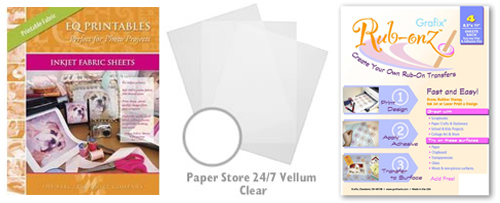
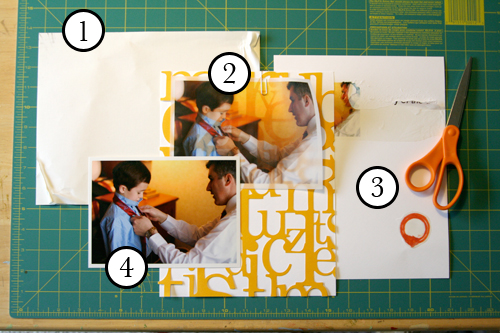
Staying in the theme of words + photos this week I wanted to experiment with a couple different inkjet printing surfaces. I took that photo of Chris & Simon and the tie and printed it on each of the following using my HP Photosmart D7360
[ Warning : any of my experiences below could very well be operator error. ]
WorldWin Inkjet Printable Translucent Vellum : Quick and easy. Great result. See sample below. It's been awhile since I last used vellum and it was fun to reintroduce it into my supplies. Definitely want to play with it more: thinking about layering with transparencies and text and photos.
EQ Printables Peel & Stick Fabric Sheets
Grafix Rub Onz - Create your own rub ons. Super cool idea. I wanted to see if this would work with a photo + some words...and at least in my case it was a challenge. This is a multi-step process that includes printing, then placing adhesive paper on top, and then adhering your image to final paper. The real challenge is getting the adhesive paper onto your image without bubbles. The second challenge is in the choice of the paper you rub on to. I tried it on textured cardstock and it didn't seem to work - it just tore the paper. I will probably try this whole process again to see if I can make it work.
[1]
EQ Printables Peel & Stick Fabric Sheets

And now, the giveaway:
3 readers will receive the following from The Papermill Store/Worldwin:
• 1 pack 27 lb WorldWin Inkjet Printable Translucent Vellum
• 1 pack 40 lb WorldWin Inkjet Printable Translucent Vellum
• 1 pack 12x12 WorldWin Doublemates Cardstock
• 1 pack 12x12 WorldWin Rouche Cardstock
For more information on The Papermill Store/WorldWin, check out their blog here.
For a chance to win this selection of papers leave a comment below with your favorite photo tip or what you want to work related to taking photos. Winners will be drawn tomorrow at 5pm Pacific.
Don't miss today's words + photos post below.


Comments
Sign in or sign up to comment.
780 comments
Love the vellum layered over lace paper. I have printed on fabric before but not the product made especially for printers. I have used cotton fabric (even some with subtle tone on tone patterns - really cool) and spray adhesive it to cardstock. The real trick for me it to tape the leading edge (use regular tape, masking tape, painter's tape, whatever you may have that is not too thick). This gives a smoother edge for the printer rollers to go over and traps any loose threads to keep them from getting caught up in the mechanism of the printer. I use this for quilt labels mostly (on a laser printer! inkjet is not water proof - but, of course, you wouldn't be washing a scrapbook page!)
Replies
Sign in or sign up to reply.
Thank you for all the coolio ideas...would love to play with the three types of printables...
Replies
Sign in or sign up to reply.
My favorite photo tip. Take the pictures and then take more. I grew up with film and the idea of wasting film was unheard of. The digital camera makes it easy to take a lot of photos I just need to remind myself that its ok to over photograph because I have a delete button.
Replies
Sign in or sign up to reply.
Thanks so much for the info, and the website! Cool Stuff, would love to win some of my own so I can play!
Replies
Sign in or sign up to reply.
Oh, there's so much to work on. Thank you for your encouragement. Trying now to take photos more consistently- less at special occassions (after all, they are special and I want to be a part of them) and more of life the way we live. Less of perfectly dressed children. More of working in the garden. Less of the birthday cake. More of the growth over a year. Less of the finished product. More of the process. Less of stuff. More of emotion. Add those to words and it's a priceless gift.
Replies
Sign in or sign up to reply.
I need to work on actually printing those photos I take! I take hundreds each week and don't usually print many.
Replies
Sign in or sign up to reply.
Photo tip: Delete as many photos as you can from your camera before putting them onto your compter!
Replies
Sign in or sign up to reply.
i am going to read the manual that came with my camera. ha! a simple yet genius idea.
Replies
Sign in or sign up to reply.
I'm sure you've given this tip - take millions. I know I have gotten better at taking photos and I know I'm more likely to get THE ONE (and with a 22mo DD, that's not always predictable!) Plus with digital tech, there is no more expense. SO why does my husband STILL moan about it!!!
Replies
Sign in or sign up to reply.
JOURNALING...I dread this word. People who knows me will agree that I am the queen of anti-journaling. However, after reading your blog, I think I will give it a shot and just accept that I may not be a genius in writing but who cares...right? I am not being graded on my grammar or punctuations. Talk about- "embracing imperfection".
Replies
Sign in or sign up to reply.
I want to work on being more organized with my photos. Right now they are in folder broken down by date...not the most efficient method when I want to find something later. Thanks for the chance at the giveaway!
Replies
Sign in or sign up to reply.
the most common advice is perhaps one must always print out photos - it's one way to preserve your memories. i've heard too many horror stories of losing precious photos because computers have crashed or caught a virus.
i have yet to learn to take really good photos...
thanks, Ali!
Replies
Sign in or sign up to reply.
Love the reminder to be RUTHLESS with deleting photos. I try to be good about this but am inspired to delete down to the best three photos of a series.
Replies
Sign in or sign up to reply.
Best photo tip:
Take tons and tons of pics and expect one or two of an event to be acceptable.
Get some Actions -- as they save lots and lots of time.
Dana
Replies
Sign in or sign up to reply.
Love the vellum idea.Emily
Replies
Sign in or sign up to reply.
i want to do the whoIe printing on fabric thing but you are making me nervous about AIi!! HA! HA! :)
Replies
Sign in or sign up to reply.
My favorite photo tip is to take extra pictures--from different angles, w/ or w/o flash, zoom in, zoom out, just experiment. It really helps me change perspective, and see things in a new way when I actively experiment.
But it is definitely key to be "ruthless" with dicarding the excess photos, and I love your rule, or guideline, of not needing more than 5 and usually less than three!
Replies
Sign in or sign up to reply.
Hi Ali,
I often use my printer to color copy patterned paper or fabric to include on my pages and as the envelope liner for a card.
Would love to win, but especially love your blog!
Thanks,
Wendy
Replies
Sign in or sign up to reply.
My best photo tip, since Ali already mentioned not using the flash, is to fill the lens with your subject. Get up close and click away!!!
Replies
Sign in or sign up to reply.
I'm just figuring out how to use my camera so my shots aren't either orange and/or blurry, so I'm probably not the best person to offer tips - any great shots that I've gotten have likely been by fluke!
Replies
Sign in or sign up to reply.