3 Things : playing with printing + a giveaway
Tags: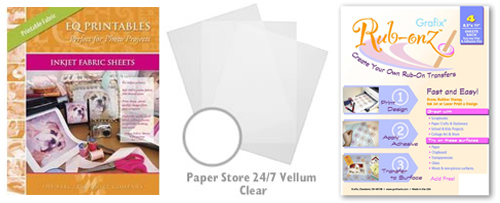
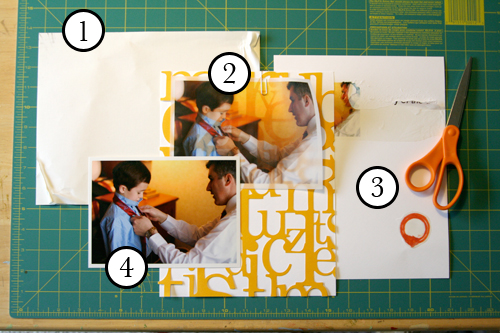
Staying in the theme of words + photos this week I wanted to experiment with a couple different inkjet printing surfaces. I took that photo of Chris & Simon and the tie and printed it on each of the following using my HP Photosmart D7360
[ Warning : any of my experiences below could very well be operator error. ]
WorldWin Inkjet Printable Translucent Vellum : Quick and easy. Great result. See sample below. It's been awhile since I last used vellum and it was fun to reintroduce it into my supplies. Definitely want to play with it more: thinking about layering with transparencies and text and photos.
EQ Printables Peel & Stick Fabric Sheets
Grafix Rub Onz - Create your own rub ons. Super cool idea. I wanted to see if this would work with a photo + some words...and at least in my case it was a challenge. This is a multi-step process that includes printing, then placing adhesive paper on top, and then adhering your image to final paper. The real challenge is getting the adhesive paper onto your image without bubbles. The second challenge is in the choice of the paper you rub on to. I tried it on textured cardstock and it didn't seem to work - it just tore the paper. I will probably try this whole process again to see if I can make it work.
[1]
EQ Printables Peel & Stick Fabric Sheets

And now, the giveaway:
3 readers will receive the following from The Papermill Store/Worldwin:
• 1 pack 27 lb WorldWin Inkjet Printable Translucent Vellum
• 1 pack 40 lb WorldWin Inkjet Printable Translucent Vellum
• 1 pack 12x12 WorldWin Doublemates Cardstock
• 1 pack 12x12 WorldWin Rouche Cardstock
For more information on The Papermill Store/WorldWin, check out their blog here.
For a chance to win this selection of papers leave a comment below with your favorite photo tip or what you want to work related to taking photos. Winners will be drawn tomorrow at 5pm Pacific.
Don't miss today's words + photos post below.


Comments
Sign in or sign up to comment.
780 comments
What I want to work on as a photographer is taking better photos of people. It sounds simple - but my candids of people all look the same. I know I should take multiple photos in the same setting, but at a party for instance - how can I get the shots I want without looking like the crazy person with a camera?
Replies
Sign in or sign up to reply.
Taking photos is part of my everyday, but I don't have a professional camera, so I take my pictures the best I can, but since I discovered Lightroom my photos are so much better than ever! It's so easy to use and you always have professional results with simple photos, I think is one of my favorites tools right now.
Replies
Sign in or sign up to reply.
Best photo tip...be ready and take lots of photos! With a 4 and 1 year old I get lots of blurry ones so I take a ton to get a few good ones!
Replies
Sign in or sign up to reply.
My photo tip is... practice and then practice some more. I am trying to learn photoshop... Thanks for the inspiration.
Replies
Sign in or sign up to reply.
A couple of tips (not original but...)
1. Really get to know your camera and it's options. I took a 'know your camera' course and it really opened up a whole new world.
2. Take lots lots of photos
What I would like to do is capture more of the 'moments in time' that happen and then are suddenly gone - i.e. building a cushion fort, kids cartwheeling, etc.
Replies
Sign in or sign up to reply.
My photo tip is get closer and squat. I take lots of pictures of my son who's 3 years old and 3 feet tall so I try to get down on his level and get close ups so he's not drowning in the background.
Replies
Sign in or sign up to reply.
Awesome site. Great giveaway.
Replies
Sign in or sign up to reply.
My favorite (and only) photo tip is to turn off your flash.
My dad just told me a story today that I'm going to have to turn into a scrapbook page. Thanks so much for all the tips and inspiration.
Replies
Sign in or sign up to reply.
Thank you for sharing all of this information this week. It is inspiring,as well as informational. Color me grateful!
Replies
Sign in or sign up to reply.
I love the paper you are offering as a giveaway. Thank you for everything you do.
Julie
Replies
Sign in or sign up to reply.
My favorite tip is trying different angles when taking pictures. Go high of low.
Thanks for your inspiration, Ali.
Mary M.
Replies
Sign in or sign up to reply.
My photo tip is every now and again print some photos in black and white. Love yor work Ali.
Replies
Sign in or sign up to reply.
I want to work on getting more spontaneous shots of my kids. I want to capture real emotion. My tip - pay attention to the whole frame of the photo. You don't need to crop things out if they are not in there in the first place.
Replies
Sign in or sign up to reply.
I use a disposable camera. But I get my photos on a cd. I want to learn some different things I can do with these.
Replies
Sign in or sign up to reply.
I'd like to work on being invisible as I take photos. I have way too many photos of people smiling into the camera. I want to capture the natural activities and not the forced "smile for the camera" poses. I guess I need to train my family to ignore me and my camera! Thanks for the terrific inspiration.
Replies
Sign in or sign up to reply.
Once again you inspire me to tell my stories and challenge me to try new things. Thank You!
Replies
Sign in or sign up to reply.
i love the inspiration i find on your blog.
my fav. photo tip, dont leave home without spare batteries:) i really dont like it when i'm in the middle of taking photos to find my bastteries die on me
Replies
Sign in or sign up to reply.
My tip would be make sure to have extra batteries and memory card! love the ideas this week thanks!
Replies
Sign in or sign up to reply.
No flash! thats the way to go just soaking up the natural light thats all around us. My camera has a hidden flash that pops up when it is in use. Therefore when I go to use it, which is almost never, I have to remind myself to take my finger off the pop up part.
Love reading your blog. Great ideas and tips.
Thanks for sharing once again.
Natasha
Replies
Sign in or sign up to reply.
Quick and easy. Great result. See sample below. It's been awhile since I last used vellum and it was fun to reintroduce it into my supplies. Definitely want to play with it more: thinking about layering with transparencies and text and photos. Printers Birmingham
Replies to Armstrong
Sign in or sign up to reply.