3 Things : playing with printing + a giveaway
Tags: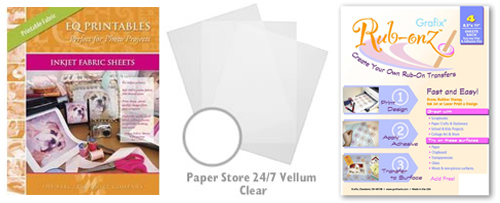
Staying in the theme of words + photos this week I wanted to experiment with a couple different inkjet printing surfaces. I took that photo of Chris & Simon and the tie and printed it on each of the following using my HP Photosmart D7360
[ Warning : any of my experiences below could very well be operator error. ]
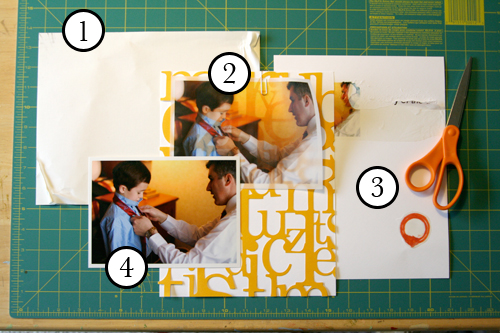
WorldWin Inkjet Printable Translucent Vellum : Quick and easy. Great result. See sample below. It's been awhile since I last used vellum and it was fun to reintroduce it into my supplies. Definitely want to play with it more: thinking about layering with transparencies and text and photos.
EQ Printables Peel & Stick Fabric Sheets
Grafix Rub Onz - Create your own rub ons. Super cool idea. I wanted to see if this would work with a photo + some words...and at least in my case it was a challenge. This is a multi-step process that includes printing, then placing adhesive paper on top, and then adhering your image to final paper. The real challenge is getting the adhesive paper onto your image without bubbles. The second challenge is in the choice of the paper you rub on to. I tried it on textured cardstock and it didn't seem to work - it just tore the paper. I will probably try this whole process again to see if I can make it work.
[1]
EQ Printables Peel & Stick Fabric Sheets

And now, the giveaway:
3 readers will receive the following from The Papermill Store/Worldwin:
• 1 pack 27 lb WorldWin Inkjet Printable Translucent Vellum
• 1 pack 40 lb WorldWin Inkjet Printable Translucent Vellum
• 1 pack 12x12 WorldWin Doublemates Cardstock
• 1 pack 12x12 WorldWin Rouche Cardstock
For more information on The Papermill Store/WorldWin, check out their blog here.
For a chance to win this selection of papers leave a comment below with your favorite photo tip or what you want to work related to taking photos. Winners will be drawn tomorrow at 5pm Pacific.
Don't miss today's words + photos post below.


Comments
Sign in or sign up to comment.
780 comments
Thanks for the continuing inspiration, Ali, it is much appreciated. My tip is, when printing photos onto transparencies, print on the less smooth side (the side the faces the backing), and change your settings to draft to use less ink. But I am guessing you already know that!. I would love to try printing on the vellum though, it looks very cool over the lace cardstock.
Replies
Sign in or sign up to reply.
I agree with a post from above, definately have two batteries.
I also like to take photos from different angles, standing vs. kneeling. I was able to capture a picture with a lot of depth by just kneeling in the sand and taking a few photos of footsteps in the sand.
Thanks for the inspiration Ali, where do you find all the energy?
Replies
Sign in or sign up to reply.
love it ali, you are always coming up with something new and creative....
Replies
Sign in or sign up to reply.
Did you change the setting when you tried the fabric paper to more of a heavier paper and not just regular paper? That often allows thicker stuff to get through easier.
Replies
Sign in or sign up to reply.
I love to take pictures but only have a point and shoot camera at this time. I make sure there are photos taken of everyday things not just special occasions. I also make sure not to have anything too distracting in the background.
And yes as some others have posted always have backup batteries that are charged.
Replies
Sign in or sign up to reply.
Hi,
My photo tip is to learn your camera, no matter what kind you have...learn what it can do. Also, try different angles, you don't always have to get the whole person, object, scene, in the shot.
Thanks so much for the opportunity to win. Blessings, Rebecca
Replies
Sign in or sign up to reply.
I need to work on interesting backgrounds in some of my still life/portrait pictures - I need to try to take some pictures of my needlework and crafts don't look so hot when they're propped up on the carpet!
Replies
Sign in or sign up to reply.
Personally I've never tried the EQ Printables, but I have tried the vellum. I love that you can use them on acrylic or transparency and it can keep the "see through" style on the minibook or layout.
Replies
Sign in or sign up to reply.
I'm trying to figure out how to fit more pictures on my layouts. I usually compose it the way I want it, and don't crop very much. you can only fit so many 4x6's on a single page.
Replies
Sign in or sign up to reply.
That vellum looks really neat! I recently started doing the tape transfers for my pictures and am enjoying learning more about that!
Replies
Sign in or sign up to reply.
love the look of the vellum photo...i'll have to try that! totally agree with previous posters...most any camera can take great photos with the right photographer...and taking lots of photos can turn you into a better photographer!!
Replies
Sign in or sign up to reply.
I feel like I have a lot I want to work on with taking photos, but your post earlier today really inspired me to edit down a lot of the images I have. Since I got a DSLR for Mother's Day last year (right after my son was born), I have SO many images, and have been afraid to delete any. But it makes total sense when you say that you only keep 5 or less of a series! So I'm going to start editing those tonight...
Thanks, as always for the great inspiration!
Replies
Sign in or sign up to reply.
I've used canvas to copy a photo onto but haven't done that technique in a while - I really liked the outcome - made it sorta look like a canvas painting instead of a photo.....
Thanks Ali
Replies
Sign in or sign up to reply.
I had a tip for printing on the eq printables fabric sheets. For the problem you had, fabric peeling back in printer, what if you put a piece of tape across the top to hold it down in place when it goes through the printer? Not sure if you tried that or not but might be worth a shot.
carla
Replies
Sign in or sign up to reply.
What I want to work on...deleting photos. I like to take lots and lots of pictures, I just have trouble deleting them.
Ali...you amaze me...your ideas are wonderful...your life is an inspiration...thanks for everything!
Replies
Sign in or sign up to reply.
Hi Ali, that vellum looks very interesting. Like you, I haven't used it in a while. Maybe I'll try again and use with an acrylic album...hmmmm....
Photo tip: Get the photos OFF your computer! In fact, take that flashcard somewhere and print them out before they even get put ON your computer! I find if I have a stack of pictures, I'm much more likely to scrap. If they're on the computer, it's too much work to print them...by the time I do, I've lost "the mood".
Replies
Sign in or sign up to reply.
Honest to goodness, I have no photo tips...well...maybe one. I often take photos for the new moms I take care of (I am a L&D RN). My only tip is to turn off the light and the baby will often open their eyes. Works very well.
I don't have any other tips...that is why I read blogs to get the awesome tips of others!!!
Replies
Sign in or sign up to reply.
This is a really inspiring week so far, and I'm certain it will continue.
The best camera/photo tip I was ever given, was don't be afraid to delete!!! As you say, in this day and age, we're so lucky with digital .. and how many pics do we all end up with that never get used!! I take about 3 or 4 shots of the same thing (if I have the time) and then when I upload them, I chose the best to use - no need for expensive editing software .. it's amazing that 3/4 pics of the same thing, taken in quick succession can be so totally different.
Thanks for all your inspiration.
S xxx
Replies
Sign in or sign up to reply.
I'd like to work on getting my Cannon s9000 printer to work right. it prints, but the color is all messed up.
Replies
Sign in or sign up to reply.
My favorite photo tip is to read the camera manual. I finally did and realized that my camera had 5 more settings that I didn't even realize existed! I'm excited to try them out!
Replies
Sign in or sign up to reply.