3 Things : playing with printing + a giveaway
Tags: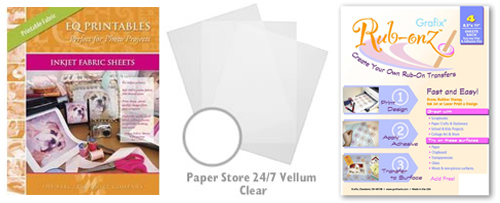
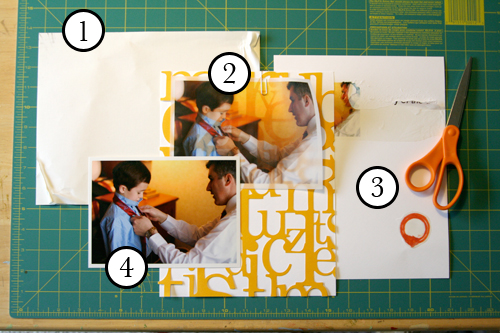
Staying in the theme of words + photos this week I wanted to experiment with a couple different inkjet printing surfaces. I took that photo of Chris & Simon and the tie and printed it on each of the following using my HP Photosmart D7360
[ Warning : any of my experiences below could very well be operator error. ]
WorldWin Inkjet Printable Translucent Vellum : Quick and easy. Great result. See sample below. It's been awhile since I last used vellum and it was fun to reintroduce it into my supplies. Definitely want to play with it more: thinking about layering with transparencies and text and photos.
EQ Printables Peel & Stick Fabric Sheets
Grafix Rub Onz - Create your own rub ons. Super cool idea. I wanted to see if this would work with a photo + some words...and at least in my case it was a challenge. This is a multi-step process that includes printing, then placing adhesive paper on top, and then adhering your image to final paper. The real challenge is getting the adhesive paper onto your image without bubbles. The second challenge is in the choice of the paper you rub on to. I tried it on textured cardstock and it didn't seem to work - it just tore the paper. I will probably try this whole process again to see if I can make it work.
[1]
EQ Printables Peel & Stick Fabric Sheets

And now, the giveaway:
3 readers will receive the following from The Papermill Store/Worldwin:
• 1 pack 27 lb WorldWin Inkjet Printable Translucent Vellum
• 1 pack 40 lb WorldWin Inkjet Printable Translucent Vellum
• 1 pack 12x12 WorldWin Doublemates Cardstock
• 1 pack 12x12 WorldWin Rouche Cardstock
For more information on The Papermill Store/WorldWin, check out their blog here.
For a chance to win this selection of papers leave a comment below with your favorite photo tip or what you want to work related to taking photos. Winners will be drawn tomorrow at 5pm Pacific.
Don't miss today's words + photos post below.


Comments
Sign in or sign up to comment.
780 comments
The only tip I have isn't mine, but Donna Downey's ... Instead of using the specialty paper, you can use ink-jet transparency and rub it on either a paper or fabric using a gel medium.
As I had relocated to another country in a different continent - I like collecting as much photos as possible from my new enviornment and contrasting it with photos from my previous home and homeland.
Thank you very much for your new series on your blog, it is as inspiring as your books and I really appreciate your efforts.
Replies
Sign in or sign up to reply.
I want to practice/learn Photoshop. I love to take pictures and want to learn how to improve them.
Mary
Replies
Sign in or sign up to reply.
I'm having fun printing on transparencies. It's funny, actually. As a professor I've been printing on them for years for teaching, but never put two and two together until recently!
Replies
Sign in or sign up to reply.
I'm having fun printing on transparencies. It's funny, actually. As a professor I've been printing on them for years for teaching, but never put two and two together until recently!
Replies
Sign in or sign up to reply.
I have a Nikon D50 SLR with two lenses and love it. I don't always have it with me - too much to carry everywhere so I bought a small Canon powershot that fits in my purse and now I am always ready - never have to say - too bad I didn't bring my Nikon - This was the best decision I've made.
Replies
Sign in or sign up to reply.
I think that my tip would be quite simple: stay spontaneous! Keep this naive look that we all had when we were children. This implies that you do not think so much to placement or lighting but that you almost feel your photo, right now!!!! =)
Replies
Sign in or sign up to reply.
I love to take pictures of my son or daughter standing behind them, capturing a part of their head, and beyond that what they are looking at. It makes me see things from their perspective and sometimes gives me insight into what they are thinking. I also like to snap shots of their little hands doing things--picking berries, coloring, etc.
I want to get better at putting the camera down and being 'in the moment' instead of always trying to get the perfect shot for my layout!
I love the idea of a pic printed on vellum, definitely going to try that!
Replies
Sign in or sign up to reply.
I recently purchased a used Nikon D100 from a photographer, and I still have no idea how to use it to its full potential. I need to work on not standing too close to my subject. I also need to work on my husband's willingness to take photos...I'm getting tired of taking pictures of my dog!
Replies
Sign in or sign up to reply.
Great post. I've wanted to try several of these before.
My favorite photo tip is to think in thirds. When I take photos sometimes it helps to "break down" the photo. If you analyze how each third is composed rather than the whole, you can take a totally different picture than when you look at the big picture.
Replies
Sign in or sign up to reply.
Always take a few photos from different distances and make sure to take a few photos in portrait and a few in landscape format of everything you shoot :)
Replies
Sign in or sign up to reply.
I want to work on using light better. Also, less blur...i think these are related...
also, thank you for your comment about NOT over processing...im a fan of printing straight out of the camera!
Replies
Sign in or sign up to reply.
I really like the velum idea. I have printed onto an iron on transfer paper before, and transferred my picture onto things such as dishtowels, etc. It was fun, but took some time/effort.
Replies
Sign in or sign up to reply.
i am working on taking more photos- i usually forget to , but i am getting better at keeping the camera out and with me- and snapping any time the urge strikes- and i am having much of the fun.
thanks for all the inspiration,
jen
Replies
Sign in or sign up to reply.
Wow Ali too bad about the "printable" fabric. I know Close to my Heart makes something like that, Donna Downey also uses printable canvas quite often. I love the idea of printing a photo on vellum. I would like to try printing a photo on vellum and the same one on a transparency and then overlaying the two, wonder what that would look like?
As for photos around Christmas time we went to Mexico and I was warned that the extreme humidity might mess-up my digital camera so I brought my old 35mm Canon REBEL xt. The digital camera lasted for one photo on the first day and then the humidity got to it. Having a 35mm only to use sure made me think about the shoots I was going to take, lighting, camera settings etc. I learned so much about my picture taking ability when I received my prints back. I pay alot more attention to the digital shots I take now.
Thanks for "Words + Photos Week" I appreciate you sharing your tips and tricks and most importantly insights.
Replies
Sign in or sign up to reply.
I'd like to try some digital scrapbooking - especially printing words directly onto my photos. I really like that effect when you do it.
Peace. Susan
Replies
Sign in or sign up to reply.
i love your blog and enjoy all your tips and inspirations.
things i want to work on with my photography:
1) take it with me everywhere (my dslr). i recently bought a small point & shoot (canon digital elph 850is for a trip back in january to thailand), the photos were ok but i should have lugged my dslr.....btw, do you carry your dslr everywhere? in what? i have the lowepro 200 slingshot, but is there a more 'attractive' bag out there that's easy to get a camera out of in a split second?
2) reading your blog i realize i take tons of photos but i keep them all - i am going to work on being ruthless ;) -- really look for the 5-6 photos that tell the story of that one event (unless it's a party/celebration that includes many people) - thanks again for your tip.
3) and, like a previous post mentioned - i need to get into my own photos. i will have to relinquish 'control' to my husband .... i don't know if i can.... ha ha, just kidding!
Keep up the great blogging - I love your work, your words, & your funny flights of fancy.
Gloria
Replies
Sign in or sign up to reply.
My favorite photo tip is the "Rule of Thirds".
You divide your frame into thirds both horizontally and vertically. The four points where those lines intersect is where your main focus of interest should be.
It creates a nice balace without having the same boring photo with something in the very center. It will challenge you and help you frame your images differently.
That being said, it doesn't mean that it's the perfect fix all for every photo.
Thanks for the candy!
Replies
Sign in or sign up to reply.
I'm still learning a lot about photography. What I like to do is take close-up of things - little hands, feet, shoes, flowers, etc. Thanks for the great post!
Replies
Sign in or sign up to reply.
favorite photo tip? I love the accidental photo. Taking a shot that you just don't quite think is going to come out right but WOW. just go for it. esp with the digital camera (I took a long time to make the switch), you can just delete if it doesn't work, but if it does? you have that moment captured...
Replies
Sign in or sign up to reply.
I'm in the process of learning how to get a better photo, so reading through these tips is awesome. Thanks.
I've been reading my manual, blogs, and some websites, and when it comes time to take pictures I go blank, so this weekend I bought a small notebook to write tips and settings in. I'm going to keep it in my camera bag, that way I have a quick reference when I'm in a certain situation and I can't remember that tip for the perfect shot.
Karen C
Replies
Sign in or sign up to reply.