3 Things : playing with printing + a giveaway
Tags: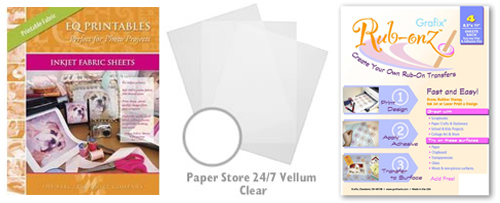
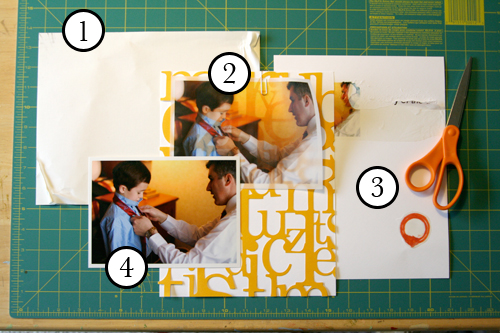
Staying in the theme of words + photos this week I wanted to experiment with a couple different inkjet printing surfaces. I took that photo of Chris & Simon and the tie and printed it on each of the following using my HP Photosmart D7360
[ Warning : any of my experiences below could very well be operator error. ]
WorldWin Inkjet Printable Translucent Vellum : Quick and easy. Great result. See sample below. It's been awhile since I last used vellum and it was fun to reintroduce it into my supplies. Definitely want to play with it more: thinking about layering with transparencies and text and photos.
EQ Printables Peel & Stick Fabric Sheets
Grafix Rub Onz - Create your own rub ons. Super cool idea. I wanted to see if this would work with a photo + some words...and at least in my case it was a challenge. This is a multi-step process that includes printing, then placing adhesive paper on top, and then adhering your image to final paper. The real challenge is getting the adhesive paper onto your image without bubbles. The second challenge is in the choice of the paper you rub on to. I tried it on textured cardstock and it didn't seem to work - it just tore the paper. I will probably try this whole process again to see if I can make it work.
[1]
EQ Printables Peel & Stick Fabric Sheets

And now, the giveaway:
3 readers will receive the following from The Papermill Store/Worldwin:
• 1 pack 27 lb WorldWin Inkjet Printable Translucent Vellum
• 1 pack 40 lb WorldWin Inkjet Printable Translucent Vellum
• 1 pack 12x12 WorldWin Doublemates Cardstock
• 1 pack 12x12 WorldWin Rouche Cardstock
For more information on The Papermill Store/WorldWin, check out their blog here.
For a chance to win this selection of papers leave a comment below with your favorite photo tip or what you want to work related to taking photos. Winners will be drawn tomorrow at 5pm Pacific.
Don't miss today's words + photos post below.


Comments
Sign in or sign up to comment.
780 comments
I love your blog and admire all the photos you take, I am really thinking of taking a class and learn how to take better pictures!!
Replies
Sign in or sign up to reply.
hi Ali!
I really love your ideas about not messing with the photos so much... i usually get exhausted while figuring out the contrast, color, etc. that i don't get around to telling the story as often. also, i really do need to start deleting some pictures - i can take a little too much at one moment but lose the ones that capture the story amidst all the dupes and extras. thanks so much for your inspiration and tips!
sus.
Replies
Sign in or sign up to reply.
Hi Ali
I have never had much luck in getting the fabric prints to work (although I know we need to upgrade our printer) Many times I find it easier to take to the print shop in our area, no hassel - no frustration and quick - and not expensive. I do this alot as I just prints on fabric in my quilts many times.
That would be my photo tip, use the fabric copies of your prints and add to quilts, bags, etc. Love that my favorite things - photos and fabric can be combined - since quilting and scrapbooking are my most favorite things.
Question for you Ali, where do you get your round links when you create your own books from left over stock etc. I have had no luck in our local stores to come up with the rings - and want to get started on using up some of my stuff and loved that idea.
Thanks so much
Nicky
Replies
Sign in or sign up to reply.
My photo tip is to bring your camera with you everywhere. and take more pictures than you think you need. lots more than you think you need! :)
Replies
Sign in or sign up to reply.
thanks for the awesome ideas ali! don't have any photo tips other than don't take pics while facing a window LOL unless you like the "glare" look. i would also love it if someone would teach me how to get my kids to stop making the "OMG-my-mom's-taking-another-picture-look" whenever i take their pic!
Replies
Sign in or sign up to reply.
Ali, super blog entries this week! I am really enjoying them. I bought the book you suggested this morning on creative composition. That's what I would like to work on. I still am trying to get the hang of aperture, and shutter speed and stuff too, but my compositions are pretty crummy. Hopefully it will help. Love your honest opinions on the products, hopefully the winner will have better luck. :)
Replies
Sign in or sign up to reply.
oohh...have been curious about the adhesive fabric paper! thanks for sharing your experiences! my favorite photo tip is to "get down" when photographing youngsters. i can't tell you how many "looking down" or "standing above" pics i have of my 2-year-old...now i get much better "in the moment" types of shots because i get down on his level. thanks ali!
Replies
Sign in or sign up to reply.
Thank you for the inspiration, Ali. I tend to take tons of photos (and my husband takes even more than me!) and then become paralyzed by the sheer quantity of them. My biggest frustration is in printing, I never seem to get the colors right which could be either my HP photo printer or the MS Digital Image Suite that I use. I generally end up printing several copies of the photo I want, which is wasteful and unnecessary. I need to be reminded every now and again just to let it be and move forward, that imperfect is perfect and that life does not wait for perfect.
Replies
Sign in or sign up to reply.
I'd love to experiment with vellum.
My main photo tip is to ALWAYS have the camera at hand!!
Replies
Sign in or sign up to reply.
Love what you've tried! The vellum photo looks great.
As for what I am working on in photography -- right now I would say it's being consistent with taking pictures. Sometimes I will go a week without picking up my camera and then I'll take 40 picturs at one event. I'd like to document more of my life. :]
Thanks for sharing! and giving away! :D
Replies
Sign in or sign up to reply.
never use a flash!!!
photoshop photoshop photoshop
and enhancing eyes is really fun!
Replies
Sign in or sign up to reply.
What fun ideas! -LauraLee, Westerville, Ohio
Replies
Sign in or sign up to reply.
Well, of course I want to win so I can play around with a great picture. The vellum over KI Lace Cardstock in orange really adds a depth to the original picture (which was great already).
Replies
Sign in or sign up to reply.
I have a Nikon D300 and use it mainly for photographing wild life, mostly birds, so I leave the camera set on shutter priority and set the shutter speed for the event........if I'm shooting birds in flight and shutter has to be much faster then a nest filled with babies. Shutter priority is also good for small children that are constantly moving, that may be the sports setting on a point and shoot..........
Love all your ideas and appreciate the time you take to pass them on to us.
Replies
Sign in or sign up to reply.
I learned a cool photo printing trick. Print your pic on Copier Transparancies and then rub the wet image onto heavy cardstock (or anything for that matter). It needs to be inkjet printer and you have to work quick while the ink is wet but it's a groovy look.
Thanks!
anne sheridan
Replies
Sign in or sign up to reply.
Wow! I just bought some of the rub on paper. I hope I won't be disappointed!! I love using PSE to add brushes or frames to pictures. And I'm trying to figure out all the new settings on my new camera before vacation next month!
Replies
Sign in or sign up to reply.
I don't think I'm a good enough photographer to leave a tip but I do have an observation.
Before going digital, I bought a Canon Elan 7e and used it as you use your Rebel - in automatic mode. It seemed like every roll of film I shot had at least one memorable picutre.
Now I'm using a Canon Powershot (I can't even remember the model number but it has 6.2 pixels - it's a decent camera.) For some reason, I'm not getting any of those incredible shots ...
My theory is that when I shot film perhaps I took a little more care? It didn't seem like I did - I really didn't know what I was doing! But now shots do seem like a dime a dozen - I try to remember to keep it around and to take pictures but it's like okay grab the camera and just shoot some pictures. I need to learn more about our digital camera!
Replies
Sign in or sign up to reply.
I never use a flash......I've compared shots and I like the NO FLASH option.
Replies
Sign in or sign up to reply.
Thanks for doing all this experimenting with different papers. I can skip the bad ones and go straight to the ones that work.
My #1 photo tip is to delete as you go. It frees up valuable card space and you won't have hundreds of images to sort through when you get home. If you aren't sure, keep it but if it's obvious that it's a bad shot, DELETE!
Replies
Sign in or sign up to reply.
Fun! I am working on making the person on the other end of the camera feel more comfortable so I get less silly faces and more true portraits.
Replies
Sign in or sign up to reply.