Tuesday Tutorial : Tim Holtz : Captured Memories

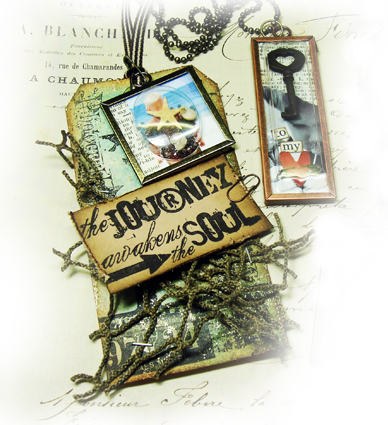
captured memories ©2009 tim holtz®
The world of scrapbooking has many interpretations. In fact, the definition of the word “scrapbook” means:
scrap·book (skrāp'bŏŏk')n. A book with blank pages used for the mounting and preserving of pictures, clippings, or other mementos.
One may say that scrapbooking always has to follow this definition when in fact it doesn’t. One of the cool things for me when it comes to scrapbooking is the ability to follow my own muse and design projects that use the same key elements but share my memories my way. Whatever creative journey you take, remember you don’t have to follow the rules, you can always make them up as you go along, just make the time to create and capture your own memories your way.
These projects use Ranger’s line of “memory” products which include memory glass, memory frames, and memory capsules. These are so fun, easy to do, they don’t take much time to put together, and of course unlimited possibilities. The hardest thing to decide is what you’re going to use your finished work of art for - jewelry? embellishment on a book cover? photo charm? holiday ornament? The list goes on. So while those wheels are starting to turn in your head, let’s go through the basics of how to make these captured memories.Supplies:all supplies below available online from eclectic Paperie
Ranger: distress inks, ink blending tool, glossy accents, memory glass, memory frames, memory capsules, black archival ink
Tim Holtz Idea-ology: jump rings, mini pins, mini paper clips, ball chain, tiny attacher
Stampers Anonymous: visual artistry clear stamps
Tonic: Tim Holtz scissors
Misc: dictionary paper, tiny key, tag, misc. beach elements
project #1 paradise found
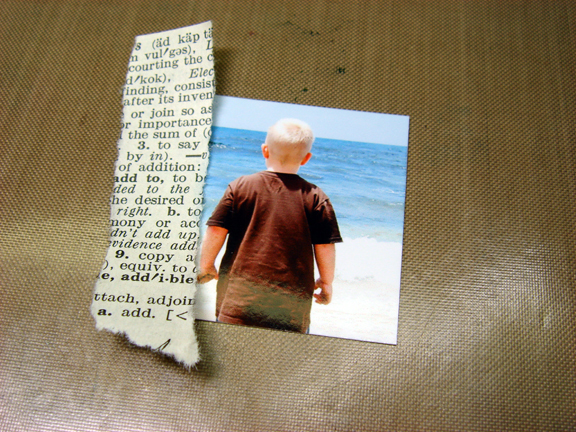
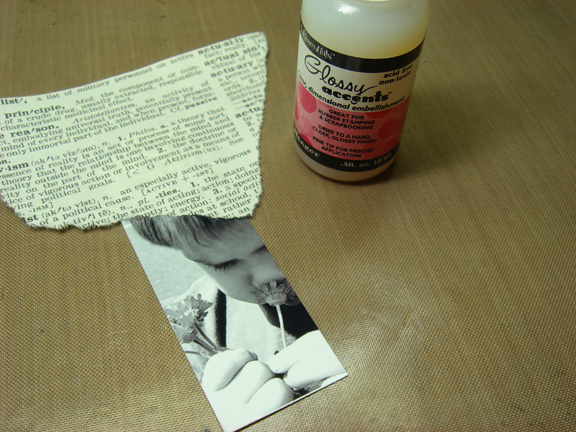
1. Select size of memory glass to use and cut photo to size. It’s important to keep the perspective of the photo when you’re cropping down to smaller sizes. Since the largest size of memory glass is 2x2 your photos can end up pretty small. One tip I have for this is don’t worry what you’re cropping off as long as your main focal image is visible. So for that spare arm or half a head in the shot simply tear a piece of dictionary paper, or any other paper and cover up those unsightly cropping casualties - no problem!
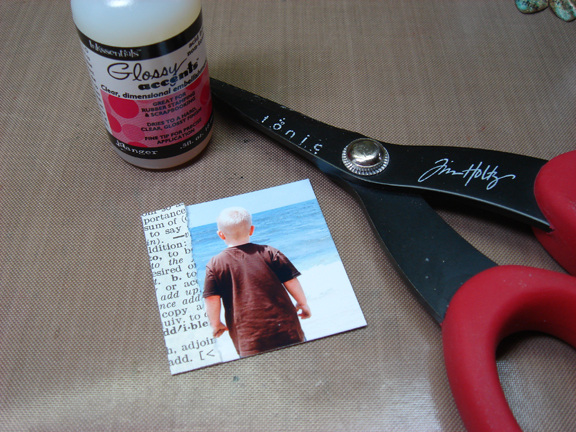
2. Next adhere that paper to your photo using your favorite adhesive and trim to the photo size.
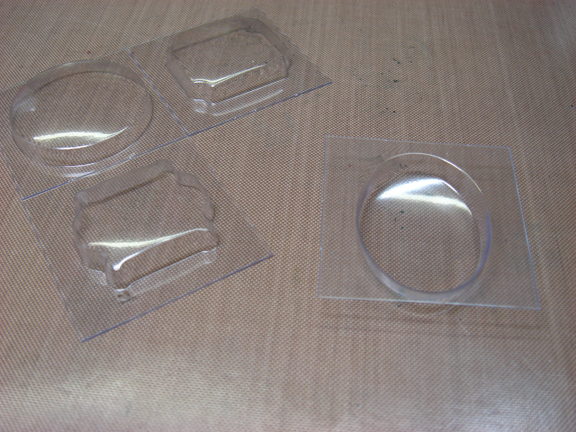
3. Now you need to select your memory capsule that fits your photo. One of the most important things when creating these memory pieces is that everything you’re working with on each project stays the size of your glass that you started with. Since it’s all made to fit together you need to keep this in mind during each step. The memory capsules are plastic bubbles designed to fit over the memory glass and inside the memory frame. These can be used to create “shakers” with elements shaking around, or just a way to incorporate a dimensional object into your project.

4. Place memory capsule (opening side up) and pour in “beach mix”. There are so many things you can use for “shakers” like beads, sand, watch parts, glitter, and anything tiny enough to move around.
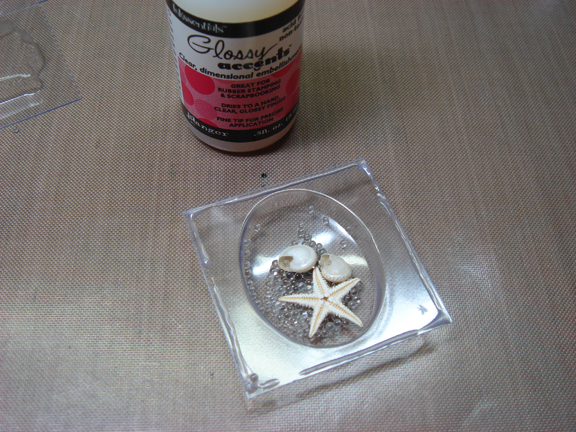
5. Apply a small amount of glossy accents around the edge of the memory capsule.

6. Press your photo background face down over capsule and let dry.

7. Cut a piece of background paper the same size of your memory glass to cover the back of your photo.
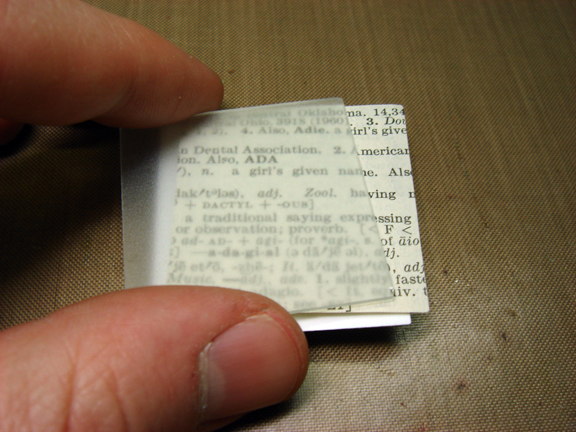
8. Place background paper and memory glass on top of the back of your memory capsule to create a sandwich - you do not need to adhere any of these layers together, the frame will keep it all together.
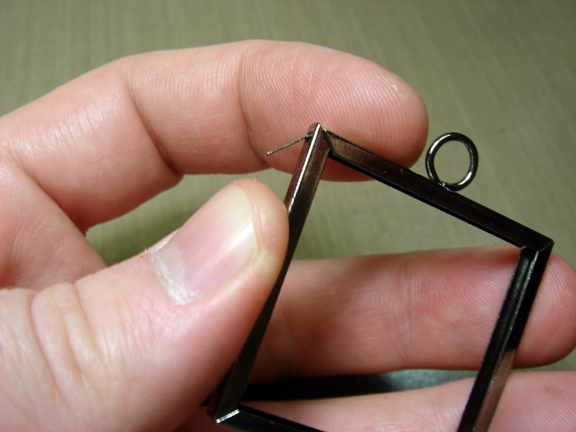
9. Open memory frame by carefully bending up the tab on the side of the frame.

10. Grab both sides of the frame corner and pull apart. One of the most important things when working with the memory frames is to remember never straighten out any of the metal edges. Otherwise the metal can become stressed and break apart.
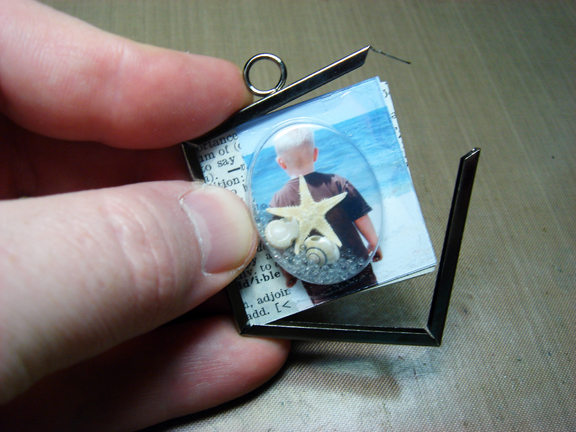
11. Insert capsule, collage, and glass sandwich into the track of the frame - be aware of the position of the frame jump ring and position it on the top of your project.
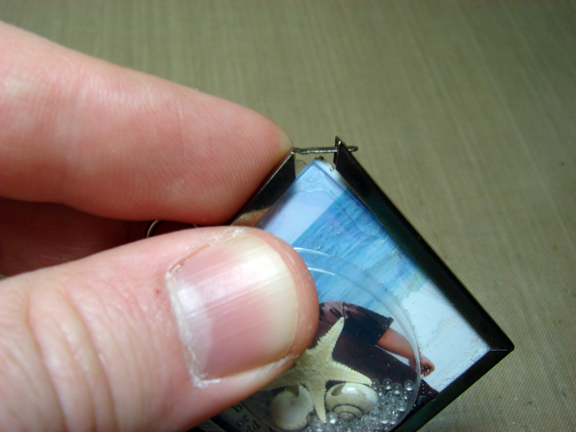
12. Begin wrapping the frame around everything being sure all layers remain in the memory frame track. Sometimes you will need to squeeze the sides together to make sure it fits inside the track. If parts of the capsule or background are too big, you should trim them off - do not force into the track of the memory frame or you could risk breaking the memory glass.
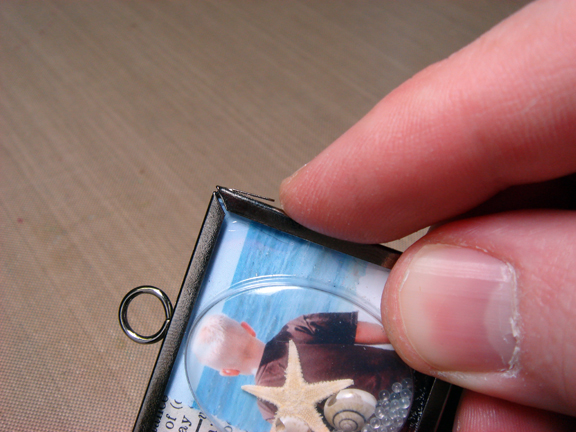
13. To secure closed, re-insert the tab on the frame back into the slot in the frame and bend back down - that’s it! How simple was that??? Now you have a custom photo charm!
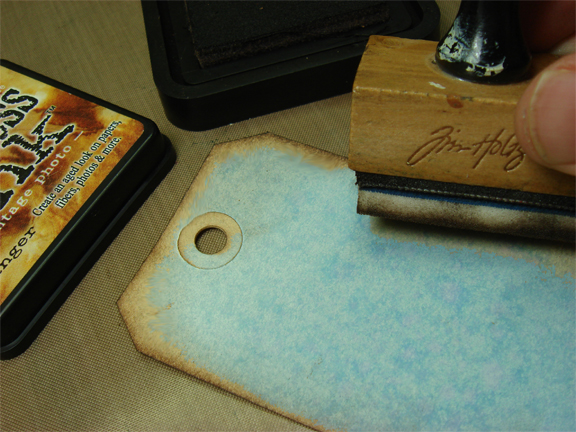
14. Ink tag with distress ink using ink blending tool.
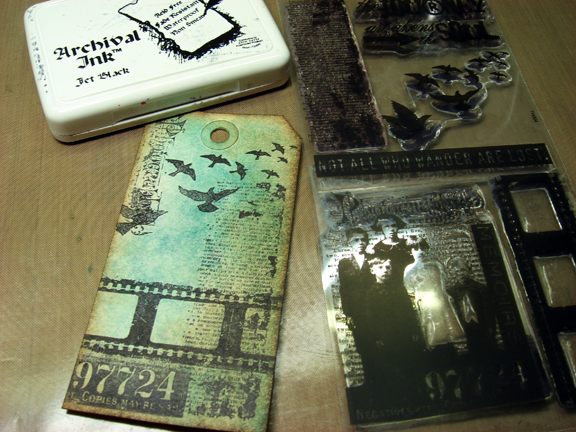
15. Stamp various images on your tag for a background.

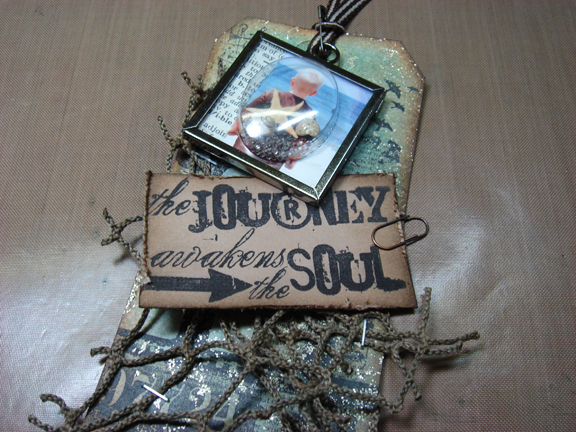
16. Place fish net around corner of tag and secure with tiny attacher in various areas.
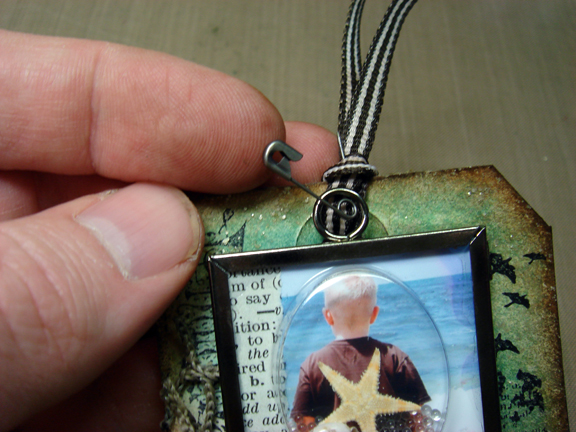
17. Tie ribbon through hole in top of tag and pin your photo charm to the ribbon with a mini pin.
project #2 key to my heart
1. Select size of memory glass to use and cut photo to size. Remember to adhere collage paper to cover up those random crop casualties.
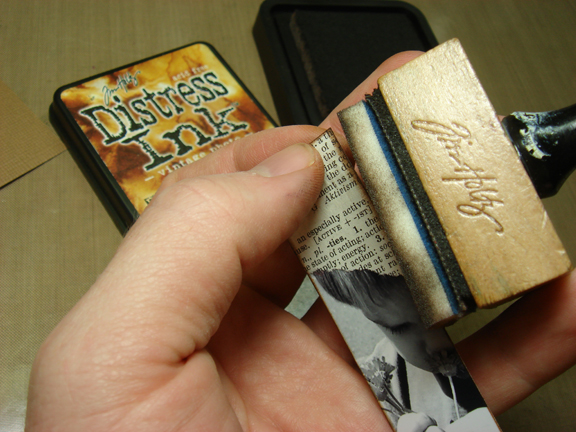
2. Ink edges of your photo with distress ink using an ink blending tool.
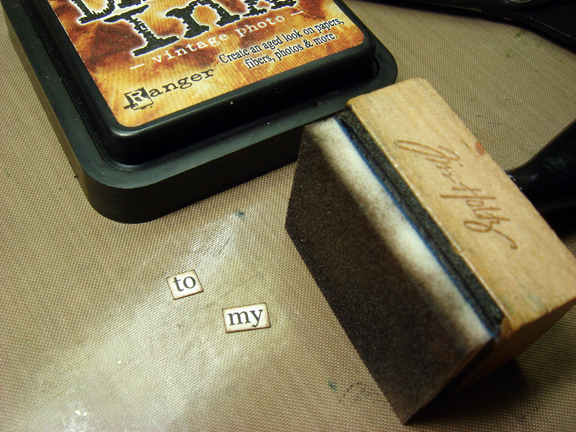
3. Print words “to my”, cut, and ink the edges with distress ink.
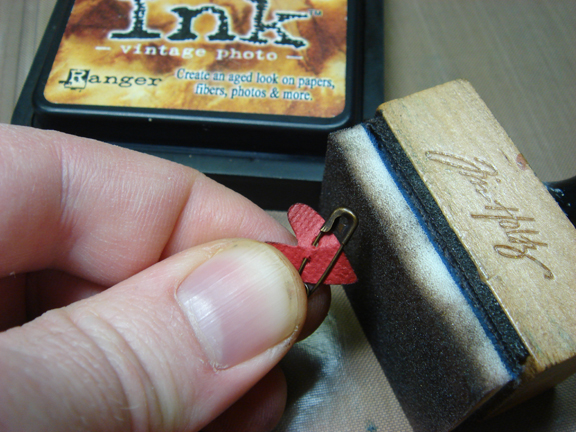
4. Punch a mini paper heart, pin with a mini pin, and ink the edges with distress ink.
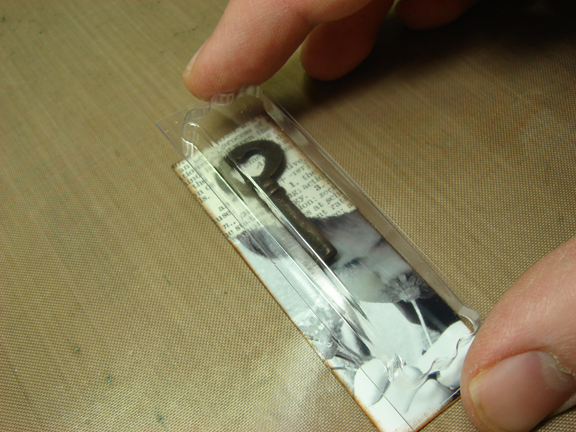
5. Place a small key or charm over your photo background and place the memory capsule over the top to make sure the capsule fits and lines up with the edges of the photo. This is am important step when using dimensional objects in your memory capsules. Sometimes where you want to put an object doesn’t always fit inside the capsule so checking this before adhering anything save time and frustration later.
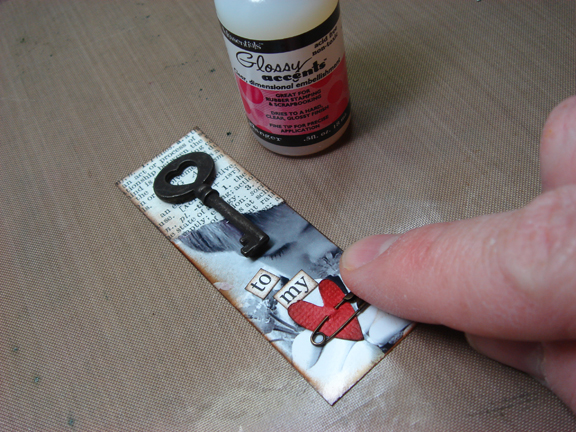
6. Once placement is determined, adhere all elements (key, words, heart) to your photo background.

7. Place memory capsule over photo background and place on memory glass. *Remember to include a background paper behind the photo if you want.
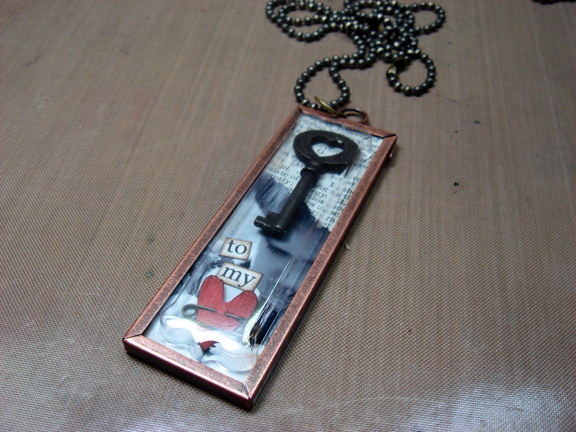
8. Follow directions for memory frame assembly - be sure the jump ring is on the top and attach a jump ring through top jump ring of frame and insert ball chain through jump ring. There you go - wearable memories!

 Tim Holtz is the Education Director for Ranger Industries, one of the leading manufacturers of innovative inks, paints, and embossing products. Tim plays an integral part in the development and design of cutting edge paper crafting products. Tim had teamed up with various key companies including Advantus/Tim Holtz idea-ology, Tonic Studios, and Stampers Anonymous to bring unique products that work hand in hand with Ranger’s extensive lines.
As a well known designer, Tim travels across the country and internationally to educate and introduce people to his world of ink techniques, clever projects, and so much more. His DVDs and books are filled with creative and inspiring ideas for the beginner paper crafters and beyond. He truly lives his motto that creativity is an endless journey...
In a world where the moments of our lives can be captured and created in art of the everyday, it’s important it reflects our own unique personality. Finding just the right objects, accents, and tools to use are most important. Whatever your artistic vision is, exploring the imaginative is a chance for our creativity to escape understanding. Remember life isn’t about finding yourself - life is about creating yourself...
For more information about Tim and to view project demos visit www.timholtz.com and www.timholtz.typepad.com.
Comments
Sign in or sign up to comment.
54 comments
Great ideas. Can't wait to get to my LSS to see what they have in stock still!
Replies
Sign in or sign up to reply.
fantastic ideas! I love the Ranger products, they are awesome! A little touch goes a long way
Replies
Sign in or sign up to reply.
Looks like you guys had tonz of fun!
Create, educate, and share with the rest of us mere mortals...lol
Have a happy, scrappy week,
Thanks for sharing ♥
~Jill
Replies
Sign in or sign up to reply.
Thanks for sharing these great projects.
Replies
Sign in or sign up to reply.
Fabulous tutorial!! Thanks!
Replies
Sign in or sign up to reply.
some other fantastics projetcs
Replies
Sign in or sign up to reply.
Fantastic projects Tim! Would expect nothing less. :-)
Replies
Sign in or sign up to reply.
Fantastic ideas, thanks for sharing this great tutorial (how much do we all love Tim???). Christmas present ideas are now popping into my head as a result of reading this.... Jo x
Replies
Sign in or sign up to reply.
So inspiring, as always. Tim is amazing, and makes me want to play outside the box.
Replies
Sign in or sign up to reply.
Love it, Love it...Love it Ü Those would be so cute on top of Christmas presents!
Replies
Sign in or sign up to reply.
These are two of the three projects we made with Tim @ CKU this year. They are even more awesome in person- so is Tim!
Replies
Sign in or sign up to reply.
Oh how I love Tim and his projects! Thank you Ali for having Tim here as a guest - these projects are so wonderful and I feel like running and get scrapping now. How inspiring!
Sandy
Replies
Sign in or sign up to reply.
I have a question about the "shaker style" piece-is there a clear piece between the photo and the loose pieces? From what I can tell there isn't-won't the photo get scratched up over time with the starfish and stuff rubbing up against it?
These projects are really wonderful and a wonderful idea for unique Holiday gifts!
Replies
Sign in or sign up to reply.
Terrific tutorials!!!! Wonderful inspiration, Ali :)
Replies
Sign in or sign up to reply.
wow- thats fantascic!
Will try to work some like this- thanks god saturday is stampin Mekka and I can by all I need there!
Elma from germany
Replies
Sign in or sign up to reply.
Oh wow! Had to stop and say thank you for this one! Great ideas here!!
Replies
Sign in or sign up to reply.
Love the tutorials, and I love Tim Holtz and his products/ideas. I never would have used the memory capsules before thinking they weren't my kind of thing, but now my mind is racing!
Thanks for sharing, Kelly Karas
Replies
Sign in or sign up to reply.
Tim Holtz is a creative God !!! I love everything he does. I love the tuesday tutorial .. this was my first, but I've got it on my favorites now so I can keep coming back for ideas. Thanks
Replies
Sign in or sign up to reply.
Awesome tutorial. I've had some memory glass and frames on my desk for a while but haven't really known what I wanted to do with them. Tim's tutorial has really helped. Thanks Tim and Ali!
Replies
Sign in or sign up to reply.
Seeing is converting me. I so get what I see, and as always T!m an excellent idea. I see Christmas ornaments here.
luv luv luv the way the scrap paper changes the look of the photos.
TY both!
Replies
Sign in or sign up to reply.