Celebrating Simon & Scrapbooking With Your Computer
Tags: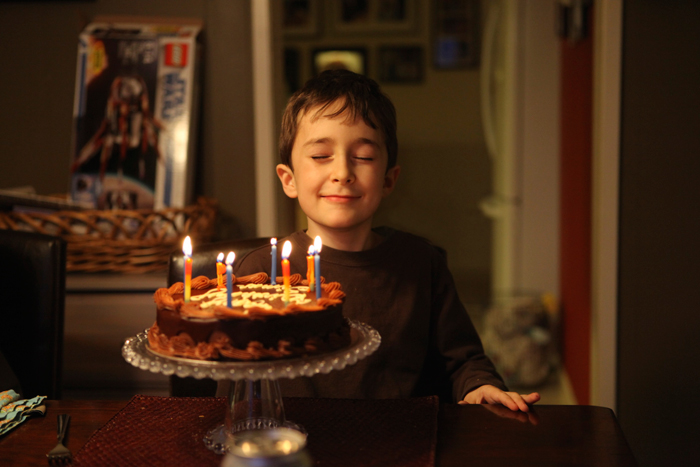
This is one of the coolest kids I know.
He is still in that awesome place where he believes in magic. Oh how I hope to encourage him to never lose that skill at being delighted by life.
At his family birthday party last night he was thrilled and thankful (expressing his thanks both spontaneously and when he was gently reminded). One of my favorite parts of the evening was when he read his cards out loud (the first year he has done that). Hearing, in his own voice, what each of us wrote to him was really special.
While Chris lit the candles on his cake he went into the other room so he could be surprised by the cake and all of us sitting around the table. With the cake on the table and the candles glowing Chris went to get him, had him close his eyes and walked him around the house before bringing him back to the table (so glad I had long candles for the cake). When he was brought back to the table and opened his eyes we all yelled surprise and the look on his face, the absolute joy, was priceless.
The photo above showing him in mid-wish before blowing out the candles is my favorite from the day.

I hope you enjoyed the basic information on Scrapbooking With Your Computer this week. I definitely let the content evolve over the course of the week (keeping it really simple) and still have a bunch of things on my list to share with you.
With that in mind I am planning to do two things:
(1) Coming soon I will do another weekly feature focused specifially on hybrid scrapbooking. I want to put some projects together with step by step photos of my processes. I need a little time to get that going.
(2) I am going to designate one day per week for a post on Scrapbooking With Your Computer. Each week I will bring you a specific tip, how-to, or video tutorial that will walk you through a specific process or idea. Some concepts will be digital and some hybrid. I currently have a list of questions that I will be using to generate specific content for the next few weeks but if there is something specific you would like to see me cover feel free to leave a comment below or email me ali at ali edwards design dot com.


Comments
Sign in or sign up to comment.
106 comments
HAPPY BIRTHDAY SIMON!! It is great when they are eight. My son is eight now and I love to read your stories about Simon. It's like it was a wonderful birthday.
Replies
Sign in or sign up to reply.
Happy birthday Simon. It's also my son's birthday today. He is 14 and it makes my heart hurt. Isn't is wonderful that we have this awesome hobby? I can now go back and see all the photos and pages of when my son was little. My scrapbooks are priceless treasures to me. Thanks for the daily encouragement, Ali. You always brighten my day.
Replies
Sign in or sign up to reply.
one word to describe the photo and your memory of the day: tear-jerkingly-awesome....
*I know that is more than one word, but you get what I'm saying.
I'm in love with the fact that he still believes in magic. Soooo cute!
Replies
Sign in or sign up to reply.
ps - I don't have kids and probably won't... but I do wish to be a parent like Ali and Chris if I ever had kids. Even if I adopt or have "bonus" (I like this better than "step") kids, you are my role models.
Replies
Sign in or sign up to reply.
That's a great picture of Simon! :)
Thanks again for your posts this week. The video tutorials are extremely helpful!! I'll look forward to more of those.
Replies
Sign in or sign up to reply.
The photo is so sweet. He's getting to be quite a big boy now. I loved your topic this week and I would love to see what you do next week. I love your blog!
Replies
Sign in or sign up to reply.
Hi Ali--
I know the majority of people start off as traditional, paper-based scrappers and for them transitioning to the computer is a big leap, but I'm in the opposite camp. As you cover the hybrid pages, I'd love it if you'd touch on why you've picked a certain digital element versus its physical equivalent and/or vice versa. Or, if you use something digital for which there is a physical equivalent, I'd love it if you could just verbalize what the parallel is. Perhaps not everyone needs this kind of dot connecting, but it's very hard for me to see traditional vs. digital scrapbooking as not being all one or the other, but the potential for a balance in between.
Replies
Sign in or sign up to reply.
Ali, thank you for the tutorials, especially the videos, actually 'seeing' things done helps. I have never done a hybrid page let alone all digital page but am loving learning and am tempted to try. For My December Daily 08 album I printed out one of your overlays on cardstock and changed the colour, that really was huge for me and took forever. I then tried printing the overlay on a photo and couldn't! As you have guessed I am not computer savvy so thank you again.
Would love to see some simple photo editing videos and any help on using actions. I'd love to try but don't have a clue.
Replies
Sign in or sign up to reply.
What a wonderful picture of Simon! I have been watching him grow from your pictures and layouts in Ck from the beginning. What a cute little guy.
Thank you so much for this weeks tutorial. I appreciate that you take the time to blog. I look forward to reading it everyday.
You take such awesome pictures. I love how you pay close attention to the details, like being sure to get the chair logo and number in the picture of Simon at the game. I never think of things like that until after the fact and then it's to late. You're such an inspiration to me.
Replies
Sign in or sign up to reply.
Happy Birthday, Simon! I'm not sure if I posted in the wrong place last time, and I'm new at commenting so I apologize if I'm repetitive...but I love the convenience of printing 4x6 photos at Costco to put in my Project 365 album and I often need to fit several photos on one 4x6 as the POTD - I've been using Picasa but since my hubby bought me a macbook last year, I've been having to import all the photos into Picasa to make a collage (and I think I'm wasting major memory space). I bought Elements late last year and have been using this FANTASTIC series to start to learn...but I still haven't figured out how to do a photo collage in Elements...any ideas? Thank you so much again for all your time and helpful hints - we appreciate you helping us along and sharing your time!
Replies
Sign in or sign up to reply.
Ali...thanks so much for the info from this week. It's moved me off dead center and jump started more than just scrapbooking in my life!!!
Replies
Sign in or sign up to reply.
Happy birthday Simon!
Replies
Sign in or sign up to reply.
Love these thoughts Yolanda - it's interesting for me to think about the why - I will make sure to address that.
Replies
Sign in or sign up to reply.
Hi Cindy - I've got a written tutorial on how to create a gathering of photos in photoshop here: http://www.lifeartmedia.com/newsletter4.html
Replies
Sign in or sign up to reply.
What a fantastic shot of such a special day. Happy birthday Simon!
Replies
Sign in or sign up to reply.
You should also check out this video tutorial that Cathy did for making multi-photo grids for my Tuesday Tutorial series: /2009/07/tuesday-tutorials-cathy-zielske-.html
Replies
Sign in or sign up to reply.
Hi Amanda - I added this to my list to cover during hybrid week. Usually I know that I am going to do (like that it will be hybrid)...and then it always evolves.
Replies
Sign in or sign up to reply.
Hi Samantha - I will add this to my list :).
Replies
Sign in or sign up to reply.
Hi amyellen - check to make sure that the layers are above the background. Also make sure that when you go to Edit/Fill layer that the color you have selected in the small window the pops up is the Foreground.
Replies
Sign in or sign up to reply.
Yes, you can do it in Word. I don't use Picasa so I am not sure about that. I will add the topic of adding an overlay to a photo in word for the upcoming hybrid week.
Replies
Sign in or sign up to reply.