Photo-A-Day Calendar, Living Your Gratitude, & A Stamp Update
Tags: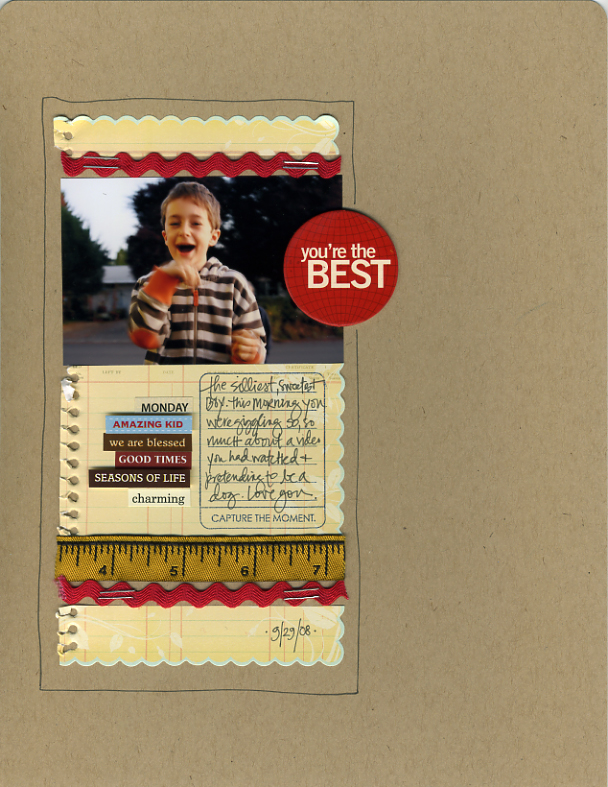
[ Layout Supplies : Kraft Cardstock: Bazzill Basics; Patterned Paper: Making Memories; Capture The Moment Stamp: Ali Edwards for Technique Tuesday; Word Stickers: from a bunch of different 7gypsies 97% Complete Sticker Sheets; "You're The Best" Chipboard Circle: Scenic Route; Other: random ribbon ]
Happy Friday.
Any one else notice how fast the weeks seem to be going lately? Sometimes I feel like I just blink and it is already Friday again.
A couple product announcements for today:
First, my new stamps are back in stock at Technique Tuesday. You can check them out here:
Today You
Remember
Capture the Moment
I also wanted to share a two new things that I have recently released through Designer Digitals (new products are added to the store every Sunday) and am really excited about as the are building blocks for very cool projects. Definitely weekend creative sort of material.
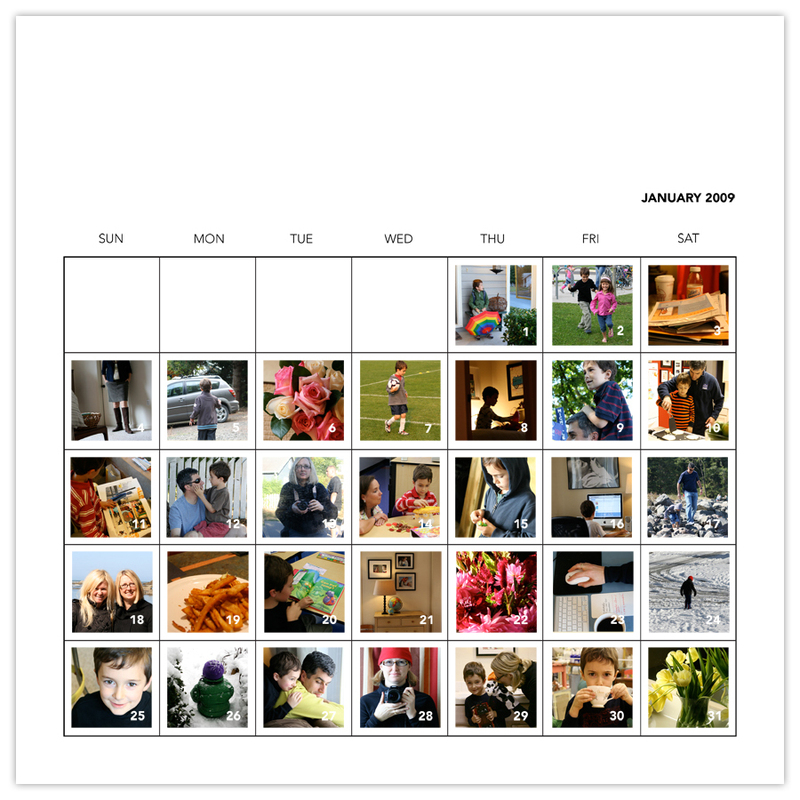
2009 Photo Calendar Layered Template : This layered template is designed to hold an entire month of photos for each of the 12 months in 2009. The download also includes a blank calender that you could use for this year or any year. Great for Photo A Day/365 projects or capturing a specific month in your life. 12x12.
I am thinking about embarking on another 365 project for nex year (I started one of just me this year and got sidetracked after about the first month). Especially with a new baby in the house I think my camera will be getting quite a bit of use this next year and I envision widening the project to just be a photo a day rather than a self-portrait a day. Even just documenting the baby's first month in this format would be really cool.
The background is customizable or you can just leave it a nice clean white.
You can learn more about working with layered templates here.
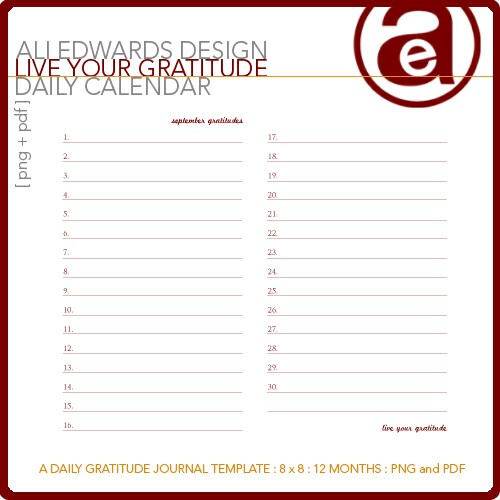
Live Your Gratitude Daily Calendar : This is my other favorite recent release and is based on a minibook I created for my newest book Sharing Your Story. It's a place to document your own personal everyday gratitudes and makes a great gift (thinking towards the holidays). You do not need to have Photoshop for this product as it comes with PDF files for easy printing. 8 inches x 8 inches.
Here's a peek at the book that appeared in Sharing Your Story:
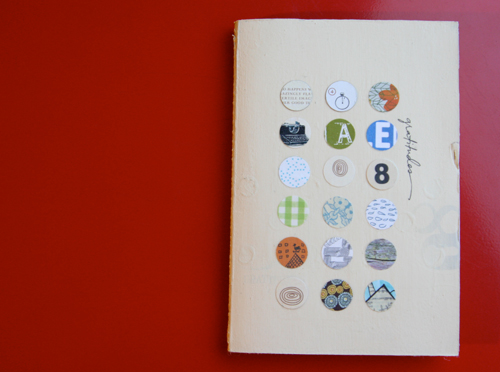
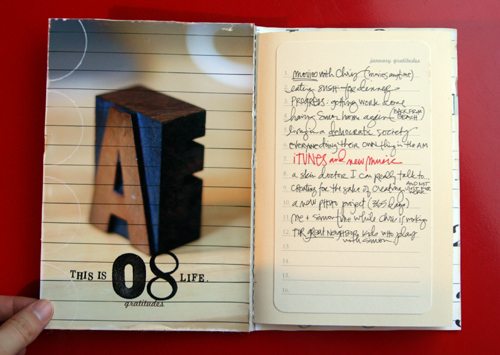
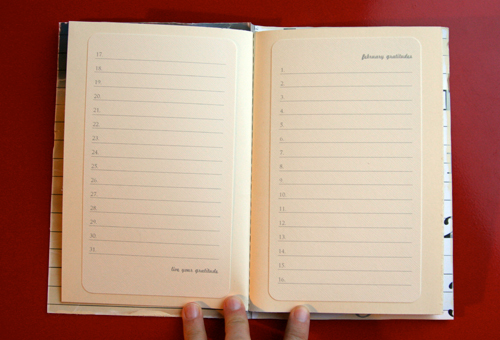
The minibook I used as a foundation for this project is a 7gypsies Naked Composition Journal. I simply printed out the gratitude pages on cream cardstock, rounded the corners, and adhered each page into the book. The cover includes a bunch of circle-punched patterns and is covered with gel medium (you could use mod podge as well).

Hoping you all have a great weekend and get a chance to work on your week in the life albums. Don't wait too long to put those books together. It is so worth the effort. That's a reminder to me as much as it is to you!


Comments
Sign in or sign up to comment.
49 comments
Love, love, LOVE your new templates!!! The calendar is awesome...makes it nice and easy for me to easily put a month together and the gratitude template is amazing as well. Last year for one month, before I went to bed I would write one thing I was grateful for in my day planner. I'm excited to have a special place for it with the help of your template!
Thanks, Ali!!!
Replies
Sign in or sign up to reply.
Wow- along with everyone else, I love your work. Thanks for sharing with us :) Scrapbooking never gets boring & that is something that I love about this industry.
Replies
Sign in or sign up to reply.
totally inspired here in Alaska. thanks.
Replies
Sign in or sign up to reply.
Is picture 19 on the calendar sweet potato fries? If so, Can you share the recipie?
ChanelD
Replies
Sign in or sign up to reply.
love that top page, so clean and simple and yet not really simple. What size is your page, it looks like 8.5x11 but with the photo I'm not sure.
Replies
Sign in or sign up to reply.
ChanelD - we just buy them in the freezer section in our grocery store :).
Replies
Sign in or sign up to reply.
Emily - it is 8.5x11.
Replies
Sign in or sign up to reply.
Ali,
Could you explain a little more about the designer digitals for a newbie like me who has never digitally scrapbooked. The designs look cool, but how exactly are they used once you download them? Do you have to have photoshop? Thanks for the information-Love your blog!
Replies
Sign in or sign up to reply.
Cindy - I would suggest checking out this link: /hybriddigital-scrapbookin.html. It is a series I did recently on hybrid + digital scrapbooking and includes links for more information and tutorials. Some products do require Photoshop (at least Elements) and that is listed in the product descriptions. Layered templates do require Elements or Photoshop.
Replies
Sign in or sign up to reply.
Try this link: /hybriddigital-scrapbookin.html
Replies
Sign in or sign up to reply.
Love your latest LO as well as the cover of the minibook! Your initials and the year are so subtle, yet right there to be recognized!
Great new quote by Mr. Channing BTW!
Replies
Sign in or sign up to reply.
I totally love the calendar photo layered template! I always thought taking a photo a day would be cool. And so many ways to use it, like you said a picture of baby each day for a month, or what you are happy about, blessed by, etc. This is going to be the one template that gets me started with digital scrapbooking! Thanks!
Replies
Sign in or sign up to reply.
I've got to say that my favorite quote is the one you just had, "Normal day ..." by Mary Jean Iron. I love that quote (we don't have that many normal days at our house) and I have it posted at my desk and my house! AND, I'm going to put it on the very first page of my "Week in the Life" album. I thought it was very fitting! Thanks to you, Ali, I'm always finding inspiration. Hope to finish my album this weekend.
Replies
Sign in or sign up to reply.
Dude - love the layout! And I really like the photo a day thing and the gratitude thing.
Replies
Sign in or sign up to reply.
thanks for all the inspiration. i love it!
Replies
Sign in or sign up to reply.
Template question from someone who is forever playing and learning PS. When you refer to your layered templates will clipping mask work for inserting photos? Thanks :)
I'm still waiting for my WITL photos but the planning and designing is done. I'm excited to put it all together.
Replies
Sign in or sign up to reply.
You come up with so many creative ideas. I don't know how you do it but I sure appreciate them!
Sue
Replies
Sign in or sign up to reply.
I loved watching your, "Week in the Life" album come together. I also enjoyed seeing everyone else's version. This seems like a play on that fabulous Christmas album from last year. It was so fun logging on to see it updated daily. Will you be doing something similar again this holiday season?
Replies
Sign in or sign up to reply.
Thank you! This is EXACTLY what I needed for this year's Christmas gifts. Now I just need to find the time to do them - think if I start now I'll have them done in time?
Rachel
Replies
Sign in or sign up to reply.
I like the idea of using a calandar template to record an entire month. That looks great.
Replies
Sign in or sign up to reply.