Layout Process : Bringing It All Together
Tags: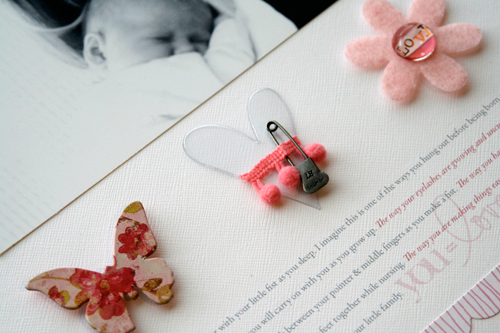
I finally got a chance to put a little something together.
The image and the words came directly from this recent post.
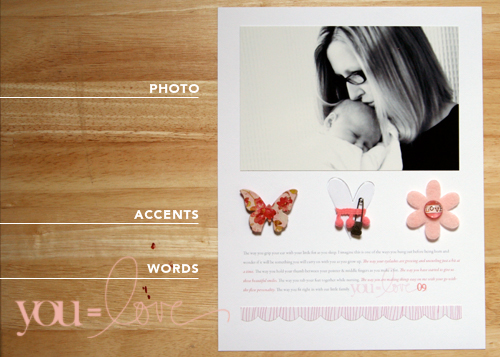
The supplies for this layout are simple. My favorite Bazzill cardstock. A chipboard butterfly from K&Company adhered with a couple foam dots. An acrylic heart from Heidi Swapp paired with some pink trim and a trinket pin from Tim Holtz. A pink felt flower from American Crafts' My House collection holding a great little Cut 'N Paste bauble from K&Company (I have a feeling these could be appearing on a bunch of things in the near future). A scalloped edged patterned paper from American Crafts (Amplified New Wave). A new digital word-art accent from a new collection that will be in the Designer Digitals shop on Saturday night ("You" Word Art).
The journaling began with one little thing I wanted to document: the way in which she holds her thumb in her fist between her pointer and middle finger. I opened a word document, jotted that thought down, and over the course of the next couple of days I added a few other things about her as they came to mind.
Those words were then organized in a document (you can do it in Word, Photoshop, Illustrator, etc) - set down near the bottom of the page - and then printed on to cardstock which become the foundation for my layout.
Next came the photo.
Most of the time when I am dealing with my photos I like to leave them as-is which most often is pretty imperfect. The photo I used in the layout above was manipulated in Photoshop. Here's the original, un-edited version that was taken by me in our bathroom:

From there I did a few things in Photoshop and ended up with this:
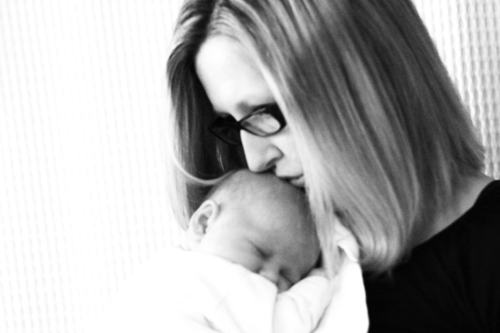
First I cropped the image (I actually did that in iPhoto because it is really simple to constrain the proportions) to remove the bath mat that is hanging over the shower curtain and the bit of my camera strap in the bottom right corner and the stripes on the burp cloth. I wanted to get to the essence & the heart of this photo which for me is the connection between mother and child.
After cropping in iPhoto I brought the image into Photoshop. I am by no means a Photoshop expert. There are a few things I know how to do and I try to use those to my advantage. The "help" menu and google searches are my friends when I need to learn something new.
There are tons of different things to do with your photos in Photoshop and many photographers offer "actions" that you can purchase that will manipulate your photo in one click (check out Maggie Holmes or the famous Itty Bitty actions to see what those are all about).
For this photo really all I did was remove the color (Image/Adjustments/Black & White or Image/Mode/Grayscale) and then adjust the contrast and the curves and the levels (under Image/Adjustment). For me "adjusting" really means "messing around" with the controls until I like the look of the image. I wanted to see some very white "whites" and some very black "blacks." I also didn't care if I washed out some of the shower curtain in the process.
I definitely don't adjust or manipulate all my photos. I like to see the real life things in the background and the colors of stuff in our home. A bit of blur has never bothered me or colors that aren't "just right." But in this case, changing up the photo helped me tell the story I was wanting to communicate.
I loved putting this one in her album. Feels like the beginning of something really nice.

You may have noticed a couple new things I am trying out around here. First is the Link Within images that are appearing at the bottom of my posts. I first saw this on Benita's blog and thought it was a great idea to give new life to older posts. This blog has been around since November 2004 - that's a lot of posts about our lives and scrapbooking (1,338 to be exact).
The other new feature is a change to the comment section. I am jumping in to the Typepad Connect system to see how that works for comments. One of the things you should know is that you now have the option to reply to other commenters (see the "reply" option at the bottom of each comment) and have a bit more of a conversation within the comments if you would like. This will also enable me to answer questions within the comments in a way that will be more relevant and easier to read. As a commenter you don't have to do anything different but you do have the option to add a photo/avatar if you would like through Typepad Connect.
Have a great weekend!


Comments
Sign in or sign up to comment.
96 comments
I love the way you edited that photo. No one would ever guess you took it yourself in a mirror in the bathroom.
Replies
Sign in or sign up to reply.
Ali, great layout! what kinda camera did you use?
Replies
Sign in or sign up to reply.
Ali,
I just wanted to tell you how you inspire me to accept things as they are. I love this photo and layout and reading you talk about your photos and how you embrace them with their imperfections really speaks to me.
I think I have been stumped to scrap my son's first year pictures because they were less than perfect and for years, I was sick over not getting certain shots. Those first babies are overwhelming experiences and I didn't start scrapbooking until he was 3. You've made me think this over and I need to scrap them, seriously need to. I think it would be a great growing experience for me to accept them as they are and let them tell their story. Thank you for being so honest and lovely and sharing everything that you do here. It's more than just about scrapbooking. It's about recording life and accepting ourselves and what we've got. You are very inspiring.
Replies
Sign in or sign up to reply.
Fabulous - just precious
Replies
Sign in or sign up to reply.
i love the 'link within' you have added. i very often go and look for older posts and am again inspired. this will be such a great addition to your already very readable blog.
your layout is stunning. there is a new sense of depth i felt while looking at it.
Replies
Sign in or sign up to reply.
Wow, simply beautiful as always. I just think this picture is gorgeous. Something Anna will absolutely TREASURE as an adult and if she becomes a mom, it'll be out of this world precious. You might think about printing it and sending it to your mom. Bet she would love to see this picture of her baby with her grandbaby on her fridge or in a frame.
Hugs,
Peg
Replies
Sign in or sign up to reply.
I needed a moment to find out what actually was part of the layout and what not on that second photo - the wood, lines and words just matched up so well with the actual layout but it did seem strange to have "photo, accents, words" written out on it :) Maybe this could be an idea for a layout on the process of scrapbooking itself?
Replies
Sign in or sign up to reply.
LOVE this Ali, I've been waiting to see what beautiful page you created for that baby girl. How do you take a photo of yourself with her??? I've tried to take photos of myself and they never come out??? Have a great weekend.
Annette
Replies
Sign in or sign up to reply.
Ree at thepioneerwoman.com offers some photoshop actions for free, and she's also got some great tutorials. She's a great resource! :)
Replies
Sign in or sign up to reply.
I have that exact shower curtain and love the texture of it. Never thought of it as a great backdrop for a photo. Love the LO. I really like how much texture is in the paper and how the curtain in the photo adds a different texture, although softened. I think the way you edited the photo was perfect. Before it was a sweet photo, edited it is much more intimate. You can SEE the connection between you two that you were going for. Thanks for sharing.
Replies
Sign in or sign up to reply.
It's random :).
Replies
Sign in or sign up to reply.
I don't think you do Noelle - I think you just need to register for Typepad Connect. Here's a link to some Q&A: http://www.typepad.com/profiles/faq.html
Replies
Sign in or sign up to reply.
Canon Digital Rebel.
Replies
Sign in or sign up to reply.
"accept them as they are and let them tell their story" - yes :)
Replies
Sign in or sign up to reply.
Simply gorgeous!
Replies
Sign in or sign up to reply.
Lovely. Simple. Amazing.
You always wow me Ali!
Love the layout.
Replies
Sign in or sign up to reply.
Sorry, i'm having one of "Those" moments ( I'm turning 45 Tuesday). It looks like your photo is a reflection of the mirror, but you must then have your camera on a shelf, right? cause i can't figure how you can hold the rebel AND push the button...at least i'm not that nimble. :)
Replies
Sign in or sign up to reply.
Nope, no shelf - just my hand. Maybe I have really long fingers :). Just held in my right hand with my pointer finger on the button.
Replies
Sign in or sign up to reply.
Ali- I just loved your layout! :) You radiate beauty as a mother! :)
Replies
Sign in or sign up to reply.
You are totally welcome!
Replies
Sign in or sign up to reply.