Tuesday Tutorials : Katie Pertiet : Adding Emphasis With A Photo Mask
Tags:
This week Tuesday Tutorials welcomes Katie Pertiet. Katie's digital tutorial walks you through the steps in Photoshop to add emphasis to a layout using a "photo mask."
New to digital scrapbooking? Check out these links to get started.

Adding Emphasis with a Photo Mask
2. Add a light green background paper (Katie usedGoing Away Solids).
3. Open a photo and drag your photo onto the new document (Photoshop will create a new layer).
4. With the move tool selected, "show transform controls" checked, and the shift key held down, scale your photo to fill the entire page.
5. To achieve the blended affect simply change the blend mode to "Soft Light" in the layer palette and adjust the opacity until you like the way it looks (no right or wrong).
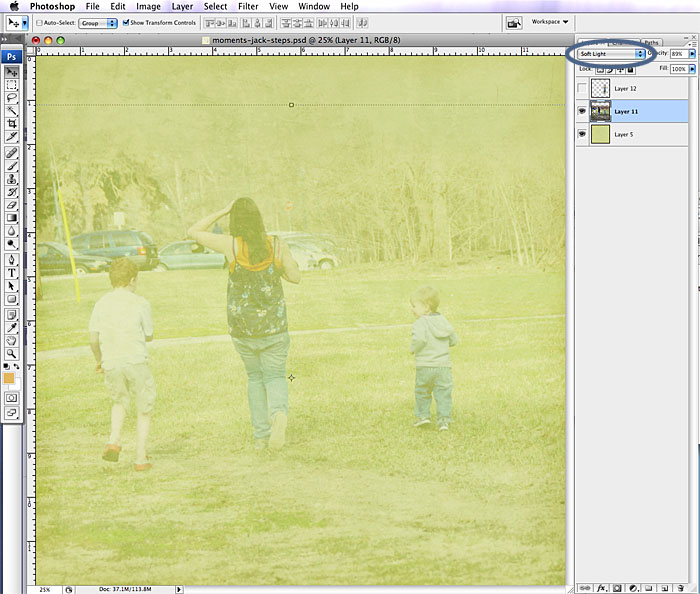
6. Since this page is for an album about Jack, the youngest in the picture, I wanted to draw more attention to him. I chose a filmstrip photo mask and positioned it over Jack in the photo:
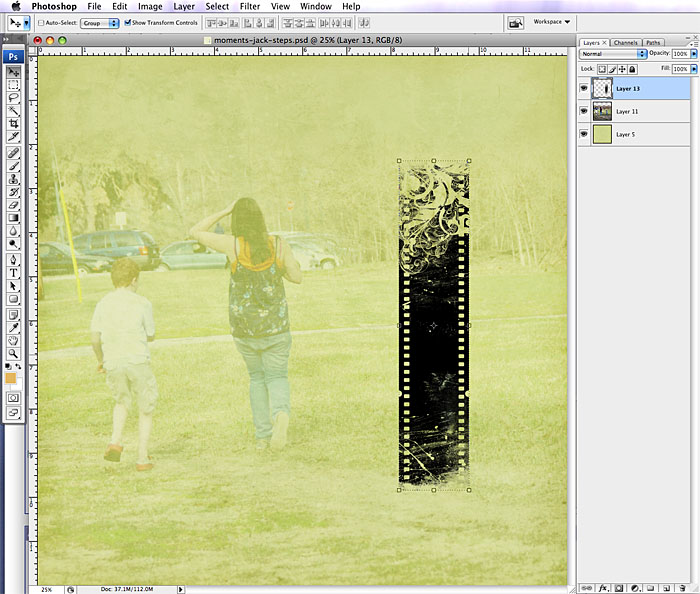
7. Turn off the visibility of the mask layer by clicking on the "eye" icon.
8. Click on your photo layer so that is your active layer.
9. Move your mouse over the mask layer in the layer palette and hold down the apple key on a mac [ctrl on a pc] and you'll see the cursor change. Click on the mask layer while holding that key down and you'll see 'marching ants' in the shape of the mask.
10. Making sure you're still on the photo layer, Edit > Copy
11. Create a new layer, Edit > Paste Into. It pastes the photo right in position:
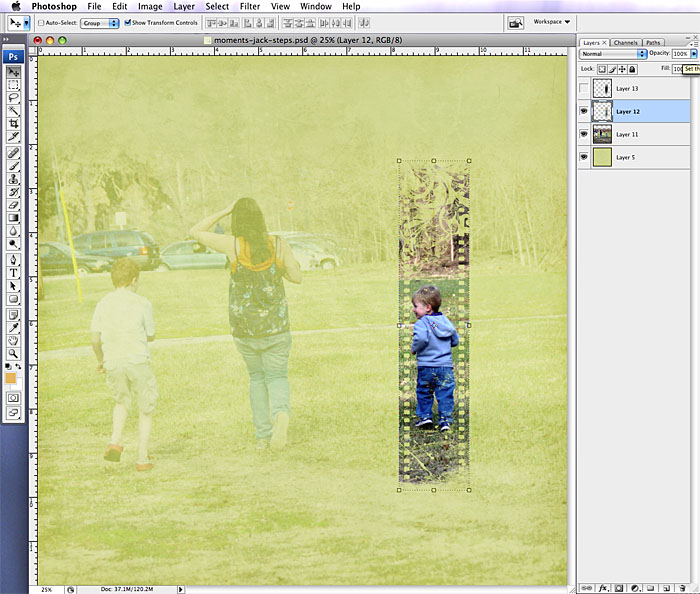
12. Adjust the opacity to the strength you're happy with.
13. Add elements to round out your page and call it done. Simple as that!
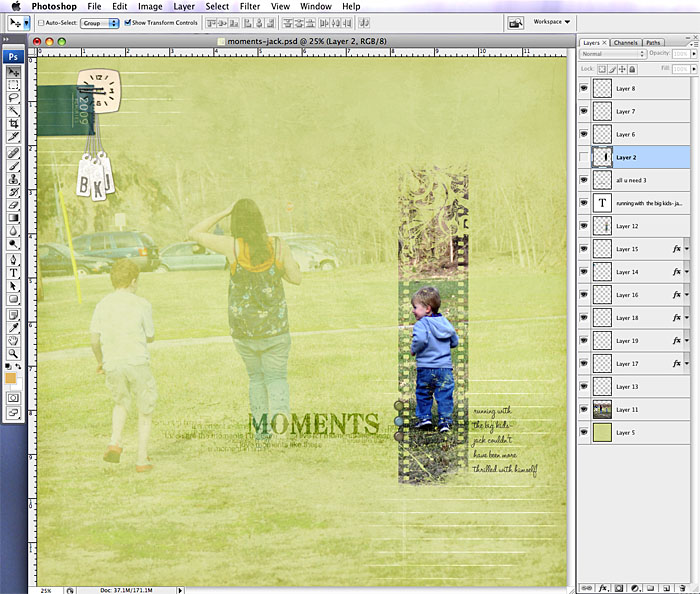
Try adapting this technique with other ideas, like pasting inside a letter or other shape!
Complete layout details available here.
 Katie Pertiet is the owner and founder of www.DesignerDigitals.com. She received her degree in graphic design nearly 25 years ago and has worked professionally as a graphic designer and art director before starting her own design firm in 1993. Her layouts have been published in Creating Keepsakes, Simple Scrapbooks, Memory Makers, Legacy, and BHG Scrapbooks Etc. Katie has also designed products for Autumn Leaves as well as licensing her designs for stationary, fabric, wall paper, prints and home decor. You can find her digital scrapbook products at designerdigitals.com and her prints at Art.com. For more inspiration check out her layout gallery.


Comments
Sign in or sign up to comment.
35 comments
Hi there. I have given you an award on my blog if you'd like to come check it out! :) P.S. You share some of the coolest stuff on your blog! Thank you for that. Corinna
Replies
Sign in or sign up to reply.
Did you see the two peas warehouse walk video on youtube? I saw the Starwars stuff and immediately thought of Simon! My little guy isn't quite old enough yet, but some day... ;)
Replies
Sign in or sign up to reply.
Ali -- I wish to thank you for your latest great gift to your blog readers - tuesday tutorials. I have loved ALL of them so far. It is wonderful learning new techniques or a twist on a technique that I hadn't thought of yet. In addition, I love being introduced to new creative people for additional inspiration. What a great idea. THANKS. Tuesday Tutorials is much better than stumbleupon.com.
Replies
Sign in or sign up to reply.
Ok, this is totally awesome. Inspired me to make a page: http://www.flickr.com/photos/upload/done/?b=1246408746-1246408746-7652520@N05
And I am with you, the desire is there to scrap but the pages are just not being completed. Totally caught up in enjoying my girls + summer.
Replies
Sign in or sign up to reply.
Wow, love this and of course Designer Digitials is a fav place on the net. So many options in this one lesson :)
Replies
Sign in or sign up to reply.
Designer Digitals rocks! Thanks Katie for another awesome tutorial and thanks Ali for hosting it.
Replies
Sign in or sign up to reply.
hey ali, you may not be "producing as many layouts and projects" right now, but you are producing LIFE for you and your family. as fun and meaningful as the projects are, this is the most important thing to do. good job! keep making that minute by minute choice to nurture the present moment. thanks for inspiring the rest of us to do the same. =)
Replies
Sign in or sign up to reply.
Oh, that is just SO. COOL.
Thanks Ali, for putting this on your blog. And Katie... you TOTALLY ROCK!!
Replies
Sign in or sign up to reply.
That's very neat! It's interesting to know a little more about Katie, too. I have been admiring her digital work for a while now.
Replies
Sign in or sign up to reply.
katie is soooo talented! thanks for sharing with us!!!
a
Replies
Sign in or sign up to reply.
Thanks! This is great.
Replies
Sign in or sign up to reply.
Blogs are so interactive where we get lots of informative on any topics nice job keep it up !!
http://www.ukdissertation.co.uk/buy_dissertation.htm
Replies
Sign in or sign up to reply.
This is absolutely great!! Thanks for sharing!!
Replies
Sign in or sign up to reply.
Thanks so much for the tutorial. I wanted to learn more about using masks & this is easy to follow.
Replies
Sign in or sign up to reply.
Blogs are so informative where we get lots of information on any topic. Nice job keep it up!!
Replies
Sign in or sign up to reply.