Half-Circle Embellishment How-To Video
Tags:Half-Circle Embellishments from Ali Edwards on Vimeo.
Cathy got me all jazzed up earlier this week with her Tuesday Tutorial. She's been guiding me through the process with some tips and tricks as I get video tutorials and keynote presentation files ready for my Big Picture class later this year. Feeling really thankful for her help and assistance.
Today I decided to test it out with the program she uses called ScreenFlow. I've been "trial & erroring" all day and it's been fun to be learning something new again. There's a few things I definitely need to work on to improve (like not zooming the mouse all over the place, slowing down to be more methodical, and doing a better ending), but it's a solid start.
The Half-Circle Embellishments are available here through Designer Digitals.
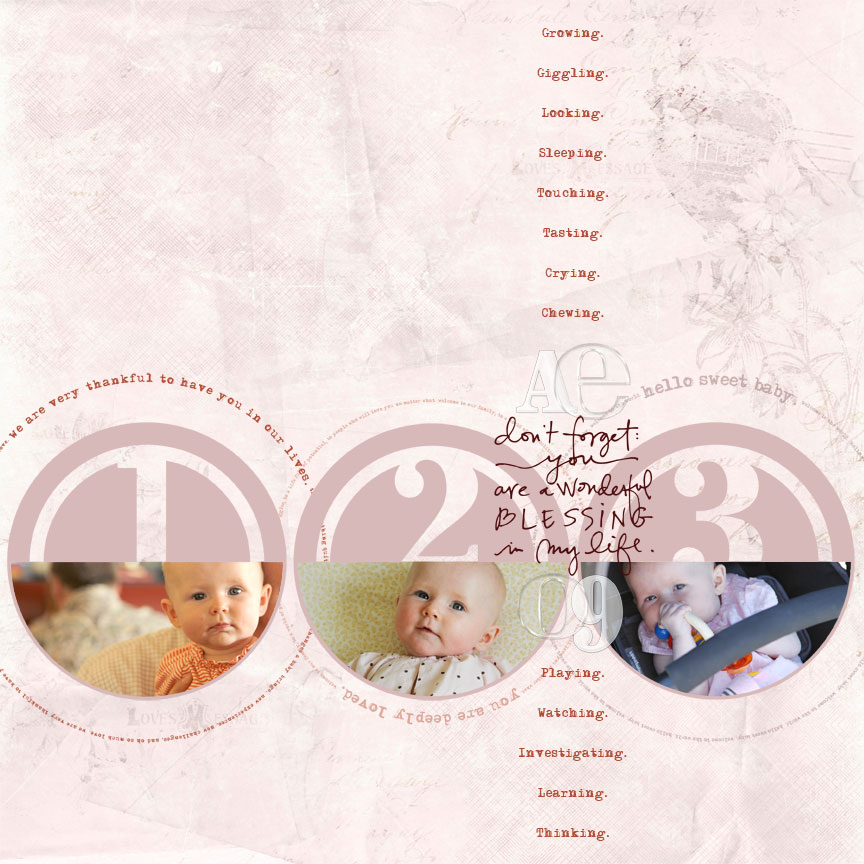
[ click on the image for a larger view ]
Here's a look at the finished layout I showed last week in the Pages In Progress post. I ended up adding some "ing" words describing things she has been doing lately, scaling down the one of the large text circles and adding a third one, and including her initials and the year with acrylic embellishments.
Supplies: Katie Pertiet Letterbox Love; AE Baby 12x12 Text Frames; AE Remember Sentiment Stacks; AE Half-Circle Number Embellishments; Katie Pertiet Acrylic Alphabet; Patti Knox DIY Acrylic Alphabet


Comments
Sign in or sign up to comment.
47 comments
That was a great tutorial and very thorough. Loved that you shared the short cuts. It makes me want to go digital. After reading your blog for 4+ years it was cool to hear your voice.
Replies
Sign in or sign up to reply.
I also can't hear anything. Bummer.
Replies
Sign in or sign up to reply.
Hi Ali,
Love your tutorial. Just a side note: in Photoshop when you're joining the baby img with the half circle, you're basically making a clipping mask (that when you see the circle icon as you drag a layer on to another). A layer mask is slightly different. Beginner PS user tend to mix the two and they get confused when it doesn't work ("I thought I did a mask" is usually what they say), so it would be helpful if you could point out what type of masking you're applying to the image.
Replies
Sign in or sign up to reply.
Thanks for the clarification Abie :)
Replies
Sign in or sign up to reply.
I had to watch Anna crawl over and over, and show it to my husband. She looks like our babies (20 years ago!!!), and we have an Anna also.
I don't know the first thing about Photoshop, but have to learn. What you do is sooo neat! Do you know of a very simple, very beginners (on or off line) class/book??? Thanks. Lisa
Replies
Sign in or sign up to reply.
Awesome article.|
Replies
Sign in or sign up to reply.
Hurrah, that's what I was seeking for, what a stuff!
present here at this website, thanks admin of this web site.
Replies
Sign in or sign up to reply.