December Daily 2010 | Day Five
Tags:
First off I wanted to take a minute to welcome anyone who may be new to my site. I've got a welcome page with a video walk-through that introduces you to some of the different areas I have here and lists popular posts you might be interested in checking out. You can read all about the December Daily project happening right now here. Thanks so much for visiting.
Welcome to Day Five!
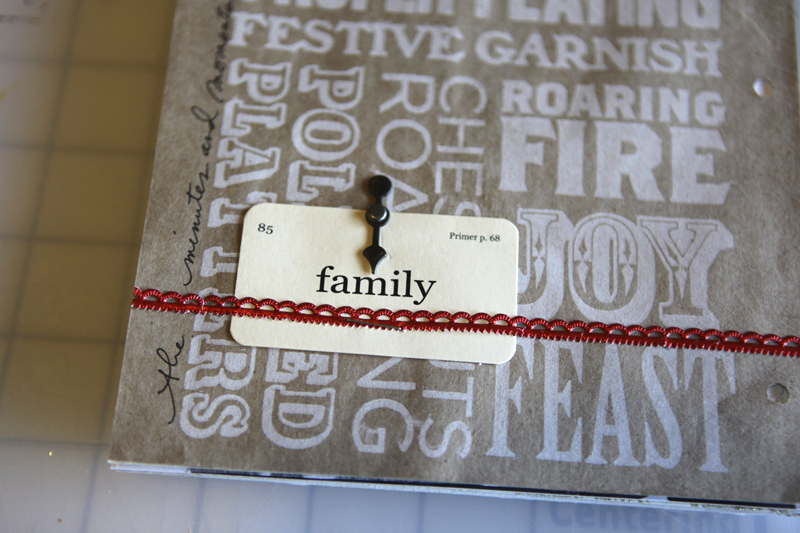
Day Five features a grocery bag from Trader Joe's and a little photo and story about sharing. On top of the grocery bag I added a bit of metallic trim (I'm pretty sure that came from Papier Valise), a mini flash card from CariKraft, and a Tim Holtz game spinner. To adhere the thin red metallic trim I used red line tape - LOVE this stuff.
Here's a little close-up:
And a look at the second page:
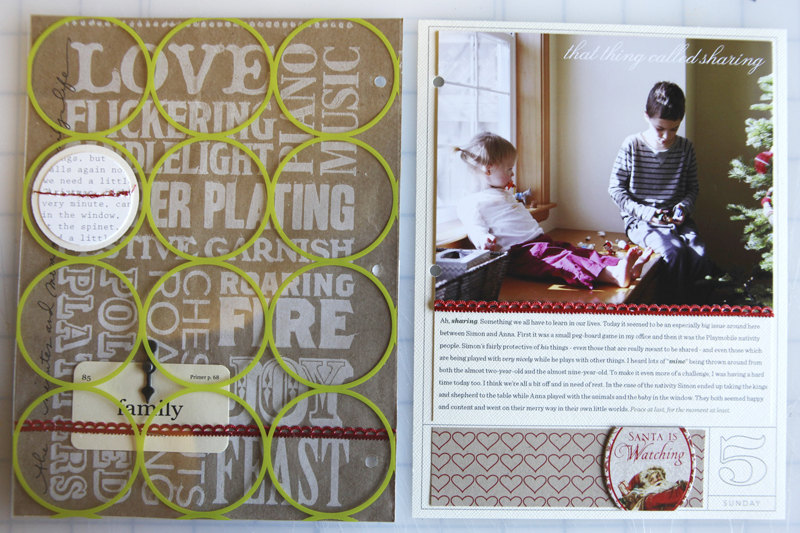
Today's photo for the second page wouldn't fit in a 5.5 x 6.25 crop without losing some of the things I wanted to include (like the side of the tree).
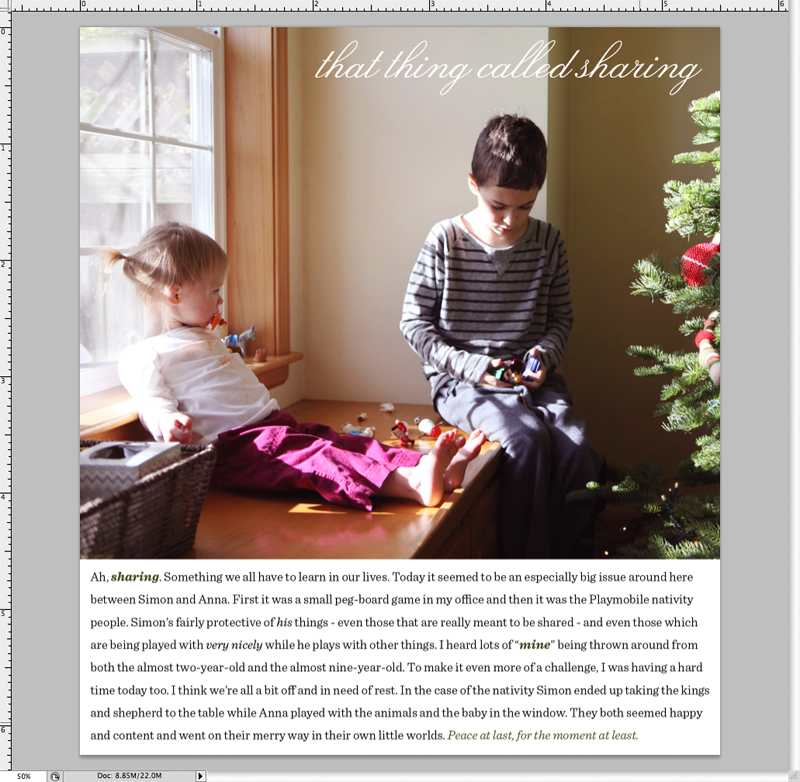
Here's what I did to get around this issue: (1) Re-sized my photo to 5.5 inches wide and let Photoshop resize the height (about 4.5 inches). (2) Changed the canvas size to 5.5 x 6.25 and moved my photo up to the top leaving an area along the bottom for journaling.
Here's a look at my 5.5 inch x 6.25 inch canvas in Photoshop with the title and journaling added:
I knew I wanted the journaling to be on cardstock and the photo on photo paper (rather than printing the whole thing on photo paper - which would have been just fine too).
For printing the photo here at home on photo paper I de-selected all the layers except the photo. For printing the journaling on cardstock I de-selected all the layers except the text. For a more in depth look at turning off layers to print parts of a canvas, including a video tutorial go here.
Here's what the two pages looked like after printing:
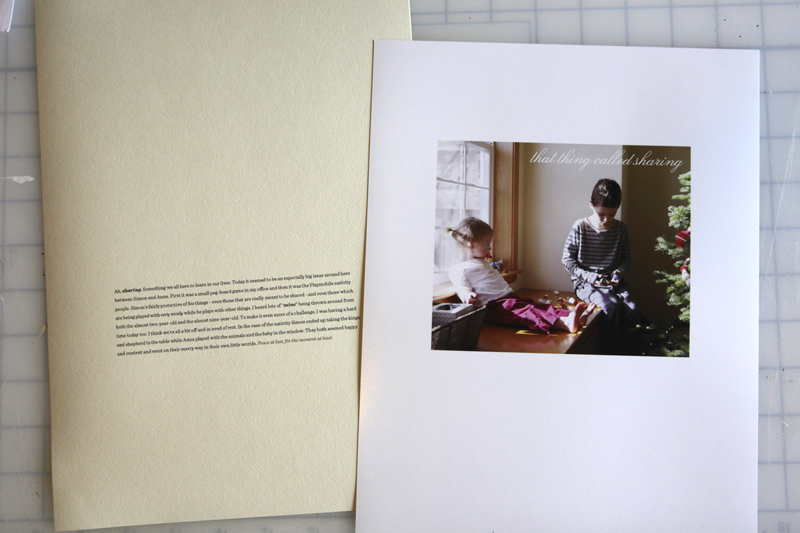
I cut the photo out with my trimmer and then laid it on top of the cardstock journaling. I used the photo as a guide for the width and then cut it out with my trimmer.
The photo and the journaling were adhered to the background dated 6x8 overlay.
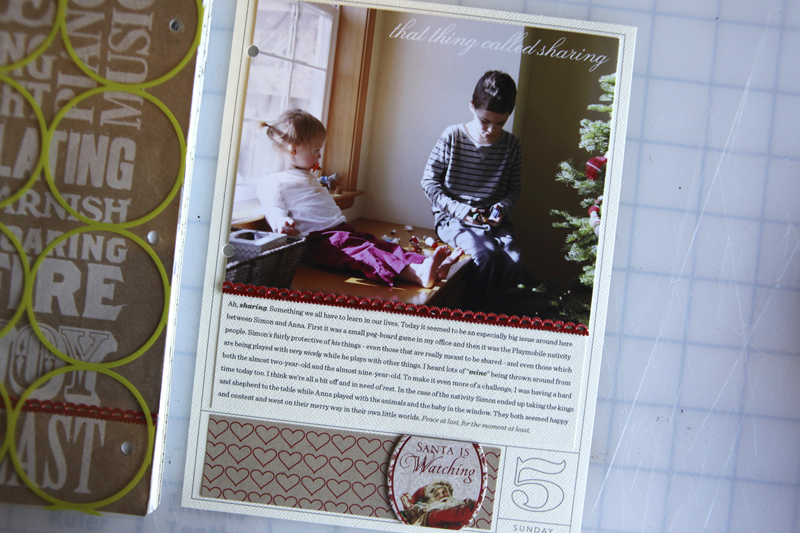
Along the bottom I added Hambly pattern paper and an oval accent from a K&Company chipbox (2009). I trimmed the top and bottom of the oval off to keep it within the box.
Here's a closer look:
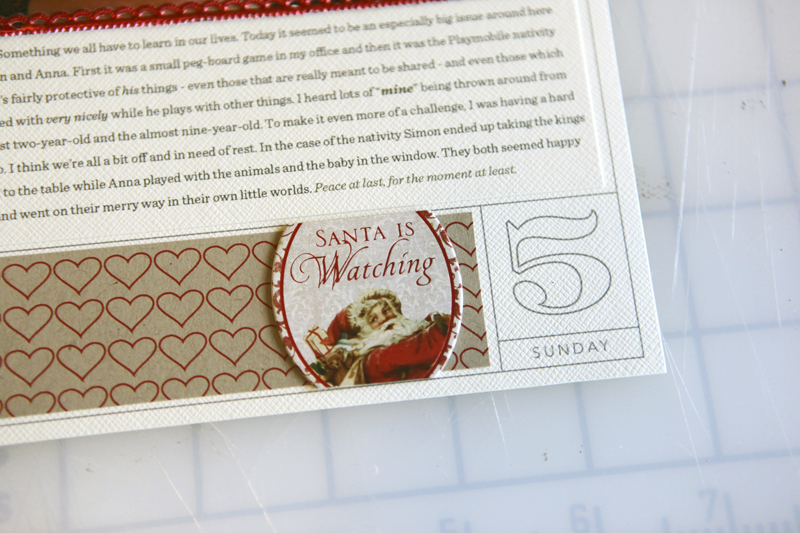
JOURNALING : Ah, sharing. Something we all have to learn in our lives. Today it seemed to be an especially big issue around here between Simon and Anna. First it was a small peg-board game in my office and then it was the Playmobil Nativity people. Simon’s fairly protective of his things - even those that are really meant to be shared - and even those which are being played with very nicely while he plays with other things. I heard lots of “mine” being thrown around from both the almost two-year-old and the almost nine-year-old. To make it even more of a challenge, I was having a hard time today too. I think we’re all a bit off and in need of rest. In the case of the nativity Simon ended up taking the kings and shepherd to the table while Anna played with the animals and the baby in the window. They both seemed happy and content and went on their merry way in their own little worlds. Peace at last, for the moment at least.
SUPPLIES :Every Jot & Tittle Red Number Tags; Hambly Chic Circles Transparent Overlay; Ormolu Christmas Tag (circle-punched); Hambly Red Hearts on Kraft pattern paper; Ali Edwards 2010 December Daily 6x8 overlay; Fonts: Lucia BT and Sentinel; CariKraft Mini Signs of Christmas Flash Cards; Tim Holtz game spinner; red line tape
GENTLE REMINDER & UPDATES
This feels like a good time to remind everyone not to make any judgments about your album (boring, plain, too simple, too complex, etc) at this stage in the process. Remember that the beauty of it is the whole album, not any single page or layout. If there's something you don't love about a particular page than make a change on tomorrow's page (learn from what you feel about the pages you make) rather than spending a bunch of time trying to re-work this one.
6x8 PRINTING UPDATE : I also wanted you to know that Persnickety Prints prints 6x8 images. I've used them before for printing my 12x12 digital pages and they printed my Christmas cards this year. Great service.
FABER-CASTELL METALLIC PEN UPDATE : Come to find out, the metallic pens I've been using on my photos the last couple of days are actually new and will be debuting at CHA. Ask your local retailer to order some or look for them online after the show in January.
QUESTIONS IN THE COMMENTS : I'm trying to keep up with questions I find in the comments. If I happen to miss yours please ask it again.
All posts related to December Daily can be found here.

TODAY'S POST SPONSORED BY :Blog Design Basics for Bloggers
Our video tutorials will teach you how to create & install a custom banner, background, photo frame, signature, post divider, & happy art when you take our {BLOG DESIGN BASICS} class! When you purchase the class you'll get these 6 READY-MADE BLOG KITS & our 5 brand new HOLIDAY BLOG KITS for free, as well as the option to purchase our ADD-ON BLOG KIT for only $20! Also, be sure to check out my BLOG & my SHOP for digital scrapbooking supplies & Kristina's BLOG for lots of inspiration!
SHARE A LINK TO YOUR DAY FIVE
I'd love to have you include a link to your DAY FIVE page here. Please link directly to your post or image on Flickr vs. your general blog link. Thank you! Also - don't feel like you need to leave a comment!


Comments
Sign in or sign up to comment.
119 comments
This linking to the blog thing is super cool Ali, thanks for including it this year. I love looking at all of the pages, and getting inspired. We are all such creative storytellers--I love it!
Replies
Sign in or sign up to reply.
Just purchased the printable 6x8 overlays and am trying to change color in Word but its not working. Followed your tutorial example but only the outer line changes color. Help…using Microsoft Word 2007. Thanks
Replies
Hi SandraL - are these the instructions you are following:
To recolor the lines of the overlay, go to View and select the Formatting Palette (I’m working in Word for Mac 2008). Click the Recolor icon near the top and select More Options at the bottom of the menu to choose a color. Click the color and the overlay should automatically change to that color.
Do you have a formatting palette?
Make sure you are using the "recolor" option rather than the "line fill" option. If you select line fill it will only change the outside color of the entire picture - not the element itself.
Sign in or sign up to reply.
I feel like I'm spending a LOT of time deciding what picture, what story and where and how I want it placed on my page. I probably spend more time doing this than I did making the album in the first place. Anyone else feel this way? It's not for every page but maybe it's just because I'm trying hybrid and I'm a little new at it???
Replies
Hi Christy - I think "choosing" is one of the easiest places people get stuck. This project is a great opportunity to work on making quick choices and trusting your initial instinct and not worrying that it's the "perfect photo" or the "perfect story" for that day. Just pick one and move forward - you can do it!
Sign in or sign up to reply.
Bahahahaha!! The "santa is watching" oval is perfect for this gem of a story!
Replies
Sign in or sign up to reply.
The grocery bag looks so great as part of this layout.
Replies
Sign in or sign up to reply.
Thanks for showing us that an 'ordinary life' day can still fit into the December Daily so nicely. We don't do something Christmas/winter related everyday and that has been a bit of a concern for me - gonna let that one go and just document the day - whether Christmasy or not. Thank you!
Replies
You're welcome - it just happened for us that we did a bunch of holiday related-stuff over those first four days ;).
Sign in or sign up to reply.
How funny that we both used a shopping bag on yesterday's page!
Replies
Sign in or sign up to reply.
love your layout ;-)
Replies
Sign in or sign up to reply.
They have a great role model for sharing--thank you for always being so generous with your time and talent.
Question--what photo printer and paper do you use at home? Your prints always look so much better than what I get out of mine.
Replies
Hi Shelley - I use a HP Photosmart B8550 printer: http://www.amazon.com/gp/product/B001B19XPA?ie=UTF8&tag=aliedwardsdes-20&linkCode=as2&camp=1789&creative=390957&creativeASIN=B001B19XPA. The paper I used is Ilford Gallerie Smooth: http://www.amazon.com/gp/product/B00006I5C3?ie=UTF8&tag=aliedwardsdes-20&linkCode=as2&camp=1789&creative=390957&creativeASIN=B00006I5C3
Sign in or sign up to reply.
Ali-loving keeping up with my DD and seeing yours. Quick question...are you planning on using a photo everyday? I love that you have little ones that give you tons of chances to photograph them...it's just me and my husband so no 'kiddish' things to photo or story tell about. OH and I LOVE that you are giving us permission to let go of perfection...sometimes we need to hear that:)
Replies
Hi Holly - in past year's I've always had a few pages without photos. Here's links to a few of those:
Write a letter: http://aliedwards.com/2009/12/december-daily-2009-day-three.html
Include a catalog image: http://aliedwards.com/2008/12/december-daily-day-3-part-two.html
Other ideas: talk about your favorite Christmas memory...or just talk about what you did that day...or what you are hoping for this year...talk about how your life is different now vs. when you were a kid...
Any story about you right now is an important peek into your world :).
Sign in or sign up to reply.
Oh man, I thought I was being so creative using the Trader Joe's bag. When I saw it I thought it would be so perfect and immediately cut it out and added it to my stack of dd pages!! For some reason had the feeling you would be including it in your book at some point. =} Gotta Love TJ's!!!
Replies
Sign in or sign up to reply.
I simply adore that photo!
I think I need to go for a long drive to Trader Joe's for a shopping bag :)
Thank you for the inspiration & nudge to keep going!
Replies
Sign in or sign up to reply.
Great story about siblings! I will have to see if I can get a story like this with my daughter and her cousin who are usually at odds over the toys at Grandma's house. I was wondering if there are any items at Designer Ditgital's for 30 days, instead of 25 and 31? Thanks Ali!
Replies
Sign in or sign up to reply.
That is so awesome that you cut out the grocery bag! I did the exact same thing and when I did, I thought "I bet Ali would love to add this to her December daily, its the perfect size." Aren't they awesome bags this year? I also cut out all those cute snowflakes to use as embellishments.
Replies
Sign in or sign up to reply.
Loving watching this book develop! As I work on my pages each day, my biggest challenge is how to limit the number of photos to include. How do you feel about the photos and stories that aren't told every day? Do you have plans to use the other photos you take every day in any other way in the future? I'm just getting back into memory-keeping and I can see how getting more experience with story-telling and mini-books will help shift my focus. But right now...it's hard to let them go.
Replies
Sign in or sign up to reply.
Ali....I'm always in awe.
I'm lagging a bit in my "assembly". I'm 100% successful in picture taking...count 385 this weekend. That's where I struggle. Too many options and how do I narrow it down...which ones tell the "story". I'm trying not to get frustrated. And I've watched your videos many times, but seem to spend too much time playing in PSE. I know by the 25th I'll be better, but right now in the assembly part.
Replies
Also...your twitter link to the DD Vol. 1, can they be adjusted ti 6x8?
I sent you a tweet back on this one but I'll answer it here too. It can be done, but it would be a lot more work that it's worth I think!
Thanks, sorry about the double ask.
Sign in or sign up to reply.
Thanks for the gentle reminder Ali! I think you read my mind last night :) I was just thinking that I really didn't like the way my DD day 5 turned out. After staring at it and wishing I could change it, I just let it go. I know I will love it. Your pages are awesome as always!
Replies
Sign in or sign up to reply.
Just an FYI... you can find the Metallic Pens (FABER-CASTELL)in gold and silver at Michael's in the fine arts section. No other colors though. I think you can get them on-line there too.
They also have a huge selection of the Sharpie Paint Pens now too. They are up by the register when you leave. They are new at my Michael's. I know that you like them too. Just thought I would share for those who are looking for some good pens to use on the photos.
Replies
Good to know Mandee - must just be the colored metallic set that is not yet available (at least that's what the marketing rep says :)). And also good to know about the poster paint pens - love those!
Sign in or sign up to reply.
I am loving everything about this process! Thank you for sharing everything about the process. :-)
Replies
Sign in or sign up to reply.
[...] This post was mentioned on Twitter by Ali Edwards, Josephina Mydreama. Josephina Mydreama said: December Daily 2010 | Day Five: First off I wanted to take a minute to welcome anyone who may… http://goo.gl/fb/rnkRX [...]
Replies
Sign in or sign up to reply.