12x12 Photo Background | Digital Scrapbook Layout
Tags: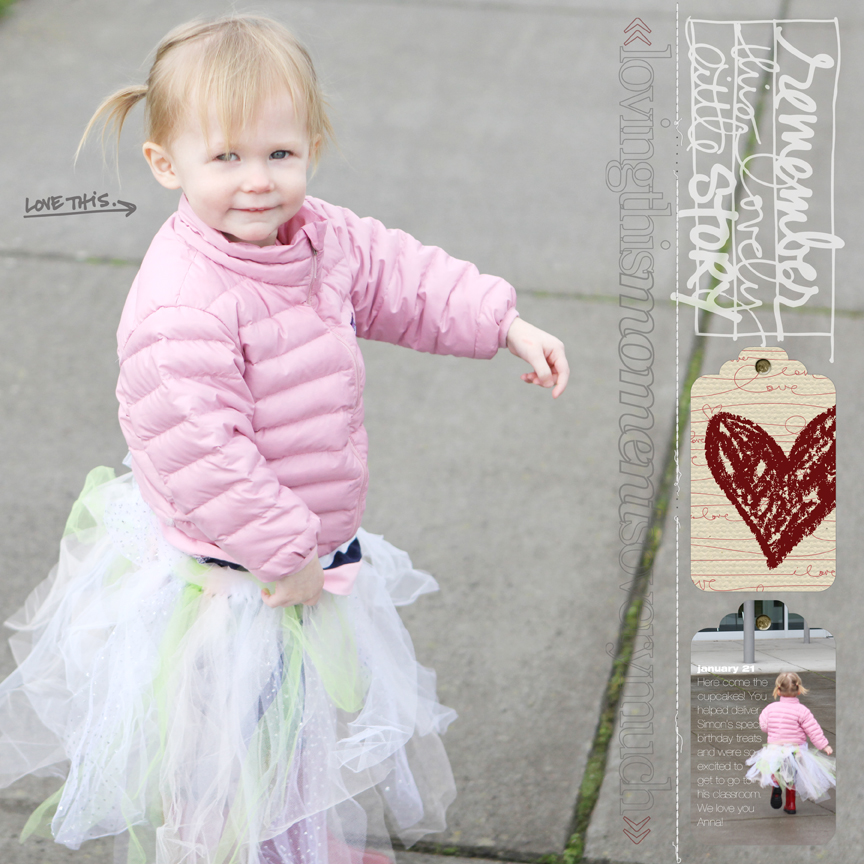
Click to view larger.
A couple ideas to consider:
1. Use a photo to fill your entire background. I've done this a few times in the past and I love it. Here's another recent one that's a traditional paper scrapbook layout (includes a how-to) which could be easily translated to digital.
2. Take an element, such as a tag, and mask a photo inside. The lower tag shown in the layout above is simply one of the Awakening Tags with a photo masked into it.
3. Add elements on top of other elements to create something new. I masked the crayon-drawn heart onto the middle tag to create a new design.
4. Using the eye-dropper tool take color from your photo and then repeat it two more times. I took a red color from Anna's boots in the bottom photo tag and recolored the crayon-drawn heart and the arrows on the long vertical word art.
5. Erase stuff to make it work. I erased the bottom portion of one of the journal blocks from my Story HandDrawn package because I just wanted to use just the word art. Don't be afraid to erase (make friends with saving and with undoing). Also don't forget that you can rotate things. I rotated the "remember this lovely little story" and adjusted it to be the same width as the tags so that they create a nice straight column along the right side.
6. Sometimes the story is short. Hooray! I added just a bit of journaling onto the masked photo tag that references the date, place and why we were there.
SUPPLIES
TAGS | AE Awakening Tag Collection
WORD ART | AE This One (coming this weekend), AE Outline Moments, AE For The Love Of Love, AE Story HandDrawn Journal Blocks
STITCHING | Anna Aspnes StraightLine Stitched White No.2Interested in getting started with digital scrapbooking or learning more about using your computer for telling your stories? Check out my list of posts and video tutorials on my Getting Started With Digital Scrapbooking page. All video tutorials can also be found in my Video Tutorial category archive or check them all out together on my Vimeo channel.


Comments
Sign in or sign up to comment.
42 comments
Ali, I'm curious. When you take a photo like this, are you mindful of the open space that will allow you to do a full page photo layout with journalling, or is it a happy thing you notice later. I have been wanting to try journalling on a photo, but there is rarely a space to do so. Most often this is due to the stuff in my house. But I think maybe I need to start watching for scrappable spaces in addition to moments to remember.
Replies
Not in the case of this photo, but I do often think about it. I will purposefully move the lens so that the focal point of my photo is to the left or the right - not always with the intent that I will use that space for journaling but just because I like the positioning of my subject to one side or the other.
Sign in or sign up to reply.
Oh my goodness! Anna is adorable in that tutu!! I love this layout. I have yet to do an all digital layout, but I will say you make it seem so easy!
I have a printer question. I have the HP Photosmart B8550 (I think you have the same or similar). I'm noticing that when I print a 6 x 4 photo (or any size photo, for that matter) and I choose to print "borderless" it sort of cuts off or zooms in on my photo. It doesn't look that way in the print preview.
I especially noticed this just now when I tried to print a photo with one of your overlays. It cut off part of the overlay.
So the questions are: Is there a way to prevent this? Am I doing something wrong? Does this happen to you?
I hope you can shed some light on this for me.
Thanks so much! ~Jen
Replies
Hi Jennifer, I'm using the same printer, HP B8550 and just printed a 12x12 borderless scrapbook page. I noticed that it does in fact enlarge the entire image a bit. My text near the edge of the page was printed to close and I noticed that the photos were cropped in at edges also. This does not happen when I'm printing normal pages/elements and I think it has something to do with the way the printer handles 'borderless' printing.
You may want to try adding a 'gutter' around the page. This can be done in photoshop by going to image, canvas size, and then make your page a bit bigger, maybe 12.10 x 12.10 inches. Then when the printer crops or zooms in, you will still get your entire original image on the 12"x12" print. You may need to play around a bit with the sizing until you figure out how much the printer is zooming in. I typically resize any of my 12x12 scrapbook pages before sending them to the lab for printing so as to not loose any of the page around the edges when the print is made.
Hope this helps some with your printer problem.
Hi Jennifer - my guess is that it has something to do with the printer settings. Are you using Photoshop Elements? Try playing with checking or unchecking "Scale To Fit Media" in the print dialog box.
Thank you so much Ali and Susie! This definitely helps. I appreciate it. Hope you're having a great weekend. ~Jen
Sign in or sign up to reply.
I adore Anna's style - you can't go wrong with boots and a tutu in my opinion :) Just too cute for words !!!
Replies
Sign in or sign up to reply.
Great tips! I have been learning so much PSE from you lately, mostly from Y & T...thank you! I feel like these lessons are helping me so much with the memory keeping processes. And it's fun! Thanks, Ali P.S. That skirt is FABULOUS! :) Love it...
Replies
Sign in or sign up to reply.
So lovely. I need to remember to do this more. And to use photo overlays more. I love them.
Replies
Sign in or sign up to reply.
So lovely!
Replies
Sign in or sign up to reply.
Another fabulous layout Ali, I just love it. Your little girl is growing up so fast... she is going to be a beauty! :) Also thanks for writing about the customizations you made to the digital products as you were creating this layout. I work so much with paper that sometimes I forget about the flexibility of digital products. :)
Replies
Sign in or sign up to reply.
[...] 12×12 Photo Background | Digital Scrapbook Layout (aliedwards.com) [...]
Replies
Sign in or sign up to reply.
I just love the look of the photo filling the entire page!
Your digi stuff is my favorite...my pages don't seem complete unless they have at least one AE thing on them :)
Replies
Sign in or sign up to reply.
[...] It might have been sparked by that digital layered template book I created a few months back. You can check that out here: Love You Because Layered Template Book. Here’s another recent layout with a full 12×12 photo background. [...]
Replies
Sign in or sign up to reply.
[...] 12Г—12 Photo Background | Digital Scrapbook Layout | Ali Edwards Mar 12, 2011 … 12Г—12 Photo Background | Digital Scrapbook Layout. Click to view larger. A couple ideas to consider: … [...]
Replies
Sign in or sign up to reply.