You Are Magic | Featuring The Silhouette + Heat Transfer Starter Kit
Tags: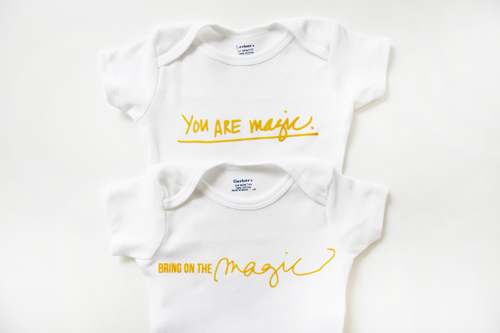
A few weeks ago Katie had the awesome idea to test out the heat transfer capabilities of the Silhouette on some onsies for our friend Elise who will be welcoming her baby girl anytime now.
She watched this tutorial from Silhouette to learn the process of cutting the heat transfer material and ended up having the best luck with the flocked transfer material (see the results above).
For the design she used two of the PNG files from my Hello Magic Brushes and Stamps set:
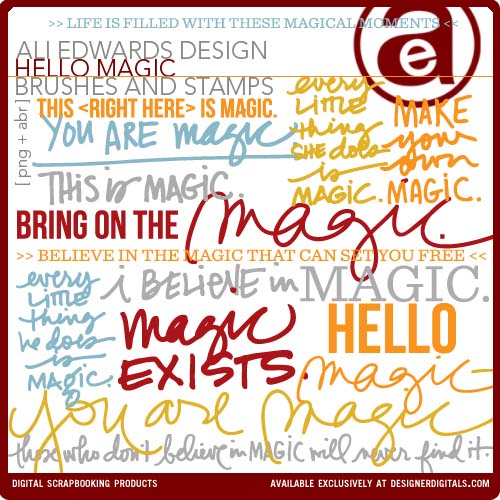
We love how they turned out! Such a cool way to use this machine that we already love for paper crafting!
Silhouette is also currently running a promotion on their heat transfer materials bundled with either a Cameo or Portrait machine.
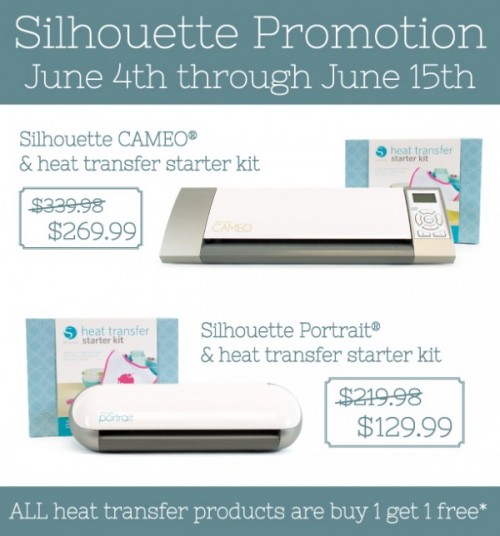
SPECIAL OFFER | Silhouette is running a special promotion on both CAMEO®, Portrait™, and the heat transfer starter kit through June 15th. To qualify for the special pricing below click hereand use the code EDWARDS (purchase must be made through the "click here" link and the code used to qualify).
Silhouette CAMEO® and heat transfer starter kit: $269.99
Silhouette Portrait™ and heat transfer starter kit: $129.99
Click here to order. You must enter the code "EDWARDS" at the checkout to receive these special promotion prices.
The Silhouette Portrait™ is an electronic cutting tool for personal use. Like a home printer, it plugs into your PC or Mac® with a simple USB cable. However, instead of printing it uses a small blade to cut paper, cardstock, vinyl, fabric and more up to 8″ wide and 10 feet long. The machine also has the ability to register and cut printed materials.
CONNECT WITH SILHOUETTE |Blog | Pinterest
Here are some tutorials I have done using the Silhouette Studio® Software:
Using PNG files with Silhouette Studio® Software
Tracing and welding PNG files with the Silhouette Studio® Software
Tracing my For The Love Of Days Journal Cards with Silhouette Studio® Software
Here are a few of my favorite projects I've created for Project Life using the Silhouette Cameo®:
Cutting out and using my For The Love Of Days Journal Cards to document our daily happenings of our Disneyland Trip in Project Life
Cutting a quote out using The Silhouette Cameo® + Vellum for Project Life
Using The Silhouette Cameo® + American Crafts POW! Glitter Paper to add a little something extra to my Heart Life 3x4 Boxes in Project Life.


Comments
Sign in or sign up to comment.
11 comments
I love that you not only show how to do the project, but you give the links to other projects with similar processes (which is very helpful for someone like me who recently got a Cameo and would love to learn more!) Thanks so much for all you share, Ali and Katie!
Replies
Sign in or sign up to reply.
These are AWESOME!!! Now I'm wishing I had a Silhouette!! My niece is expecting twins in Sept and I'm throwing a baby shower for her. These would make excellent decorations as well as gifts. Decorate onsies with the theme and hang on some matching bakers twine, with cute little clothes pins!
Replies
Sign in or sign up to reply.
what a great idea! elise is going to LOVE these.
Replies
Sign in or sign up to reply.
Really Really thank you for your information & the code!
Maybe I'll order 'portrait' right away^^; and should study this machine using tutorials above.
Replies
Sign in or sign up to reply.
Totally cracking up because I have some onesies and t-shirts on MY worktable right now that I'm doing the same thing to for a friend that just had a baby! Great minds! Amazing results you got with the really fine text.
Replies
Sign in or sign up to reply.
Thank you, Silhouette and Ali! Just placed an order and am looking forward to creating some cool and cute t-shirts my youngest nieces and nephews!
Replies
I bought the Cameo about 18 months (or longer!) ago and then got the Portrait when you did the Silhouette and adhesive package giveaway a few months ago! Haven't done much with either machine YET...need to finally get my craft room organized and all my stuff out the boxes from my move (11 months ago!). :)
Oh you will love it - awesome machine!
Sign in or sign up to reply.
So cool! Thanks for sharing!
Replies
Sign in or sign up to reply.
The onesies turned out so cute.........LOVE my Silhouette Cameo!!
Replies
Sign in or sign up to reply.
Elise will love those for her baby girl......
Replies
Sign in or sign up to reply.