December Daily® 2017 | Day 06
Tags: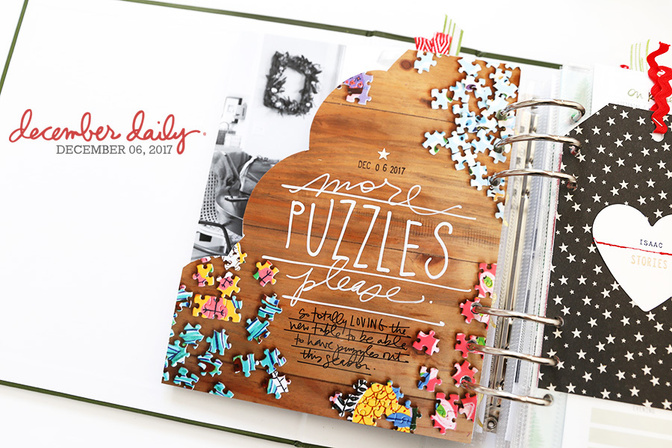
Welcome to December Daily® 2017 | Day 06.
I've been super excited for Day 6 to come up so I could do something with and assign a story to the page I made for the December Daily® Product Play Workshop (you are still welcome to join here and get immediate access to all the content).
Here's a look at what Day 06 looked like when I put together my foundation pages:
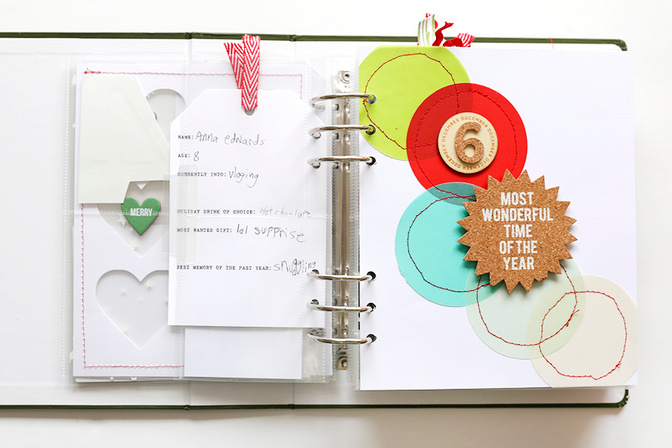
As I considered different ideas for what to do with this page initially I thought about adding journaling in the top left corner with the white space or adding circle photos or something along those lines. In the end I decided I wanted to be "risky" and cut off the top left area by following the outer shape of the circles and add a photo to the back.
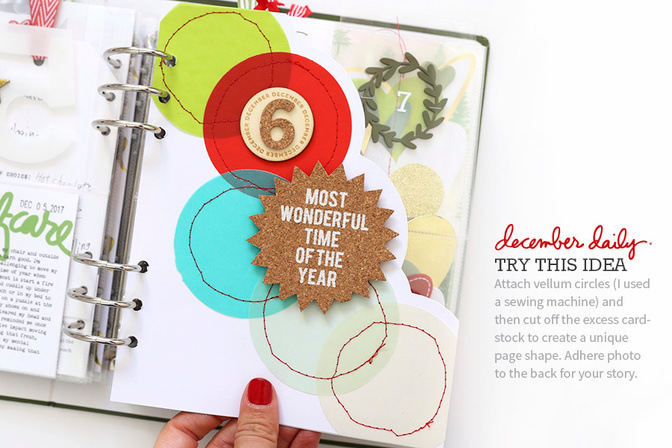
To achieve this look I used a pencil to first lightly draw lines around the circles to make cutting them out with scissors easier. I adhered the photo to the back before cutting so that it all happened at one time.
I totally love how this turned out! Such a fun way to create a different page shape.
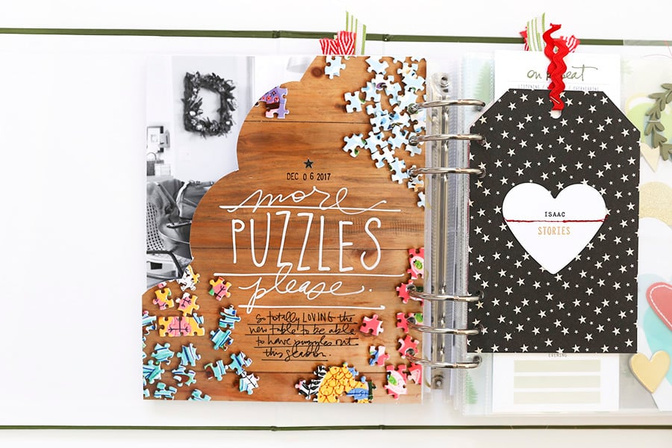
The story I wanted to tell was about how happy I am to have a second table for eating + playing + gathering + puzzle building in our downstairs living area. I took photos of the puzzle I have currently in progress which is one from eeboo called Peacock Garden (this is my favorite brand of puzzle) and did it with the intent that I would have space available within the photo to add a story.
At first I considered typing a story to go in that space but then once I decided that I was going to cut the page to mimic those circles on the other side I decided to just handwrite some journaling using a combination of white and black pens. In the video you can see how I traced the shape of my page and tested out my hand-drawn title before actually writing on my photo. I also tested my pens on a portion of the photo paper that was cut off to make sure they worked with the paper.
The white pens I used include a Sharpie Poster Paint Pen and a thick POSCA white pen. The black pen I used is one of my Precision Pens. The photo paper I used is Epson Premium Glossy Photo Paper. You can read more about white pens that I tested earlier this year here.
DAY 06 | VIDEO OVERVIEW
SUPPLIES
December Daily® Main Kit 2017
Printer: Canon Pixma MG7720 (edited and cropped to size in Photoshop)
White Pens: POSCA, Sharpie Poster Paint Pen
Brother Sewing Machine (XL2600i)
SHARING FOR 2017
This year I'd love to invite you to leave a link in the comment section if you'd like to share your daily pages. As usual, please include a direct link to your blog post vs. a general blog address link.
For more inspiration on working with products for this project, check out my December Daily® Product Play workshop - registration is still open with immediate access to all the content.


Comments
Sign in or sign up to comment.
30 comments
Love this! Not sure if I am brave enough to try it! :)
Replies to christyj
Sign in or sign up to reply.
My mom and I worked that puzzle at our lake house this summer - it was so so pretty that we didn’t want to take it apart for the next one! Enjoy!
Replies to petaline
Sign in or sign up to reply.
so cute! I have been wanting to buy a puzzle but I am overthinking it and I can't decide on one to do!
Replies to NancyCarey
Sign in or sign up to reply.
Very Cool! Simple with fun impact. I appreciate being able to "scrap lift" Have a wonderful day. Jill B
Replies to jkbroyles
Sign in or sign up to reply.
As always... love, love it! I wish I liked my handwriting enough to incorporate within our families albums. Besides the majority of people always comment how fancy and the inability to read my writing.
Replies to Paper_Inkpressions
Just write! I love looking at past handwriting of my family members or even people I don't know.... it makes it so personal and I feel shows so much more love looking at it, like Christmas cards I've saved. I wish I had more pieces of my Grandparents handwriting
Sign in or sign up to reply.
Cool idea! I would've been sweating as I was cutting those pages. 😂😂😂
Replies to StephanieHokenson
Sign in or sign up to reply.
This turned out so cute!! I love that awesome shape cutout.
http://avinashhecker.blogspot.com/2017/12/december-daily-day-5-holiday-cheer.html
Replies to nirupama01
Sign in or sign up to reply.
Oh I love this one! My in-laws always have a puzzle in progress on one of their tables. Here is my page: https://www.instagram.com/p/BcZ2JhYHv-I/?taken-by=littlethingsbigdays
Replies to SusanB
Sign in or sign up to reply.
Really love this! My only question . . . how do you keep your cats away from the puzzles? I used to love doing jigsaw puzzles, especially during the holidays, but I can't keep my cat's from batting pieces on the floor and ending up with missing pieces at the end of the process!
Replies to terriporter
Hi! They haven't shown any interest - they are usually just sleeping on the couch - ha.
Sign in or sign up to reply.
I love this idea! Here is my page: https://marie-pierresavard.blogspot.ca/2017/12/dd-2017-6-decembre.html
Replies to Pepierre
Sign in or sign up to reply.
I loved how you created a different shape page. I love that in my album. Thanks for inspiring me today and all year long. I love jigsaw puzzles. I normally do springbok puzzles. Why do you like the eeboo puzzles? Is it the design or do you like the quality of the puzzle pieces? I'm thinking of trying this brand. Thanks for your input. :)
Replies to Untiedt
I really love the illustrations - I have a few of them and I love the way they all look. Nothing to do with the actual puzzle quality - totally about the illustrations.
Sign in or sign up to reply.
Completely not DD, but man Ali, your red manicure is rocking! I noticed a few days ago and watching your daily videos it looks great (and shiny) all these days later. I'm assuming it is a gel manicure? Any tips to keep it looking great!
Replies to loripsm121
Hi! Yes, it's gel :). No tips really - she did three coats of this particular color last time so it feels extra solid.
Thanks Ali! Must be that third coat. With the busyness of life, I've fallen out of the regular manicure routine. Just do a coat myself if I need it.
Sign in or sign up to reply.
I am looking at getting a photo printer and have noted the two you most frequently use - the Cannon MG7720 and Epson PictureMate 400. (I currently get pictures printed every week for Project Life and would love to not have to go to the store!) Which one would you say prints the best quality photos? I would mostly be needing it for Project Life photos. I follow you blog and absolutely love your style!! Thank you so much for your help!
Replies to katiembolton
If you are printing mainly for PL and don't want anything bigger than 5x7 then definitely go with the PictureMate. I use it for all my PL printing. Love it.
Thank you so much for your help!!
Sign in or sign up to reply.
So far feeling good that I am keeping up with December Daily. Here is my day 6 http://www.petracorcoran.com/december-daily-2017-day-7/
Replies to petrac
Sign in or sign up to reply.
This is making me want to break out the puzzles!
My Day 6 is simple and uses the DD kit + the Give Story Kit to document how my family is going about our long gift list this year. https://instagram.com/p/BcaxkVVgtMT/
Replies to thenerdnest
Sign in or sign up to reply.
This is my favorite page of yours so far! Love it!
Replies to itcouldbelove
Thank you!
Sign in or sign up to reply.
http://scrapinspired.com/2017/12/december-daily-2017-day-4-7/
Replies to smbradford
Sign in or sign up to reply.
And here is day 6: Celebrating St. Nikolaus, a story different to what I planned, but sometimes they write themselves and these are always the best stories! :D
http://smartiswelten.blogspot.com/2017/12/december-daily-day-6-eng.html
Replies to Smartis86
Sign in or sign up to reply.
Got my hubby working on puzzles this last year...he was spending to much of his retirement time on the computer...so this December a trip to Hobby Lobby for some Christmas theme puzzles has worked out great. He's adding to the decor. Love this page. I did a 3x8 page about his puzzle.
Replies to bsantee
Sign in or sign up to reply.
I love the white handwriting on the photo! I need to buy me some good white paint pens. Blogged here: http://rockermorsan.blogspot.se/2017/12/december-daily-days-5-8.html
Replies to Rockermorsan
Sign in or sign up to reply.