3 Things : playing with printing + a giveaway
Tags: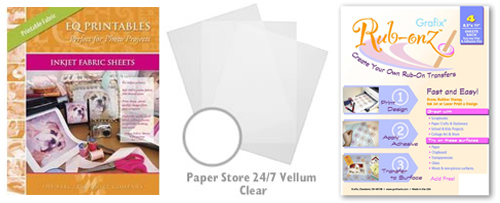
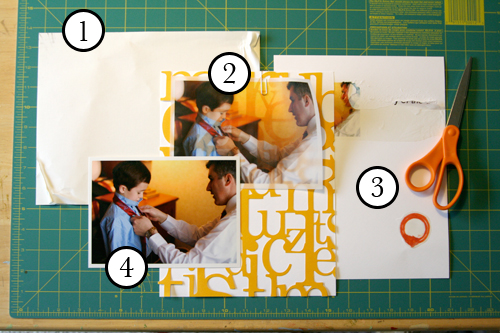
Staying in the theme of words + photos this week I wanted to experiment with a couple different inkjet printing surfaces. I took that photo of Chris & Simon and the tie and printed it on each of the following using my HP Photosmart D7360
[ Warning : any of my experiences below could very well be operator error. ]
WorldWin Inkjet Printable Translucent Vellum : Quick and easy. Great result. See sample below. It's been awhile since I last used vellum and it was fun to reintroduce it into my supplies. Definitely want to play with it more: thinking about layering with transparencies and text and photos.
EQ Printables Peel & Stick Fabric Sheets
Grafix Rub Onz - Create your own rub ons. Super cool idea. I wanted to see if this would work with a photo + some words...and at least in my case it was a challenge. This is a multi-step process that includes printing, then placing adhesive paper on top, and then adhering your image to final paper. The real challenge is getting the adhesive paper onto your image without bubbles. The second challenge is in the choice of the paper you rub on to. I tried it on textured cardstock and it didn't seem to work - it just tore the paper. I will probably try this whole process again to see if I can make it work.
[1]
EQ Printables Peel & Stick Fabric Sheets

And now, the giveaway:
3 readers will receive the following from The Papermill Store/Worldwin:
• 1 pack 27 lb WorldWin Inkjet Printable Translucent Vellum
• 1 pack 40 lb WorldWin Inkjet Printable Translucent Vellum
• 1 pack 12x12 WorldWin Doublemates Cardstock
• 1 pack 12x12 WorldWin Rouche Cardstock
For more information on The Papermill Store/WorldWin, check out their blog here.
For a chance to win this selection of papers leave a comment below with your favorite photo tip or what you want to work related to taking photos. Winners will be drawn tomorrow at 5pm Pacific.
Don't miss today's words + photos post below.


Comments
Sign in or sign up to comment.
780 comments
My photo tip is once you have all your pictures saved to your pc....make sure you back up your files. Even better, back them up in 2 different ways (external hard drive and maybe an online photo place like scrapbookpictures.com or shutterfly).
What I am would like to work on is taking better candid shots and learning to take better pictures in low lighting (like an auditorium or dusk shots).
Love your blog...very cool ideas and advice that you come up with!
Replies
Sign in or sign up to reply.
My own tip is to remember to keep your batteries charged for your camera....can't take a picture is your camera won't work...good or bad pics....
Replies
Sign in or sign up to reply.
Ali -
I love the idea behind this week's posts (even though I just bought lots of embellishments at hobby lobby's scrapbooking sale).
The photo tip I would recommend (somethign I've gotten into recently) is cross-processing of my digital photos in Photoshop. I love how this turns out with film and have loved figuring out techniques to get these same effects in Photoshop on my digital files. Below is a cool link that makes this process super-easy:
http://www.layersmagazine.com/curvy-cross-processing.html
I love your giveaways.
Replies
Sign in or sign up to reply.
I couldn't find any ready to go printable fabric in New Zealand stores, so I bought some freezer paper (you know the stuff with wax on one side) and ironed some white cotton onto it, then feed it through the printer which worked a treat as long as I did it straight away and the fabric piece was smaller than the freezer paper going through, so the printer grabbed the paper not the fabric first ... love love coming to your blog each day and trying new things ... thank you, thank you, thank you :)
Replies
Sign in or sign up to reply.
I'm loving your words + photos posts -- cool stuff! I just tried printing a photo that I took in color but turned b + w and then tinted blue in Photoshop onto June Tailor colorfast printer sheets (http://www.softexpressions.com/Merchant2/merchant.mv?Screen=PROD&Store_Code=CQMEASE&Product_Code=bj05a&Category_Code=5b) and it worked beautifully. I'm planning to use it for a ringbearer's pillow.
Replies
Sign in or sign up to reply.
Ali, loved today's post! Makes me want to go and take pictures right now! My favorite tip is regarding the flash--to turn it off. I have read Life Artist and A Designer's Eye for Scrapbooking and I think what draws me to your photos is how natural they all look. I feel as if I'm there with you and your family. And I really think it's because of the natural lighting in the photos.
What I need to work on: Two things! 1) Not obsessing about the "perfect" photo and 2) Capturing more everyday life pictures.
Thanks for all the tips!
Replies
Sign in or sign up to reply.
Would love to win this set!
My best photo tip:
when you see a very rare and special moment that you just HAVE to capture with your camera, just fire away one shot as quickly as you can without worrying about checking all the settings. Once you have taken that first picture, then quickly look over the settings (white balance, aperture, shutter speed, ISO, etc...) and shoot again. Also, don't bother zooming in - you can always crop the image later. The most important is not to miss the important moment. I am certain you'll be happy that you have a slightly faulty photo instead of no photo at all.
Replies
Sign in or sign up to reply.
I am really embarrassed that I haven't figured out how to use our digital camera! It just intimidates me for some reason! I snap lots of pictures with a disposable camera. I think my best photography tip is that i read cool photographers blogs (yours, tara's, and kc's) so when my dream comes true (hubby buys me a rebel) i'll know what to do! i also am obsessed with my old photos, polaroids, my grandma's pics, and i scrap the heck out of them! No one was looking at them in a dusty box, but now they are in beautiful albums & minis.....thx ali, happy tuesday!
Replies
Sign in or sign up to reply.
I want to capture more everyday moments - the little, unscripted events in my life. So that is my photography 'goal'.
I'm lovin this new series of yours!!
Replies
Sign in or sign up to reply.
I want to capture more everyday moments - the little, unscripted events in my life. So that is my photography 'goal'.
I'm lovin this new series of yours!!
Replies
Sign in or sign up to reply.
I almost bought a package of that make-your-own rub-on stuff this weekend - it looked really cool. I will wait to see if someone else has got it to work - maybe there's a trick to it! My favorite special photo treatment is to print on textured cardstock - not original, I know - but super cool effect!
Replies
Sign in or sign up to reply.
my tip: have a digital camera (of course), take *lots* of photos, delete &/or crop.
thanks for all the inspiration.
Replies
Sign in or sign up to reply.
My tips are on my blog, I just did a big post about it, but two of the big ones are turn OFF the flash, and auto ISO. :)
I want to work on the ruthless deletion! Also I'm trying out shooting in RAW, and need a lot of work, but that's more an editing thing....
Replies
Sign in or sign up to reply.
ok I can't throw away photos, and I shoot in raw format a lot so you can imagine how much room they take up. I know I don't NEED them all but I WANT them all. I do now delete the really bad ones but now with things like soccer games I want every photo, I could actually make an animation they are so in sequence
Replies
Sign in or sign up to reply.
I want my photos to be natural and not just in events, about the paper fabric I use colorfast form june taylor and works great.Thanks
Replies
Sign in or sign up to reply.
I am not much of a photographer, so my photo tip is always check and make sure you have removed the lens cap before taking photos...what can I say?
Thanks!
Replies
Sign in or sign up to reply.
It seems (in my life anyway) that there are always more "not so great" pictures compared to "really great" pictures. So my tip is to keep working and learning to improve your picture taking skills...in the mean time...keep using the not so perfect pictures to tell the story of your life and the lives of those your love. Embrace imperfection...hummmm...wonder where it heard that! :)
Replies
Sign in or sign up to reply.
Hi Ali, I need to work on exposure. I think that is the key to getting great shots.
Replies
Sign in or sign up to reply.
I've recently been inspired to print my photos with white borders. It adds a lot to my scrapbook pages without actually having to do anything to them.
What I'd like to work on with my photos is deleting! I take so many photos and try to use them all when I don't NEED to in order to tell my story. My goal is to at least HALF my photos. Obviously I'd like to do more... but it is at least a starting point :-)
--Maggie
Poulsbo, WA
Replies
Sign in or sign up to reply.
My tip: take lots of photos! It gives you lots to choose from and helps you learn.
What I want to learn: Photoshop!! (guess that'll take a while)
Replies
Sign in or sign up to reply.