3 Things : playing with printing + a giveaway
Tags: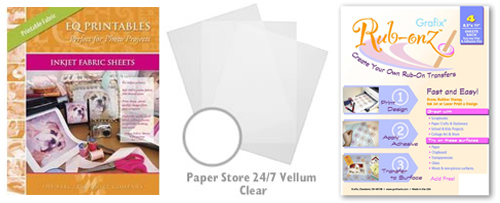
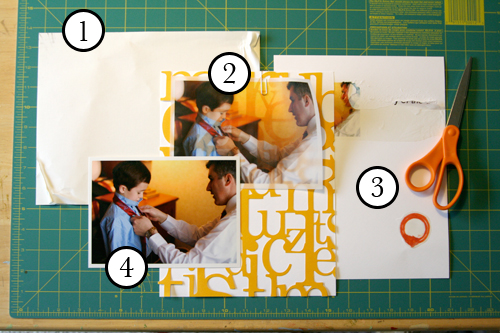
Staying in the theme of words + photos this week I wanted to experiment with a couple different inkjet printing surfaces. I took that photo of Chris & Simon and the tie and printed it on each of the following using my HP Photosmart D7360
[ Warning : any of my experiences below could very well be operator error. ]
WorldWin Inkjet Printable Translucent Vellum : Quick and easy. Great result. See sample below. It's been awhile since I last used vellum and it was fun to reintroduce it into my supplies. Definitely want to play with it more: thinking about layering with transparencies and text and photos.
EQ Printables Peel & Stick Fabric Sheets
Grafix Rub Onz - Create your own rub ons. Super cool idea. I wanted to see if this would work with a photo + some words...and at least in my case it was a challenge. This is a multi-step process that includes printing, then placing adhesive paper on top, and then adhering your image to final paper. The real challenge is getting the adhesive paper onto your image without bubbles. The second challenge is in the choice of the paper you rub on to. I tried it on textured cardstock and it didn't seem to work - it just tore the paper. I will probably try this whole process again to see if I can make it work.
[1]
EQ Printables Peel & Stick Fabric Sheets

And now, the giveaway:
3 readers will receive the following from The Papermill Store/Worldwin:
• 1 pack 27 lb WorldWin Inkjet Printable Translucent Vellum
• 1 pack 40 lb WorldWin Inkjet Printable Translucent Vellum
• 1 pack 12x12 WorldWin Doublemates Cardstock
• 1 pack 12x12 WorldWin Rouche Cardstock
For more information on The Papermill Store/WorldWin, check out their blog here.
For a chance to win this selection of papers leave a comment below with your favorite photo tip or what you want to work related to taking photos. Winners will be drawn tomorrow at 5pm Pacific.
Don't miss today's words + photos post below.


Comments
Sign in or sign up to comment.
780 comments
Ali...
I really love this
you have inspired me to get creative with printing things on unusual surfaces...
I have printed on CALICO before and it wasn't like meant for the printer I just actually put calico through the printer to print the photo out...it worked really well.
that wasn't for scrapbooking it was for a quilt with photo blocks though
but i imagine that you could trim the calico and put it through a xyron to make it sticky???
just an idea.
I really love the printed on vellum look i am DEFINITELY going to try that and i reckon it looks awesome in front of the KI lace...
I am loving this blog concept i have learnt heaps
thanks ali
Hugs
Kayla Renee
Replies
Sign in or sign up to reply.
My tip is to pay attention to the area surrounding your subject. When I haven't taken photos for awhile I sometimes forget this and end up with all sorts of clutter in the background. Thanks for the giveaway and sharing your inspiration!
Replies
Sign in or sign up to reply.
Biggest tip - carry your camera with you.
Move around - change your perspective. Realize what your point of view is on life - and how do you show that with your photos.
Replies
Sign in or sign up to reply.
I continue to work on capturing the moment without having everyone looking at me. I spent so much time, for so long, getting everyone to look at me when I took a photo, now I want to capture them in the moment and not have them look into the camera, but that is all they will do now. It is all about re-teaching them and surprising them. I never thought I would love "in the moment" photos so much, but I do. Thanks for all the inspiration and things to think about!
Replies
Sign in or sign up to reply.
I would like to be to take better self-portraits. thank you for all the inspiration!!!
Replies
Sign in or sign up to reply.
The only tip I have is take lots of pictures and don't be afraid to delete the not so wow ones. I have surprised myself many times with the pictures I have taken.
I have learned to look at what I am viewing in the view finder, and zoom in a bit. And sometimes zoom out a bit. I've been more patient with what I want to get a picture of. For example, animals. They are so unpredictable, more so than kids (and I have 6 of them).
Good luck on the printing on various papers. Love to see the results, even if they don't quite turnout the way you hoped.
Replies
Sign in or sign up to reply.
some of my best loved photos were mistakes...never discount a less than perfect photo.
cindy
Replies
Sign in or sign up to reply.
Love the look of the vellum photo - that's a must try!
The tips that have worked the best for me are to get close and avoid using flash.
Thanks so much for this great series :)
Replies
Sign in or sign up to reply.
you can never take too many photos! And I'm working on getting a new lens for my Nikon . . .
Replies
Sign in or sign up to reply.
My number one tip would be to "move" your subject from the middle of the viewfinder/screen. Some of my greatest photos are of my son heading in/out of the frame.
I love my pictures that i take outside, but i need to work on ones i take indoors... they don't have great lighting and/or they are fuzzy. I so need to work on that!
I would love to play and try printing my photos on vellum or fabric! I've been wanting to!
Thanks for the giveaway! And thanks for this awesome new adventure words + photos!
Carolyn in FL
Replies
Sign in or sign up to reply.
I hope I am not too late -
quick tip - try different angles of your subject -their backs, high above them ...
Also since I digi scrap, I sometimes use sweet but not so photographic photos blended into a background paper.
Replies
Sign in or sign up to reply.
I just made some photo confetti for a graduation. It was so easy to do.
Upload photos in photo program, crop, print and cut with a small round punch. I then ran them through a sticker maker and stuck them on circle cardstock pieces. Fun!
Replies
Sign in or sign up to reply.
One of my best tips is to save up and buy yourself a digital SLR camera - it will make a big difference when you are trying to take pictures of toddlers!
I really want to buy Photoshop Elements and learn how to put text on pictures. And resize pictures for custom printing - like 8X8 or 2X2.
One other thing - print extra copies of pictures that have other people in them and then mail them those pictures. I do this for our nieces and nephews (18 - 25 years old) and they love getting happy mail - and have pictures of themselves at family events too!
Thanks for sharing your wisdom - and goodness!!
Replies
Sign in or sign up to reply.
My tip is simple. At the end of each month I print a selection of photos. I get triples of four or five and send copies to my parents and my husbands parents. Our baby is growing so quickly and I know that receiving a few prints in the mail each month means so much to them! I think sharing photos digitally is wonderful, but there is something special about getting prints in the mail.
Michelle
Replies
Sign in or sign up to reply.
wow this looks like fun!!!
Replies
Sign in or sign up to reply.
I've done the vellum-which I love. I have a pack of transparencies I am looking forward to using. I think some of the photo special effects will look really cool. I want to try the transparency on a mirror.
I had been wanting to try the rub-on. Thank you for the input.
Replies
Sign in or sign up to reply.
I want to work on printing and scrapping more of my photos. I need to learn to use more sizes and not just 4 x 6's.
Replies
Sign in or sign up to reply.
I want to gain some confidence with my SLR so that I can turn off the manual setting and play!
Replies
Sign in or sign up to reply.
use a flash when you take outdoor shots. your subject will be well lit (by the flash), and so will the background (naturally).
Replies
Sign in or sign up to reply.
Ahh, the list of things that I need to learn is so long. It seems that I only remember what I do not know when I botch a picture. I would really like to learn how to work with "depth of field". (Is that even the right term?) Thanks for offering the cool goodies!
Replies
Sign in or sign up to reply.