Tuesday Tutorials : Cathy Zielske : Multi-Photo Grids
Tags:

This week Tuesday Tutorials welcomes Cathy Zielske.
I first met Cathy back in 2003 when I took her Scraphic Design class at Creating Keepsakes University in Vancouver, BC. Known for her awesomely simple, beautifully designed layouts that get to the heart of the matter, she is also one of the best teachers around. Today she's going to walk you through the steps (via video + a pdf download) to create a photo grid in Photoshop Elements.
If you ever have the chance to take a class from Cathy online I highly recommend it.
Here's Cathy:
Consolidation has been a key inspiration for my scrapbook layout design lately, and I know of no better way to consolidate than to get a lot of photos onto a single layout using multi-photo grids. In this video, I’m going to walk you through how to make a 12-photo grid using Photoshop Elements for use on your next scrapbook page or project.
You can also download the PDF step by step tutorial here.
Tuesday Tutorial from Cathy Zielske on Vimeo.
Here's a look at some additional layout samples using the photo grid technique:

Cover one month at a glance.
I love condensing a whole month into one page. I designed a cool “monthly snaps” date artwork series so I can make a page a month for a full year. (See below for info on how you can download my artwork for free to use on your own pages.)
MATERIALS: Photoshop Elements 6; Avenir and Archer fonts
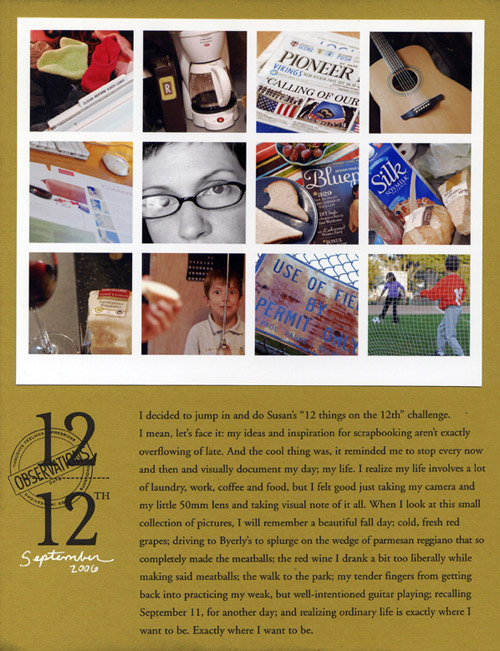
Give everyday snapshots an interesting home.
Ali and I once had a conversation where we both decided if photo grid layouts were the only ones you could ever again do, we’d both be just fine with that. Here, I used the grid approach to create a page when I was participating in my friend Susan’s 12 of 12 project. With a handful of photos and a few lines of text, you can capture a nice wide swath of your everyday life on one page.
MATERIALS: Photoshop; stamp (Cat’s Life Press); Times New Roman font
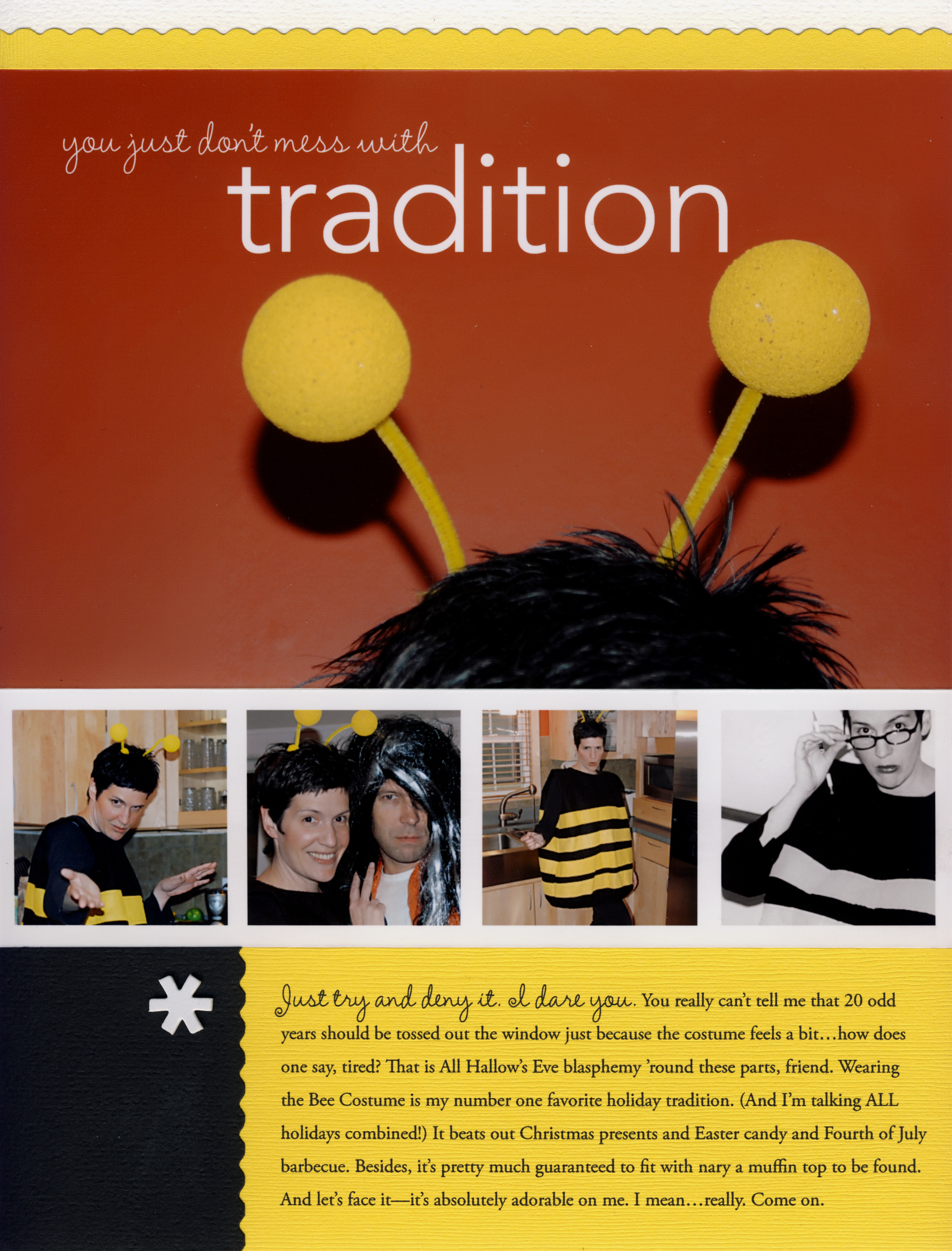
Make a grid strip.
Here one grid row is used to fill in shots taken over the years of me in my fabulous bee costume. (Note: I’ve been wearing it every year since I was in my early 20s.)
MATERIALS: InDesign CS; Amelie, Avenir and Times New Roman fonts
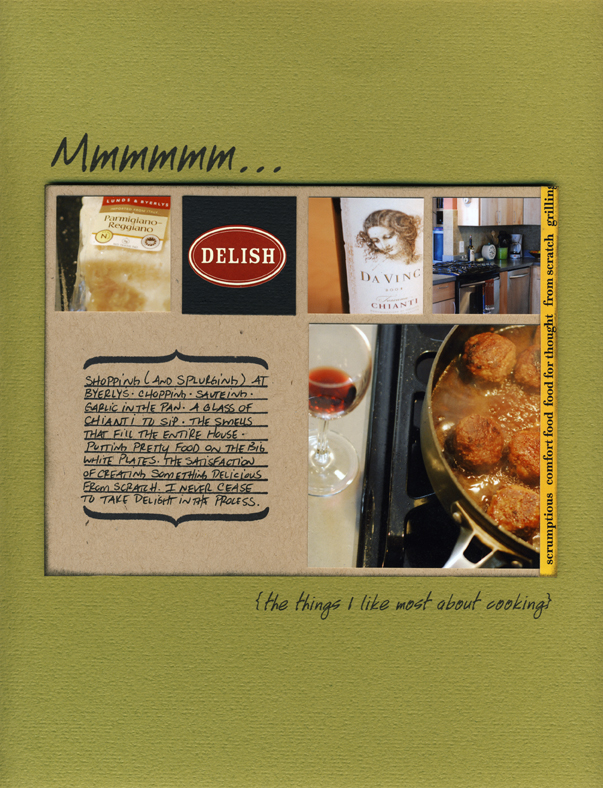
Think grid.
Thinking grid on any design can make page layout a snap. Here, the 12-square grid exists, it’s just filled in differently. One larger photo takes the place of four smaller ones, and a journaling area to fills in the other. Once you divide up the space, you’ll find that grids can be mixed and matched really easily.
MATERIALS: sticker (7gypsies); stamp (Autumn Leaves); Handwriting font.
FREE DOWNLOAD
Cathy is offering a free download of her Monthly Snaps artwork, to use in creating a page like the one above every month for a full year. You can also download the journaling card as well. Visit her blog for the download and while you're there catch some outtakes from her tutorial video.
Cathy Zielske is a graphic designer, author and blogger. She is the former art director for Simple Scrapbooks magazine, where she oversaw the visual direction of all Simple publications and books.
Cathy started scrapbooking in 2001, and found that her background in design and her passion for telling stories made her new hobby as easy as it was fun. As a scrapbooker, Cathy helped to usher in the trend of clean, graphic layout design. She is the author of the best-selling books, Clean&Simple Scrapbooking, and Clean&Simple Scrapbooking: The Sequel. Both books inspire women to take a fun, well-designed and guilt-free approach to telling their stories through scrapbooking.
Cathy is currently developing and teaching online workshops to help scrapbookers write better and take what they've written and make it look fabulous. She's currently teaming with Big Picture Scrapbooking in 2009 to offer her workshops.
Cathy also reaches scrapbookers through her popular blog, Bits&Pieces.
She hopes to develop more online content in 2010 and beyond, to inspire scrapbookers to continue telling their story in an authentic and well-designed way.


Comments
Sign in or sign up to comment.
95 comments
I LOVE you guys! I've been using an OLD version of Photo Impression to try to do this and just recently downloaded the trail version of Photoshop Elements. I am definitely buying it now. You guys have awesome tutorials! Thank you! Thank you! Thank you!
Replies
Sign in or sign up to reply.
Thanks so much for your photoshop awesomeness, CZ! :) Learning a lot from you!
Ali, thanks so much for featuring Cathy! :D
Replies
Sign in or sign up to reply.
I just got Photoshop and this was exactly what I wanted to learn to do. Thank you Ali and Cathy, I have admired your work for years and am always inspired by you both.:)
Replies
Sign in or sign up to reply.
Oh, I love Cathy! I just wish my Photoshop was working-I have the Vista version and everytime I try to use it, I get an error message and it closes. So, disappointing as I love those grid pages. I guess I'll just have to continue doing it the old-fashioned way until I figure out to fix it. I will be saving the directions for someday!
Replies
Sign in or sign up to reply.
THIS IS SO COOL.
I just realized I have no idea what I am doing in elements.
Replies
Sign in or sign up to reply.
Yeah! So glad you included a tutorial from Cathy Z. I'm loving this new feature on your blog. Thank you!
Replies
Sign in or sign up to reply.
Thanks Ali for inviting the best teacher in the world... except you of course!!! For those of you who haven't done any of her classes ENROL NOW. She's the best (and no she isn't paying me to say this. She doesn't even know me). Thanks for this tutorial can't wait to try it out. I have been doing this the long way for so long now.
Love you Cathy and can't wait to start writing about ME!!!
Replies
Sign in or sign up to reply.
This is fantastic. I can't wait to try it out!!
Replies
Sign in or sign up to reply.
Hey Ladies,
I love this tutorial. I have a funny question, but I cannot figure out how to change my grid preferences. I don't have that cool line at the top when I open my adobe photoshop page. Help???
Replies
Sign in or sign up to reply.
Ali thanks so much for having Cathy share yesterday, I love the idea of using a grid, and doing so using Photoshop is just another lesson learned. Wonderful! I can't wait to try it out, thanks again
Replies
Sign in or sign up to reply.
This is so cool, I've had CS2 for ages and not known how to use it very well, I gave this tutorial a go, found my way around the different controls, and produced a grid of photo's that I'm really proud of!! Thank you ladies C x
Replies
Sign in or sign up to reply.
Thanks for all these tutorials, they are really helpful for a photo newbie like me :)
Replies
Sign in or sign up to reply.
Thank you soooo much for sharing so many useful tips!! I love multiphoto layouts and this makes it so much easier!!!
Replies
Sign in or sign up to reply.
THANK YOU! I was just trying to figure out how to do this on Monday! Perfect timing!
Replies
Sign in or sign up to reply.
Thanks so much for the lesson. I have sooo much to learn. I am in a computer tech. class this summer so that I can "get" this stuff. It is all starting to make sense. Sure beats reading a book. I am a visual learner. Thanks again.....
Replies
Sign in or sign up to reply.
THANK YOU!!
Replies
Sign in or sign up to reply.
Ali, thanks for sharing your treasures with us! Cathy, I love you. That was the easiest yet most awesome tutorial I've seen yet! Thank you so much! You ladies ROCK!!!!!!!!
Replies
Sign in or sign up to reply.
What a great tutorial. You've made this easy to understand and follow. Although I am new to Photoshop Elements, I feel that I can follow your directions. Thank you for explaining things in such detail.
Replies
Sign in or sign up to reply.
fantastic! Wow, Cathy IS a great instructor.
Replies
Sign in or sign up to reply.
Thanks so much for the tutorial!! I'm a Photoshop junkie and this was so informative! Love it!!
Replies
Sign in or sign up to reply.