The Traveler & Deeply Loved : Four Corners Layered Template Two Ways
Tags:
I love getting stuff back from the printer. Whether it is a 12x12 digital scrapbooking page or a bunch of individual photos for paper pages, it just makes me happy (as it should be).
The above layout was printed at Scrapbookpictures.com (I noticed they are having an August sale with 12x12 prints for $1.99). These digital pages go right into my 12x12 albums with my other pages. You can see a post that includes photos of some pages in one of my albums here.
The layout above appears in the August issue of Creating Keepsakes magazine. It's a good example of showcasing different time-periods on one layout. Think of all the time our kids spend in the car (and how much time we spend in the car going here and there). I need to get my camera out and make sure to take a few shots now that we have two kids and two car seats in the back.
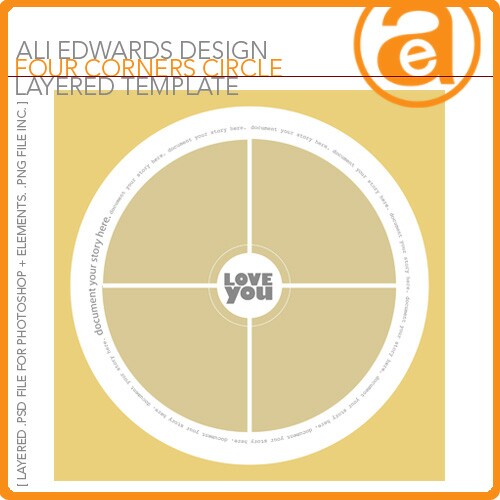
The digital layout above was created using a layered template available at Designer Digitals: Four Corners Circle layered template. Wondering how to work with layered templates in Photoshop or Photoshop Elements? Go here or here or here.
I posted this layout in my gallery at Designer Digitals
and someone mentioned that they liked how each of the photos included
something Simon was interested in at the time (or still is today). That
was a cool observation that I had not intended when I was putting it
together. It's another reason to remember to include more than just a cute face in the photos we take - the surroundings often add so much more to the story.
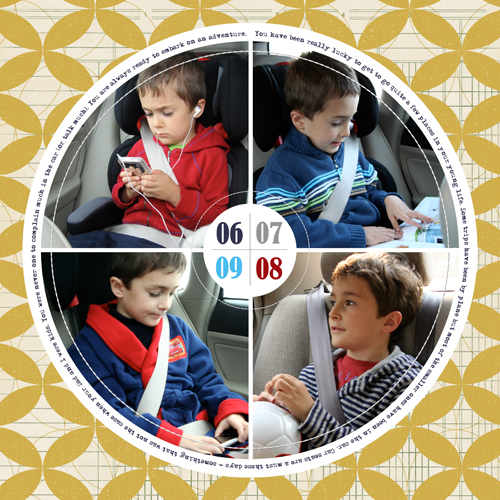
Digital Supplies: AE Four Corners Circle Layered Template; Katie Pertiet Graphic Garden No. 2
See all of my available layered templates here.
I was going to end the post here but instead decided to put another page together to show a different way to use the template as a jumping off point for another project. Here's the result:

Digital Supplies: Ali Edwards Four Corners Circle Layered Template, 12x12 Text Frames Baby; Michelle Martin: Aryanna & Colbie Solids Paper Packs; Pattie Knox Absolutely Acrylic Clockworks; Katie Pertiet Rose Garden Mini Kit, Negative Sleeves; Anna Aspnes Stitched By Anna No.5
Instead of the four quadrants I changed the main circle area to a full circle by simply using the shape tool and deleting the other areas.
As I was adding (and removing - with digital especially I find myself adding + removing more than with paper) elements I decided to try adding a page protector sleeve vertically (love those things in paper + digitally) and slip a couple elements in behind. This is all done using the layers palette in Photoshop or Elements.
The circle stitching was added last. I like how it felt finished to me when the stitching was added.
Now it goes into the "TO PRINT" folder for the next time I upload.


Comments
Sign in or sign up to comment.
51 comments
Love these. What type of paper do they print these on??
The few times I have had them printed they look more like a photo, and I relly want the paper look instead, any comments??? Thanks for sharing Ali.
Replies
Sign in or sign up to reply.
Love those layouts. I wanted to post this idea that I remembered looking at the layout of Simon. A couple of years ago I was getting ready to go camping 8 hours away, and took pics of my two boys in the back seat, just like that. But in the journaling I listed everything that they brought with them to do in the car on the drive. Then last year I did it again- it was interesting to see the differences in what they just "HAD" to have with them. The first time my little guy's list included "attention" three times. It's also fun to see how technology changes in just a couple of years, as well.
I hope someone can use my idea!
Replies
Sign in or sign up to reply.
The "To Print" folder got me thinking...what a great idea. I would love to know how you organize your pictures on your computer - what software you use etc. I have recently switched to a MAC and use iPhoto, but I find that I cannot always find what I am looking for easily. I love the idea of a To Print folder...what other gems do you have?
Thanks again for the inspiration!
Replies
Sign in or sign up to reply.
Love that idea...listing all the stuff the kids "NEED" to have in the car. I will definately use that!
Replies
Sign in or sign up to reply.
great layouts, great templates, but that photo of chris and anna is PRICELESS! total love there. tfs
Replies
Sign in or sign up to reply.
Hi Allison - I do carry my camera with me most of the time (just in my bag, not a separate camera bag). Sometimes I will something and will say to Chris, "do that again" and catch it that way. Not cheating...the moment is just being replayed as a new moment :).
Replies
Sign in or sign up to reply.
It's really helped me in getting these pages + other photo enlargements printed.
Replies
Sign in or sign up to reply.
Hi Arrica - I just created a file that is on my desktop. Easy to just save to that file :).
Replies
Sign in or sign up to reply.
Hey Sansku - check out these links - there are some good places to begin listed here: /getting-started-with-digi.html
Replies
Sign in or sign up to reply.
Hi Annette - they are printed on matte photo paper. I remember the first time I saw Jessica Sprague's scrapbooks in person (printed digital pages) - I was amazed how awesome they looked all together. I didn't notice the paper at all...and now it is the same when I see them in my albums. I look right at the photos :).
Replies
Sign in or sign up to reply.
Ali I love the layouts but I have a question about something in the picture. What is that seat thing Anna is in? Is it one of those portable high chair things? Do you take it with you when you eat out (does it fold up)? The other night I realized Tuesday could sit in the high chair at the restaurant instead of the car seat, but it was gross.
Replies
Sign in or sign up to reply.
Yep - take it with you & it folds up (kinda). My sil has one for Lucy. It is from Chicco - it's called a Caddy HookOn: http://www.chiccousa.com/gear/highchairs-hookons/caddy-hook-on-highchair/caddy-hook-on-red.aspx
Replies
Sign in or sign up to reply.
Hi Ali!
In just under a month, I'm going on my first vacation in 4 years. I'm so excited! I was wondering... I know you've done a few scrapbooking-on-the-road things. Any chance you can show that again? I really want to make a pack up on what to take and could really use the help getting it together!
Thanks!
Replies
Sign in or sign up to reply.
I love, love, love these layouts! I saw that first one in CK and loved everything about it. Also am going to steal that idea regarding the "to print" file, that's going to save me a ton of time! =)
Thanks Ali!
Jen
Replies
Sign in or sign up to reply.
Cool thanks Ali!
Replies
Sign in or sign up to reply.
love the pink! r u still using scrapbookpictures for digital printing? thanks! have a great day! emily
Replies
Sign in or sign up to reply.
haha never mind....i see that you mentioned it earlier in your post, I just missed it. :)
Replies
Sign in or sign up to reply.
love, LOVE this whole layout and idea... but look at Simon... what a handsome boy... he is so growing up.
Replies
Sign in or sign up to reply.
Ali,
When you send the layouts to the printer, are they saved as a psd file or jpeg file? Also, do you change the resolution when you post on your blog?
Thank you,
Deanna
Replies
Sign in or sign up to reply.
What cutting mat are you using? I would really like a white one like that!
Replies
Sign in or sign up to reply.