Week In The Life 2011 | Working With The Layered Template Album (Video Tutorial)
Tags: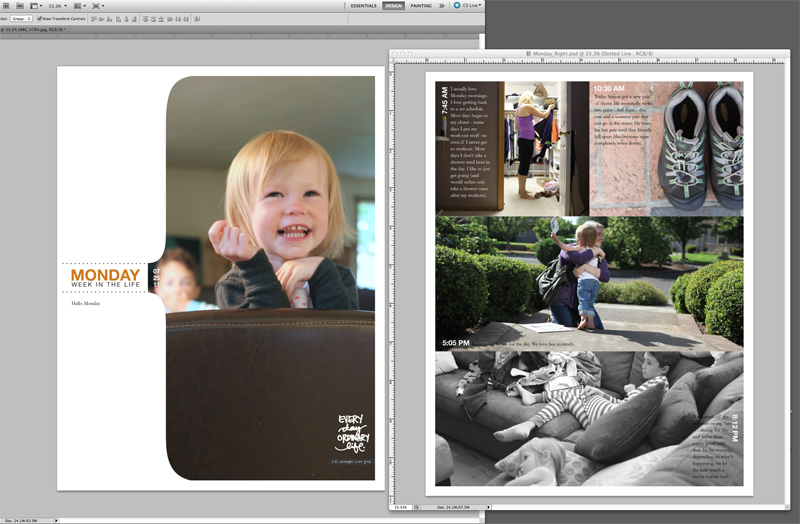
I'm in progress on bringing all my content together for my Week In The Life album.
I'm working at a bit of a different pace since it's summer time and I'm taking advantage of the good weather around here for some quality family time.
Today I put together a video tutorial that shows how I work with the digital layered templates in Photoshop Elements (I use Photoshop CS5 but do my tutorials in Elements). Check that out here:
Week In The Life 2011 | Layered Template Tutorial from Ali Edwards on Vimeo.
I'm happy to try to answer any questions you might have about working with the layered templates. Feel free to leave them in the comment section of this post.
Here's some of the things links I mentioned in the video above:
PRODUCT LINKS
ADDITIONAL LINKS
2010 Week In The Life | Working With The Photos and Part Two (see the hybrid process I used last year)
Getting Started With Digital Scrapbooking (a variety of links to help you get started)
Hope you are having a chance to get started on bringing your content together.
Remember to embrace the photos and stories you have rather than the ones you don't.


Comments
Sign in or sign up to comment.
79 comments
hi Ali
I have never done any digital scrapbooking before, but it looks like fun
I have paintshopphoto proX on my computer and really want to give this a try!
Do you have some samples we can download so we can experiment with it, before buying a lot of stuff and being unable to use it ?
I really like your journaling boxes and overlays
Replies
I do Robin - check out this post which includes a free layered template to play around with: http://aliedwards.com/2010/01/scrapbooking-with-your-computer-creating-layouts-with-layered-templates-video-tutorial.html. Also, the bottom of my Welcome Page includes links to other free downloads I've offered in the past: http://aliedwards.com/about-ali/welcome
thank you Ali
I downloaded the template and am going to give it a try !!
Sign in or sign up to reply.
Hi Ali
can you recommend some good quality white digi papers? I'm having trouble finding one that is not too grey, flat or over dominated by texture. It's seems to be pretty hard to beat the physical quality of basil and AC cardstock but I really want to stick to digi this year. Thanks :) Hx
Replies
If you're printing at home, you can print on cardstock. Just use Best Setting, not Photo Paper setting.
thanks Maureen ~ this may become my back up plan.
I'm actually thinking of making WIL into a small book for print so would like to include a white digi paper in the layout first...
Sign in or sign up to reply.
Wonderful tutorial Ali, will try to make it Digital this year!! I still remember the first album I did way back in Dallas....lots of cutting. Love this one, easy and simple. Thanks.
Replies
Sign in or sign up to reply.
where do you get the pages printed for your album? do you then add stuff to it that isn't digital? I just ordered my prints at Costco today, now to drive the 30 minutes to pick them up! At least I did all my journaling! I don't have a base for my album yet though. I wish I would have purchased these and done it this way!
tara
Replies
This year I'm printing them here at home because I'm testing out a new printer (Epson Stylus Photo R2000). Last year I had them printed through http://www.scrapbookpictures.com.
Sign in or sign up to reply.
Ali is there a flickr site this year with peoples contribution in this project as there was last year? I realise that some are adding their pages to Big Picture.
Replies
Hi! Here's the group for 2011: http://www.flickr.com/groups/weekinthelife2011/ and the one from 2010: http://www.flickr.com/groups/weeekinthelife2010/. Both of these are listed on my main Week In The Life page: http://aliedwards.com/2010/01/week-in-the-life.html
Sign in or sign up to reply.
Hi, Ali! Thanks so much for the wonderful inspiration you always provide. I just wanted to share that I printed out your free daily sheets onto 4 x 6 sized white cardstock and inserted them into the existing diary I already have. I was so happy to capture this week. Thank you.
Here is the link if you want to see:
http://pasigmom.blogspot.com/2011/08/our-week-july-25-to-july-31.html
*hugs*
Nina
Replies
I love how you did that Nina - cool!
Thanks, Ali! Thanks for the inspiration. =)
Sign in or sign up to reply.
Hi Ali
Great video and some neat extra ideas - Thank you.
When resizing the boxes - do you have things 'snapped to grid'? Still learning how that works. Just wondering how you make sure the boxes are a uniform size if you have two or do you always duplicate them? For example if we made one of the long boxes into two or three for photos instead.
Also I am flipping my templates to landscape and it has worked really well for the daily sheets but I am struggling a little with the 'share your story' templates when I flip them. Because then they are landscape which worked fine for the photos but I quite like the idea of some 'portrait' photos and portrait journalling. So after flipping the template to make a landscape page I am then rotating the boxes but then obviously the fit is different across the page. Seems to fit a 4x2 layout rather than a 3x3. Do you make them a particular standard photo size?
I have tried selecting the box and tab layers (not the words) and locking them togther and rthen resizing them to fit better across the page but I wondered if there was a quicker way. Or whether I should just stick with the size you have made and leave uneven white spaces top and bottom vs the sides. I'm still fairly new to this and playing around with it all to learn. But I would definitely appreciate shortcuts if there are some :)
So many questions I hope this made sense.
Thanks
Replies
Hi Toni - I like using snap to grid (an easy way to keep things lined up). I also like to just duplicate the box layers if I'm wanting them to the the same size. You can then use snap to grid to get the margins between the boxes to be the same.
When I'm creating templates I don't usually think about any standard photo size since I have so many options. In the case of the Share Your Story template I did make those boxes a similar to size as if you were going to use divided page protectors (you could put the photos in there, print it out, cut it up and place them inside the pockets).
If I was doing it the way you are (flipping the whole thing horizontal) I'd probably try to do whatever is the quickest - that might be selecting everything and dragging (without any photos in place) to fit the page. You can then go in and adjust the size of the text and the titles (making them smaller because they will get bigger).
Is that helpful at all?
Thanks Ali - That's great. Have managed to play around with them toinght and got it working much better. Hope you had a great weekend in the garden. We did :)
Sign in or sign up to reply.
Hi Ali, Thanks for always bringing me inspiration!
I just bought the layered template 8.5x11 week in the life 2010, and it said on designerdigitals that you should easily be able to change the date, but I can´t seem to understand how to do that...
I mean for example the little square called "sentiment tab", on one of the pages. I would like to keep it on my layout and maybe have som own text in it but the only thing I understand is how to take it all away by clicking on the "eye", but then it is gone all together and that I dont want...Is it not possible to edit or remove just the text and keep the square?
Hope you can figure out what I mean despite my not so perfect english...
Thanks,
Hanna, Sweden
Replies
Hi HannaP - there's a couple things you can do with that version. The 2010 piece on the sentiment tabs is flattened - you can either purchase the updated sentiment tabs for 2011 (http://www.designerdigitals.com/digital-scrapbooking/supplies/product_info.php/products_id/11677) or you can follow these steps:
1. Select the sentiment tab layer
2. Using the marquee tool (with the tolerance set to "0"), select just the date area (draw a rectangle around it) and hit delete. This will remove the date but it will also remove the background of the sentiment tab within that rectangle.
3. With the eyedropper tool, click on the sentiment tab to make that the foreground color.
4. Draw a new rectangle shape (should be the same color as the sentiment tab) and place that behind the sentiment tab in the layers palette. You can merge those two layers together or you can just leave it -
5. Use the Type tool to enter the year. The font I was using is Pica. http://www.searchfreefonts.com/free/pica.htm
Hope that helps!
Also, that 2011 sentiment tab package includes a PSD file that would make it easy for you to enter in your own text (not flattened).
Thanks so much, will try that!
Hanna
Sign in or sign up to reply.
Hi Ali. Thanks for all you do! I have most of the freebies you've so generously offered, but when I tried to use the download links on a couple of the Welcome Page items, they don't work. Wondering if these are permanently down? I didn't think so since you are referencing them now. I'm particularly interested in the Weekend Creative handwritten days.
Replies
Hi Kay - let me take a look. I thought I had updated all those links...
Sign in or sign up to reply.
I was wondering how you plan to use the "share the story" template? One for each day or one for the week?
LOVE this, I've been doing it since 2008 and I love seeing how our life changes from year to year and it's so fun to see what normal is and how much it changes!
Tawnda
Replies
Right now I'm using it to print out my photos (basically just as a template). I'm not going to be using it in my album - that page for me will be a divided page protector and each day will have one of those.
Sign in or sign up to reply.
LOVED the video Ali and even though I do not have or use photoshop I was still inspired and learned so much about how to assemble my album now. I was a bit overwhelmed come Monday and I had to start editing my photos, etc. But now I've adapted my publisher documents because I know how to use it and did not want to get discouraged and give up. I kept it real simple and I'm really happy with the end result. I blogged about it here if anyone is interested in how a publisher file can work for this album. Fondly, Roberta
http://con-tain-it.typepad.com/love_shack_studio/2011/08/in-the-studio-summer-travel-journal-week-in-the-life-album.html
Replies
Sign in or sign up to reply.
I surprised myself by diving into this project and enjoyed every day of it! Thanks for doing it and sharing your process! One question unrelated to the project itself: what lens are you using on your camera these days? I love your photos! Thanks!
Replies
24-70, 2.8. I love it!
I can clearly see WHY you love it...luckily, my birthday's next month....hint, hint to my husband! Thanks for the info.
Sign in or sign up to reply.
Hi Ali! Thank you for a great tutorial--seriously watching the video and hitting "pause" so I can do the same thing, step-by-step with you as this is my first adventure into digital scrapbooking! I do have a question for you though--I have an older version of PSE (version 5 I think--old, I know!) and the font used for the little date is one I don't have. I have not figured out how to change it or substitute a different one. Right now, nothing shows up in the text box. Any suggestions for how to go about fixing that? Thanks!
Replies
Sign in or sign up to reply.
Sorry to be a camera equipment pest...I meant to ask you what Canon you're using too these days...
Replies
Sign in or sign up to reply.
[...] Week In The Life 2011 | Working With The Layered Template Album (Video Tutorial) [...]
Replies
Sign in or sign up to reply.
Car shopping is stressful. Now that there are hundreds of
makes and models to choose from, not to mention promotions and payment options,
it's easy to become frustrated and stressed out. The information here will help make buying a car as easy and stress-free as possible.
Replies
Sign in or sign up to reply.
The fast food business is a fast growing and very challenging means of entering the
market. We need to not listen to our doctor who will be very helpful and write a prescription for almost anything to help
you live with your diabetes. It is necessary for us to figure out effective ways to
solve this tough trouble.
Have a look at my blog; papa johns coupons 2013, Katherine,
Replies
Sign in or sign up to reply.
It's an amazing article in support of all the online viewers;
they will get advantage from it I am sure.
Replies
Sign in or sign up to reply.
You can choose to go for the protective versions of this
equipment. Electric is often the cheapest and
can be found almost anywhere. I did a little bit
of research for tools on the internet which would make it easier to
cut these branches down, and I came across an
electric saw, I looked through the reviews of the saw,
people had nothing but good things to say about it, so I purchased it and waited for delivery.
Replies
Sign in or sign up to reply.