Week In The Life 2011 | Working With The Layered Template Album (Video Tutorial)
Tags: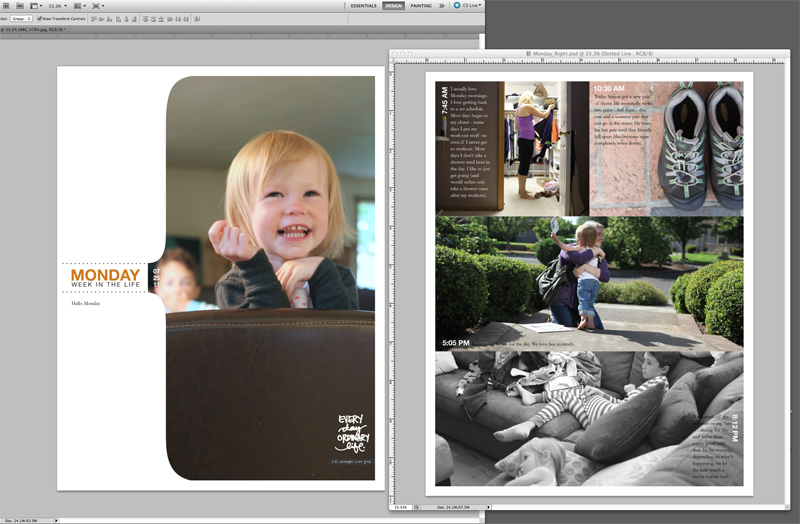
I'm in progress on bringing all my content together for my Week In The Life album.
I'm working at a bit of a different pace since it's summer time and I'm taking advantage of the good weather around here for some quality family time.
Today I put together a video tutorial that shows how I work with the digital layered templates in Photoshop Elements (I use Photoshop CS5 but do my tutorials in Elements). Check that out here:
Week In The Life 2011 | Layered Template Tutorial from Ali Edwards on Vimeo.
I'm happy to try to answer any questions you might have about working with the layered templates. Feel free to leave them in the comment section of this post.
Here's some of the things links I mentioned in the video above:
PRODUCT LINKS
ADDITIONAL LINKS
2010 Week In The Life | Working With The Photos and Part Two (see the hybrid process I used last year)
Getting Started With Digital Scrapbooking (a variety of links to help you get started)
Hope you are having a chance to get started on bringing your content together.
Remember to embrace the photos and stories you have rather than the ones you don't.


Comments
Sign in or sign up to comment.
79 comments
Ali, I have never done any digital scrapbooking. The only "program" I currently use is Picasa...is Photoshop an absolute requirement to use your templates? Thanks for your time.
Shannon
Replies
Hi Shannon - here's a good article from The Daily Digi about using Picasa: http://thedailydigi.com/picasa-a-free-useful-tool-in-your-digi-scrap-toolbox/. It sounds like it's great for organization but I think you'll still need Elements to be able to work with the layered templates...
Sign in or sign up to reply.
So.... what are your thoughts on using this template for a week long vacation where I took WAY too many pictures? It happened to be WITL week when we were gone (last week)..... I haven't fully looked through all of the pages to see if you have text that would make it silly... but I'm really thinking about making this my vaca template for last week?
Thoughts?
Heather
Replies
I think you could totally make it work. All the text is editable so you could make it work with your own content.
Sign in or sign up to reply.
Great tutorial - think my beginner self might just be able to make this work. Thanks so much for the time and effort you place in ALL of your projects.
Replies
Sign in or sign up to reply.
Ok - so just had 5 minutes to start the video & your txt "Week in the Life" is a layer - so I can change that to "Week in Duluth". :)
Replies
perfect
Ok... not an editable layer... but still I can delete it & create my own.... better than it being on top of a graphic & mixed in with it. ;)
Sign in or sign up to reply.
ugh! Now I wished I had participated!
Replies
Never too late - you could start tomorrow!
Hi Barbara,
Just wanted to let you know my WITL will begin next monday (August 8th). So I highly encourage you to do it whenever you want. :-)
Barbara, my WiTL this year will be the end of August when I have a girls week down on the Alabama coast. This year, it's gonna be a summer project and just for me and about me. It can work any way you do it, that's part of the beauty of the project. No rules, remember? ♥
Thank you for the encouragement - I think I will. I will look at preparing for the last week in August. I was feeling like it wouldn't be as exciting if I didn't do it the first week with everyone else. Now I am going to do it!!!
Sign in or sign up to reply.
Hi Ali...love all your fabulous ideas and your pictures are amazing. Love your unique take on the daily things.
Wondering if you have thought more on the idea of putting a Shutterfly book together with some of your amazing ideas?
I would love to see a drag and drop book of a "year in the life of..." with a 7 day, weekly approach for the year. Including your verbage templates.
Just an idea! Thanks for the inspiration!
Replies
I second the motion!! I would also love to see you do a "Week in the Life" or a "Life Right Now" type Shutterfly book!!!
While you are at it (!), even a "December Daily"! :)
I so appreciate your blog, Ali...helps us remember to focus on our life stories as they are happening, and to capture those memories while we can.
Love that idea too! Sometimes things just get too busy that this would be a great option for those stressed over time.
Sign in or sign up to reply.
Hi Ali,
I don't have photoshop so not doing a digital album. Just wanted to say how cute that picture of Anna is, love her smile and how tiny she is. I see that big brother popping up in the back too, great first page for you. Can't wait to see it all together. I've been going over my pictures and finding some stories. Hope to get started next couple weeks, hard with kids here all day.
Replies
Sign in or sign up to reply.
Fantastic I've been looking forward to seeing how you are planning to use your templates. Thanks for the video Ali. Oh and love those cut up words by Katie Pertiet, must check them out.
Replies
Sign in or sign up to reply.
Wow ! for everyday journaling it makes it really easy , and the price is right.
I just might have to pick this software up.
Replies
Sign in or sign up to reply.
Thanks for sharing this Ali. I took the majority of my photos via cell phone, so I knew going into this that photo quality would be an issue (and I'm ok with that :) ). But one of my concerns is the ability to expand and minimize my photos to fit the different layers of your templates without too much distortion... even for photos taken with my regular camera.
Do you mind sharing what size and resolution you save your photos to when you're editing them in batches (before putting the album together)?
Thanks again for sharing this... I could go on and on about how much last week means to me, but I'll save us all the story. ;)
Replies
I'm not Ali but I thought I would address your question since I used a lot of phone photos. I did make sure I selected the highest quality option on my phone. Before dropping them in the templates, I would change the resolution to 300 DPI. I didn't change the size. I will say the phone pics were fine for the smaller photos but looked pretty grainy on the big template.
Ali's tutorial from last year about putting it all together - the pictures has a really good explanation that covers resizing too.
Thanks, Gina! I'll stick to 300 dpi. :)
Sarah, I do all my photos on my iPhone4 and resize them to 300dpi also. However, my default size is way to large so I usually resize them to 4x6. I'm fine with the resolution because the bottom line is it gets done.
Sign in or sign up to reply.
Thanks for the fantastic tutorial, I was fighting with PSE 9 last night but I'm pretty certain I can conquer it tonight!!!
Replies
Sign in or sign up to reply.
really love the digital overlays...very sleek and clean looking
Replies
Sign in or sign up to reply.
Ali.. Just purchase PSE 9..loaded it on my MAC..now feel intimidated. : ( Do you think with your video it is good to work w/PSE9 or should I start 'smaller'?
thank you..
Love your BLOG, thank you for all your 'time'...
Replies
When you say "smaller" are you talking about a different project? If that's what you mean you might be interested in this free layered template and tutorial I have available as part of my "getting started" series: http://aliedwards.com/2010/01/scrapbooking-with-your-computer-creating-layouts-with-layered-templates-video-tutorial.html
That said, the best way to learn (in my opinion) is to dive in and learn as you go. I do a ton of learning as I go - googling - figuring things out as I need to know them :).
Sign in or sign up to reply.
Thank you, thank you, thank you for the tutorial! I have all the photos and documentation (planning to do a hybrid album) and this tutorial is so excellent! I love your first pages! Too late to dive into to my photos tonight (I did some prep by saving each days photos into a separate folder) but I know what I will be doing tomorrow!
On a separate note, while I didn't post about our WITL it was a really interesting process(this was my first time). We don't have a young child any more (he's 18) and our life is really unstructured. It was neat to see that it's still interesting (lol), how busy we are, how nuclear our little threesome is even though a bit unconventional and how there was lots of content (although not too many overheards...not like when Nick was much younger) and it gave us the opportunity to focus on favourite moments and things we are thankful for. Thank you Ali, for helping me to focus on and reinforce for myself what I love about my life!
Replies
Sign in or sign up to reply.
So, I was away during "the week" and have two Scrapbook on the Road projects going, but I still plan on doing the WITL project later this month. Thanks again for the inspiration!
Replies
Sign in or sign up to reply.
Is anyone else having difficulty with the audio on Ali's tutorial? It's too low, and I have the volume slider all the way up.
Also, I'm on a PC computer, and I can't get the photo inside of the template. I pressed the "option" key and toggled between the layers as stated by Ali. I wonder if she's using a Mac Computer. Maybe this is why I am struggling.
This is my first "Week in the Life" and I would like to have success in this project.
Replies
Damiane,
I am having the same problems and it is frustrating! I cannot get past the toggle part (not able to hold down the option key as shown in the video to get the overlapping circles and have the mask work - I can get the layers by going to the bottom but they won't conform to the curved shape). I am also working on a PC.
I would love feedback from others as well!
On a PC you use control + G as the keystroke command to mask.
Thank you Ali!
Hi Damiane and Cynthia.
I use PC also and have always used ctrl G for masking. I believe control for PC is the same as Command for Apple.
But watching Ali's video I thought there must be a way to do it the way she was and might be quicker sometimes if already using the mouse in the layers palette. So I have just tried the Alt key (I think on a PC we use Alt where Mac use option) so try that and you might have another way of using a shortcut. It allowed me to do the 'two circle' thing that Ali was doing. Well it worked for me anyway.
:)
Sign in or sign up to reply.
I am on a PC and this is how I do it. Have your photo layer right above the mask layer and just do CTRL-G. Then you can position your photo layer however you want in the mask. Hope this helps.
Replies
Thanks for your help! I've been pulling out my hair trying to figure this out.
Thanks Amy and Ali! That was easy! I haven't really figured out all the ins and outs of the PSE9 and I don't do enough digital scrapbooking to always remember what I might have done before (usually from a class). Thanks again!
Sign in or sign up to reply.
Hi Ali, love the video and soo excited about putting it all together! this is my second year doing this and even though i am not as happy with my photo taking for the week I am super excited to put the album together!!
I wanted to ask you what is the name of the Katie Pertiet packet for the words that you used as an example on the Monday opening page, i think it said "i'll always love you". I really like the way those look.
Thanks again and so excited to get going on this!!
Replies
Never mind!! I found them on your links!!
thanks! you are the greatest and such an inspiration!!
Sign in or sign up to reply.
Ali - thinking about diving into 8.5x11 for my album - I really like the look better in this template. Do you print your own or where do you print? Most places don't seem to print 8.5x11 - although mPix does.... anywhere else that's a little less $$? I love mPix quality, but it's not cheap.... Shutterfly & Costco etc. seem to do 8x10.
I have a photo printer & paper... but I also have two grandmothers who usually get a copy of my digi pages.
Thanks!
H
Replies
This year I'm printing my own (testing out a new printer). Last year I used http://www.scrapbookpictures.com and they were great.
Sign in or sign up to reply.
Hi Ali,
I have a question concerning your layered templates (not these though). I downloaded the ones from Designers Digitals. They are the ones with the sentiment tags. I have a question concerning how to change the date. They say 2010. I did it successfully when there was a white background (title page). But with the gray, its not working. Any help would really be appreciated.
thanks,
Dani
Replies
Hi Danielle - those 2010 dates are set (flattened). I created an update for those tabs for 2011 available here: http://www.designerdigitals.com/digital-scrapbooking/supplies/product_info.php/products_id/11677
Sign in or sign up to reply.