Video Tutorial | Printing Two 3x4 Images On A 4x6
Tags: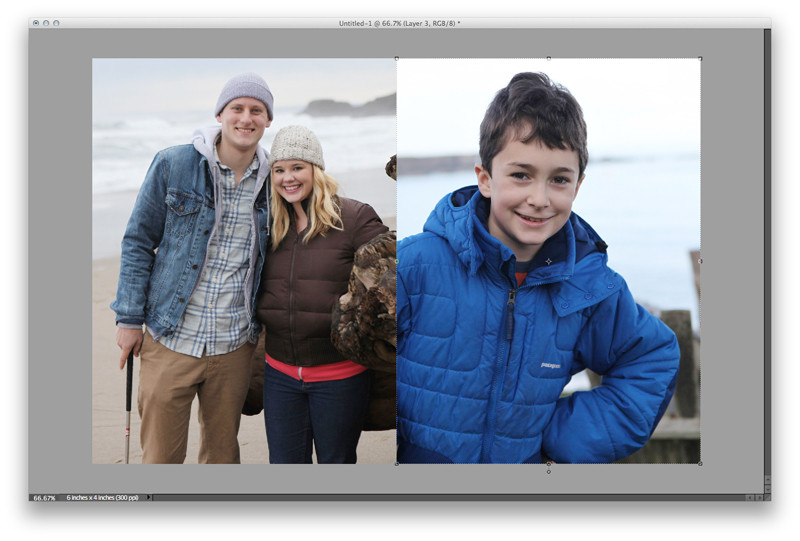
I've had some requests over the last couple of weeks for help with how to print 3x4 photos (specially for use in the smaller Project Life page protector pockets). I put together a quick video tutorial that walks you through the steps to put 2, 3x4 images on a 4x6 canvas in Photoshop Elements.
You could definitely adapt these steps to put more 3x4 photos onto a larger background canvas (such as an 8x10).
Ali Edwards | Printing Small Photos for Project Life from Ali Edwards on Vimeo.


Comments
Sign in or sign up to comment.
126 comments
Brilliant! I needed to read comment #35 to enable "Float All in Windows"and then had the same problem as Carolyn in #38 and found the blank canvas was set to 300 pixels/cm instead of 300pixels/inch!!!
Then everything worked just as your tutorial.
Many thanks
Replies
Sign in or sign up to reply.
Thank you so much for this tutorial! I was printing a 4x6 and cutting it down to 3x4 and wasting so much good photo paper. So thank you again ~ I really appreciate it!
Replies
Sign in or sign up to reply.
[…] From there I open the image in Photoshop and crop it to 3×4 (at 300dpi) and place it on a 4×6 canvas with another 3×4 photo before printing on a 4×6 sheet of photo paper using an Epson Picturemate Show. Check out a video tutorial on placing two 3×4 images on a 4×6 canvas here. […]
Replies
Sign in or sign up to reply.
Okay, I know this is probably a ridiculous question but for some reason I am stuck! When you create your 4x6, what extension do you use to save them so you can print them? I did them and am so proud of myself but every time I try to upload them to print it says "invalid jpeg file". so I am assuming I am saving them wrong! HELPPPPPP!!!
Replies
Sign in or sign up to reply.
I did my pictures for Project Life from this tutorial and it went great. BUT when I went to upload it for printing it it said "invalid jpeg file'. Is there a particular way to save them so that I can upload them and have them printed? Please help!!! These are for my December Daily!!! Thanks!
Replies
Sign in or sign up to reply.
Thank you so much for this tutorial, Ali. I had to watch it a couple of times but I've got this down now. Yahoo!
Replies
Sign in or sign up to reply.
Hey, Ali...is this video still live? I can't seem to get it to play, and yes...I'm new to Project Life :)
Replies
Sign in or sign up to reply.
[…] at home or upload to your favourite lab! I had my bookmarks printed at Costco. Here’s a great video tutorial on printing custom size photos that gives you step by step instruction using Photoshop Elements. […]
Replies
Sign in or sign up to reply.
Hi Ali (or Katie) :) i have one question, I'm not avid in elements so this may be a silly Q but i don't know the answer, so...how would i be able to print photos from my camera, following this tutorial, but not cropping them? some of my photos i want to keep the whole photo but have them as a 3x4. is this possible? Thanks so much! MEG
Replies to mugsie
Sign in or sign up to reply.
Super helpful tutorial. It's even easier to do it in Canva!
Replies to jzmcbride
Sign in or sign up to reply.